Termbase Search not working

Hello,

I need some help with my Termbase. When I started working with Studio 2019 a couple of weeks ago, all the basic tools including the Termbase where working fine. Then I switched to another project, for which I was not using any termbase. When I got back to the initial project and re-opened my Termbase Search window, I noticed that no hits are showing, although the saved terms are still highlighted in the source text.

I have tried to reorganize my termbase in MultiTerm, but it hasn't had any effect.

I have also tried to update Multi Term to have the latest version, which seems to be the case.
I am working on Studio 2019 SR2-15.2.6.2831
Multi Term version: 15.0.6.56482


Can you give me any advice on how to fix this problem? Any simple tips? I must say that I have just started using Trados Studio and I am not exactly an IT person either...

Thank you very much in advance for your help,

Ales Burget

Parents
  • Hello @,

    Does this only happen with the one project?

    If you have already reorganised the termbase then I would try a couple of things

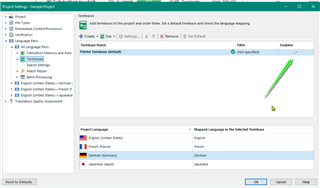
    Check that the Termbase is enabled via Project Settings

    Trados Studio Project Settings window showing Termbase enabled with a green checkmark next to the 'Enabled' option.

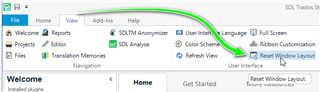
    Next- Try 'Reset Windows Layout' as this often resolves unexplained issues

    Trados Studio ribbon menu with an arrow pointing to the 'Reset Window Layout' option under the 'View' tab.

    If you are still having problems, try recreating the project and ensuring the Termbase is enabled.


    Oana Nagy | Developer Experience | QA Engineer | RWS Group

    emoji


    Generated Image Alt-Text
    [edited by: Trados AI at 9:09 PM (GMT 0) on 28 Feb 2024]
  • A note to SDL:

    I hope someone at SDL is noticing the glaringly obvious pattern here! Alost daily, and for many, many years, every couple of days a user complains that term recognition is not working reliably. Just have a search for "trados studio term recogntion problem" (etc.) through community.sdl.com, or On Proz, or just google it.

    This is just not acceptable anymore.

    Please please please, develop a new underlying system!

    When something is randomy unreliabe, it is simply not usable in a professional setting.

    90% of my clients (agencies) use Studio, and want me to use it too. I keep trying, year in, year out. It's a very powerful tool and I actually wuite like certain aspects of it. However, terminology is a fundamental part of how I work, and so I cannt use the system as it is, or ever has been.

    Since CafeTran and memoQ can now both handle Studio files (both sdxliff and packages) pretty much seamlessly, and yet their termbase systems are rock solid reliable, and adding terms is instantaneous and painless in both tools, there really is very little reason to actually use Studio anymore. So, until you guys fix this mess, I will just continue translating in CafeTran or memoQ, and pretending to my clients that I am using Studio.

    Michael

  • Oh... Thanks Michael. Good to know. I had to start translating because of COVID-19 and didn't really have time to think of other options besides Studio...

Reply Children
No Data