 Translate





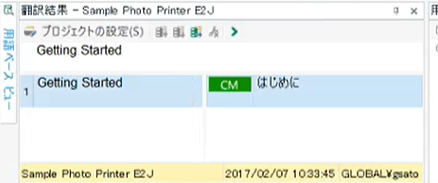
本日、初めて起動したのですが上記の部分が広げられません。この部分を、下記のようにするにはどうすればよいかご教示ください。初歩的な質問で申し訳ありませんが、よろしくお願いいたします。
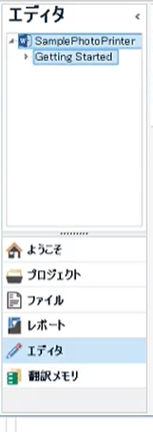
Generated Image Alt-Text
[edited by: Trados AI at 9:13 PM (GMT 0) on 28 Feb 2024]


本日、初めて起動したのですが上記の部分が広げられません。この部分を、下記のようにするにはどうすればよいかご教示ください。初歩的な質問で申し訳ありませんが、よろしくお願いいたします。

投稿いただきありがとうございます。
[表示]タブより[ウィンドウのレイアウトを元に戻す]をクリックしてください。
...
なにか変化はございますでしょうか。お試しいただけますようお願いいたします。
土田様
下記のブログをお読みいただき、SDL Freshstartというツールをお試しください。
https://www.sdltrados.com/jp/blog/freshstart.html
Trados Studioの状態をリセット及び修復するツールとなります。
お困りのところお手数をおかけいたしますが、どうぞよろしくお願いいたします。
土田様
大変お世話になっております。
ご教示いただきました内容を行いましたところ、左側のエリアにつきまして広く表示されるようになりました。ありがとうございました!
ただ、下記の部分につきましては、「[Remove folders from following locations:]に戻り、全ての項目を選択して、[Remove folders]と[Repair Studio]を再度実行」まで試ましたが、直りませんでした。

この部分を広く表示させる方法はございますでしょうか。

ご連絡ありがとうございました。
前例のない事象のため、動作環境に付きましてご教示ください。
- Windows のバージョン
- PCのメーカー(デスクトップ・ラップトップの別も)
よろしくお願いいたします。
土田様
大変お世話になっております。
私のPCのバージョンは、Windows10 Professional、
PCのメーカーは、マウスコンピューターのデスクトップです。
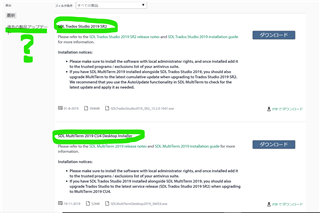
tradosを立ち上げたときに、ダウンロードのお知らせが来ておりましたので、下記の2つをダウンロードいたしましたが、関係ありますでしょうか。
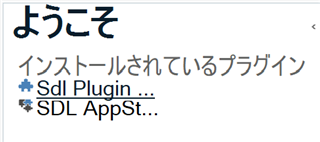
大変お手数をおかけ致しますが、よろしくお願いいたします。
現在、担当部門と確認を行っております。つきましては、以下を追加でご教示いただけますでしょうか。
1.表示に異常が起こっている状態での、Trados Studioのウィンドウ全体のスクリーンショットをご提供ください。
2.現在、問題が起こっているのはエディタビューのみでしょうか。Trados Studio以外に、表示に異常がおこっているソフトウェアはありますでしょうか。
3.現在のコンピューターの表示解像度をご教示ください。
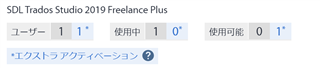
4. Trados Studioの現在のバージョンをお知らせください。[ヘルプ]タブの[SDL Trados Studioのバージョン情報]から確認できます。
お手数をおかけいたしますが、どうぞよろしくお願いいたします。
お手数ですが、以下を追加でご教示いただけますでしょうか。
1.表示に異常が起こっている状態での、Trados Studioのウィンドウ全体のスクリーンショットをご提供ください。
2.現在、問題が起こっているのはエディタビューのみでしょうか。Trados Studio以外に、表示に異常がおこっているソフトウェアはありますでしょうか。
3.現在のコンピューターの表示解像度をご教示ください。
よろしくお願いいたします。
土田様
大変お世話になっております。
Trados Studio以外に、表示に異常がおこっているソフトウェアはありません。
私は使い始めたばかりで、翻訳メモリと用語集をンポートしたのみで、trdosの使い方もこれから勉強です。
お伺いしたいのですが、消えて困るものもありませんので、一度アンインストールして、再度アカウントからダウンロードしてインストールすることは可能ですか?
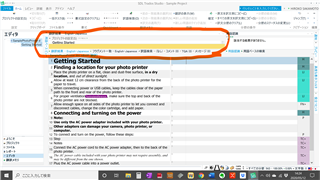
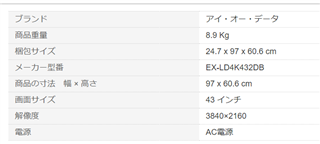
Trados Studioのウィンドウ全体のスクリーンショットとコンピューターの表示解像度は下記になります。
よろしくお願いいたします。
土田様
大変お世話になっております。
Trados Studio以外に、表示に異常がおこっているソフトウェアはありません。
私は使い始めたばかりで、翻訳メモリと用語集をンポートしたのみで、trdosの使い方もこれから勉強です。
お伺いしたいのですが、消えて困るものもありませんので、一度アンインストールして、再度アカウントからダウンロードしてインストールすることは可能ですか?
Trados Studioのウィンドウ全体のスクリーンショットとコンピューターの表示解像度は下記になります。
よろしくお願いいたします。
土田様
大変お世話になっております。
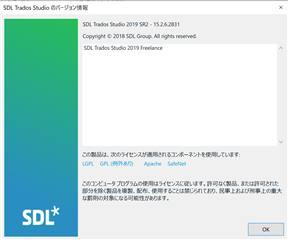
Trados Studioの現在のバージョンは、下記になります。
よろしくお願いいたします。
ご連絡ありがとうございました。
再ダウンロードおよび再インストールの手順に関しましてはご認識のとおりです。アンインストール前にライセンスの非アクティブ化をお願いいたします。非アクティブ化の手順に関しましては下記をお読みください。
解像度に関しましてもう少し確認させてください。
デスクトップを右クリックし、[ディスプレイ設定]を表示させた場合、どのように表示されますでしょうか。
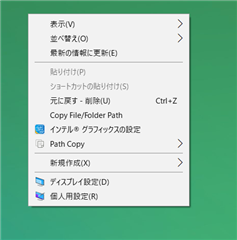
たとえば、このような画面です。
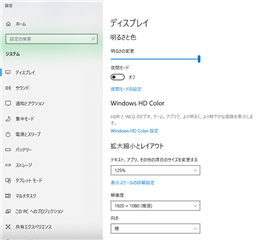
動作中の解像度をご教示いただきたく存じます。どうぞよろしくお願いいたします。
土田様
大変お世話になっております。
表示解像度は下記になります。
よろしくお願いいたします。
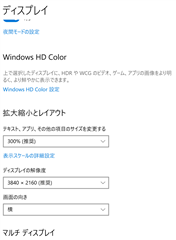
ご協力いただきありがとうございました。
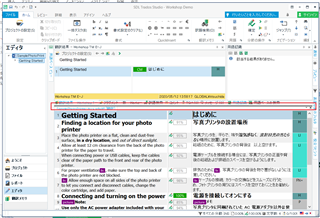
画面の赤枠の部分にポインタを移動すると、ウィンドウの幅を上下に広げられるような形にポインタが変化いたしませんでしょうか。まことにおそれいりますが、お試しいただけますようお願い申し上げます。
土田様
大変お世話になっております。
ご教示いただいたように試してみたところ、広がりました!
どうもありがとうございました。
大変お手数をおかけしてしまして、申し訳ございませんでした。