Can't sellect TMs after updating Trados Studio 2019

Good morning,

A few days ago I updated Trados Studio 2019. Now I can't select any TM.

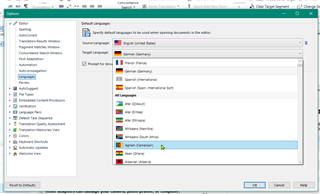
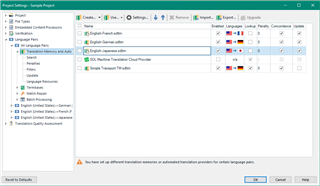
I might have a bit of a mess with my language pairs. Perhaps I selected a different target language variety while installing. I can also see this message: "you have set up different translation memories or automated translation providers for certain language pairs"

Is there a way of knowing the target language variety I always have used for creating my TMs and my projects? I'm not sure.

Thank you in advance for your help.

Diana Gibson

Parents Reply
  • Hello ,

    I think we need a little more information as I'm unable to replicate this (maybe down to our different versions)

    You mentioned you have updated Studio 2019- have you only updated Studio 2019 to the latest version- or updated from a previous (2017) version?

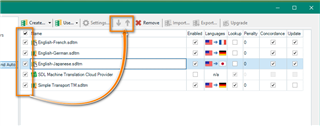
    If you go to your Project Settings - Make sure the name box is not enabled-

    Here you can see, this is not enabled, and I'm able to move the TM's

    Trados Studio Project Settings window showing Translation Memories and Search tabs with a warning message 'You have not set different translation memories or automated translation providers for certain language pairs.'

    However if the tick boxes are checked, then this is not possible

    Close-up of Trados Studio Project Settings window highlighting the 'Name' checkbox which is not ticked, indicating that the name box is not enabled.

    When you navigate to the project folder (Studio2019- Translation Memories) can you see the TM's

    Are the TM's stored locally? or on the cloud maybe?

    Oana Nagy | QA Engineer | RWS Group

    emoji


    Generated Image Alt-Text
    [edited by: Trados AI at 9:17 PM (GMT 0) on 28 Feb 2024]
Children