SDL TRADOS Studio 2019 Getting started - how to I select German as the target language?

Hello, I am currently taking the course SDL Trados Studio 2019 Getting Started. I am coming up to the point where where I need to translate the sample documents into German - however, German is not an option I can choose as a target language. Is there any way I can change this to be able to select German as a target language and continue with the course properly?

Thanks in advance.

Parents
  • Hello,

    If you are working with the Sample Project, you are no longer required to manually select the target language because it has been already selected during the project creation phase.

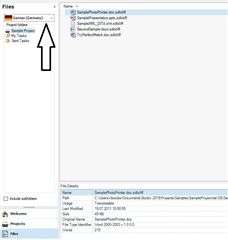
    You should simply open the Sample Project from the "Projects" view and then make sure to have "German (Germany)" selected when you see the files inside the project (see screenshot). German will be target language set when opening any of these files. 

    Screenshot of Trados Studio showing the 'Projects' view with 'Sample Project' selected and 'German (Germany)' highlighted as the target language for the files within the project.

    Vlad Bondor | Senior Technical Support Manager | RWS

    emoji


    Generated Image Alt-Text
    [edited by: Trados AI at 9:31 PM (GMT 0) on 28 Feb 2024]
Reply
  • Hello,

    If you are working with the Sample Project, you are no longer required to manually select the target language because it has been already selected during the project creation phase.

    You should simply open the Sample Project from the "Projects" view and then make sure to have "German (Germany)" selected when you see the files inside the project (see screenshot). German will be target language set when opening any of these files. 

    Screenshot of Trados Studio showing the 'Projects' view with 'Sample Project' selected and 'German (Germany)' highlighted as the target language for the files within the project.

    Vlad Bondor | Senior Technical Support Manager | RWS

    emoji


    Generated Image Alt-Text
    [edited by: Trados AI at 9:31 PM (GMT 0) on 28 Feb 2024]
Children