The Trados cloud platform will be undergoing maintenance on Saturday, 9th May 2026 between 05:00 to 17:00 UTC. During this time, you will not be able to log in to the Trados platform.

multiterm 2019 15.0.6.56482: some terms cannot be edited nor deleted, and simply won't appear in the target language when translating.

Hello,

in nearly all my term banks, I always come to a point where the terms are in the bank, but will only appear in the target language. If I try to delete or edit them , it simply doesn't work.. Instead, the next term is suppressed!

I tried following steps: closed Studio, opened Multiterm, reorganised, reopened Studio... nothing helped. 

Can anyone help me on this?

Many thanks!

Parents Reply Children
  • Hi

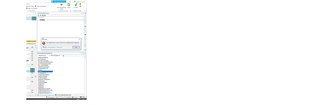
    The first image is displaying an error (Object not set to an instance...) 

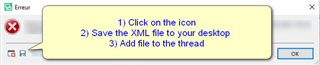
    Please save the error stack to your desktop and then attach it to this thread.

    This should now show us what the problem is

    Error message in Trados Studio with instructions: 1) Click on the icon, 2) Save the XML file to your desktop, 3) Add file to the thread.

    Oana Nagy | QA Engineer | RWS Group

    emoji


    Generated Image Alt-Text
    [edited by: Trados AI at 9:40 PM (GMT 0) on 28 Feb 2024]
  • Hello Steven,

    Thanks. Here is the file.

    <SDLErrorDetails time="26/06/2020 11:06:07">
      <ErrorMessage>Der Objektverweis wurde nicht auf eine Objektinstanz festgelegt.</ErrorMessage>
      <Exception>
        <Type>System.NullReferenceException, mscorlib, Version=4.0.0.0, Culture=neutral, PublicKeyToken=b77a5c561934e089</Type>
        <HelpLink />
        <Source>Sdl.TranslationStudio.Editor</Source>
        <HResult>-2147467261</HResult>
        <StackTrace><![CDATA[   bei Sdl.TranslationStudio.Editor.Terminology.TermbaseViewer.TermHit.FromTermAccessTermHit(ITermHit term, ITerminologyProvider termbase)
       bei Sdl.TranslationStudio.Editor.Terminology.TermbaseViewer.MultiTermViewerWinFormsUI.MiniEditor_TermSelected(ITermHit term)
       bei Sdl.MultiTerm.Client.MiniEditor.MiniEditor.control_TermSelected(ITermHit term)
       bei Sdl.MultiTerm.Client.MiniEditor.MiniEditorControl.TermBrowser_TermSelected(ITermHit term)
       bei Sdl.MultiTerm.Client.UI.Browser.TermBrowser.FireTermSelectedEvent(ITermHit term)
       bei Sdl.MultiTerm.Client.MiniEditor.MiniEditorTermBrowser.OpenWindowRequest(ITermHit hit, Boolean newWindow)
       bei Sdl.MultiTerm.Client.UI.Browser.BrowseListControl.lstItems_SelectedIndexChanged(Object sender, EventArgs e)
       bei System.Windows.Forms.ListBox.OnSelectedIndexChanged(EventArgs e)
       bei System.Windows.Forms.ListBox.set_SelectedIndex(Int32 value)
       bei Sdl.MultiTerm.Client.UI.Browser.BrowseCalculator.ShowTerm(IFilteredHitTerm hit, Boolean fullRefresh)
       bei Sdl.MultiTerm.Client.UI.Browser.TermBrowser.set_ActiveTerm(ITermHit value)
       bei Sdl.MultiTerm.Client.MiniEditor.MiniEditorControl.JumpToTerm(ITermHit activeTerm)
       bei Sdl.TranslationStudio.Editor.Terminology.TermbaseViewer.MultiTermViewerWinFormsUI.JumpToTerm(TermbaseStatus termbaseStatus, ITermHit term)
       bei Sdl.TranslationStudio.Editor.Terminology.TermbaseViewer.MultiTermViewerWinFormsUI.JumpToTerm(ITermHit term)
       bei Sdl.TranslationStudio.Editor.Terminology.TermbaseViewer.TermBaseViewPartX.TerminologyProviderViewerJumpToTerm(ITermHit term)]]></StackTrace>
      </Exception>
      <Environment>
        <ProductName>SDL Trados Studio</ProductName>
        <ProductVersion>15.0.0.0</ProductVersion>
        <EntryAssemblyFileVersion>15.2.6.2831</EntryAssemblyFileVersion>
        <OperatingSystem>Microsoft Windows 10 Professionnel</OperatingSystem>
        <ServicePack>NULL</ServicePack>
        <OperatingSystemLanguage>1031</OperatingSystemLanguage>
        <CodePage>1252</CodePage>
        <LoggedOnUser>PC1\Caroline</LoggedOnUser>
        <DotNetFrameWork>4.0.30319.42000</DotNetFrameWork>
        <ComputerName>PC1</ComputerName>
        <ConnectedToNetwork>True</ConnectedToNetwork>
        <PhysicalMemory>15930164 MB</PhysicalMemory>
      </Environment>
    </SDLErrorDetails>

  • Hello  

    Im really not sure what might be causing this.

    I would suggest resetting Studio 

    https://gateway.rws.com/csm?id=kb_article_view&sysparm_article=KB0039395

    Should this still not help- please log a free support ticket 

    https://gateway.sdl.com/webtocase and the team will be able to help further.

    Oana Nagy | QA Engineer | RWS Group

  • Hello Steven,

    Thanks for your help. 
    I solved my issue this way:
    Export in xml, sorted by entry number.
    Created a new termbase (definition coming from the old one)
    Imported my xml-export
    Works a dream! 
    I guess my problem was due to the fact that my old termbase was nearly 10 years old. I upgraded it with every new Studio version, but it got corrupted at one point or another. To start from scratch with legacy content was a solution that worked for me.

    Greetings,

    Caroline