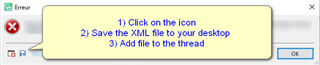
プロジェクト設定をクリックすると「呼び出しのターゲットが例外をスローしました。」のエラーメッセージが出ます

いつも大変お世話になっております。

6月24日にFreelance Plus 2017からFreelance Plus 2019にアップグレードを行いました。

プロジェクトを作成後、プロジェクト設定をクリックすると、「呼び出しのターゲットが例外をスローしました。」のエラーメッセージが出ます。

今回使用したのはExcelファイルです。以前にsrtファイルでプロジェクトを作成しましたが、その際もプロジェクト設定ができませんでした。

解決のための手順をご教示いただければ幸いです。

どうぞよろしくお願いいたします。

Parents
  • Hello ,

    Could you please post the full error stack please and tell us exactly what you are trying to do.

    -Error message popup with instructions: 1) Click on the icon, 2) Save the XML file to your desktop, 3) Add file to the thread.

    Are you trying to create a project based on an Excel file and/or an SRT file type?

    After migrating to Studio 2019- have you updated to the latest release?

    SDL TRADOS STUDIO 2019 SR2+ supports SRT natively. If you haven't updated, you will need the SRT filetype and Studio subtitling app.

    https://appstore.sdl.com/language/list/?search=SRT


    Oana Nagy | Developer Experience | QA Engineer | RWS Group

    emoji


    Generated Image Alt-Text
    [edited by: Trados AI at 9:46 PM (GMT 0) on 28 Feb 2024]
  • Thank you.

    As I posted a question in Japanese, I expect an answer from the Japanese team.

    [Dear Japanese team]

    I look forward to your kind reply. Thank you.

  • As I posted a question in Japanese, I expect an answer from the Japanese team.

    In the meantime I'd recommend you at least provide the missing information as this will also help those you'd prefer to have a response from.

    Paul Filkin | RWS Group

    ________________________
    Design your own training!

    You've done the courses and still need to go a little further, or still not clear? 
    Tell us what you need in our Community Solutions Hub

  • Former Member
    0 Former Member in reply to Paul

    投稿いただきまして、ありがとうございます。

    Stevenからのご案内にございましたように、error stackを保存していただき、こちらに添付していただけますでしょうか。エラーメッセージウィンドウにてXMLファイルの形で保存されるエラー発生の詳細情報となります。

    お困りのところお手数をおかけいたしますがどうぞよろしくお願い申し上げます。

  • Hello

    Thank you ALL for your help. 
    Attached please find the error file.

    <SDLErrorDetails time="2020/07/07 9:11:18">
      <ErrorMessage>呼び出しのターゲットが例外をスローしました。</ErrorMessage>
      <Exception>
        <Type>System.Reflection.TargetInvocationException, mscorlib, Version=4.0.0.0, Culture=neutral, PublicKeyToken=b77a5c561934e089</Type>
        <HelpLink />
        <Source>mscorlib</Source>
        <HResult>-2146232828</HResult>
        <StackTrace><![CDATA[   場所 System.RuntimeTypeHandle.CreateInstance(RuntimeType type, Boolean publicOnly, Boolean noCheck, Boolean& canBeCached, RuntimeMethodHandleInternal& ctor, Boolean& bNeedSecurityCheck)
       場所 System.RuntimeType.CreateInstanceSlow(Boolean publicOnly, Boolean skipCheckThis, Boolean fillCache, StackCrawlMark& stackMark)
       場所 System.RuntimeType.CreateInstanceDefaultCtor(Boolean publicOnly, Boolean skipCheckThis, Boolean fillCache, StackCrawlMark& stackMark)
       場所 System.Activator.CreateInstance[T]()
       場所 Sdl.Desktop.Platform.Settings.SettingsPageReference`1.Initialize()
       場所 Sdl.Desktop.Platform.Implementation.Settings.AbstractSettingsHost.EnsurePageInitialized(ISettingsPageReference r)
       場所 Sdl.Desktop.Platform.Implementation.Settings.AbstractSettingsHost.ActivateSettingsPageCategory(String[] path)
       場所 Sdl.TranslationStudio.ProjectManagement.ProjectOperations.ProjectSettingsOperation.<>c__DisplayClass3_0.<Execute>b__0(ISettingsDialog d)
       場所 Sdl.TranslationStudio.ProjectManagement.Actions.ProjectSettingsDialogHelper.Show(IProject project, IProjectManagementService service, ConfigureProjectSettingsDialogDelegate configureProjectSettingsDialog)
       場所 Sdl.TranslationStudio.ProjectManagement.ProjectOperations.ProjectSettingsOperation.Execute(IProject project, String operationId, Object[] args)
       場所 Sdl.ProjectApi.Implementation.Operations.ProjectOperationComposite.Execute(IProject project, String operationId, Object[] args)
       場所 Sdl.ProjectApi.Implementation.Project.ExecuteOperation(String operationId, Object[] args)
       場所 Sdl.TranslationStudio.Editor.TranslationEditor.Actions.AbstractProjectSettingsAction.Execute()
       場所 Sdl.Desktop.Platform.Implementation.CommandBars.ActionService.<>c__DisplayClass30_0.<ExecuteAction>b__0()
       場所 Sdl.Desktop.Logger.Log.Resources(Object message, Action action)
       場所 Sdl.Desktop.Platform.Implementation.CommandBars.ActionService.ExecuteAction(IAction action, ActionOrigin origin, Boolean allowToggle)
       場所 Sdl.Desktop.Platform.WinForms.IgCommandBarAction.Execute()
       場所 Sdl.Desktop.Platform.WinForms.IgCommandBarAction._lazyButtonTool_ToolClick(Object sender, ToolClickEventArgs e)
       場所 Infragistics.Win.UltraWinToolbars.ToolBase.OnToolClick(ToolClickEventArgs e)
       場所 Infragistics.Win.UltraWinToolbars.UltraToolbarsManager.OnToolClick(ToolClickEventArgs e)
       場所 Infragistics.Win.UltraWinToolbars.UltraToolbarsManager.FireEvent(ToolbarEventIds id, EventArgs e)
       場所 Infragistics.Win.UltraWinToolbars.ToolBase.OnToolClick()
       場所 Infragistics.Win.UltraWinToolbars.ButtonToolUIElement.DoClickProcessing(MouseEventArgs e)
       場所 Infragistics.Win.UltraWinToolbars.ButtonToolUIElement.OnMouseUp(MouseEventArgs e)
       場所 Infragistics.Win.ControlUIElementBase.ProcessMouseUpHelper(Object sender, MouseEventArgs e)
       場所 Infragistics.Win.ControlUIElementBase.ProcessMouseUp(Object sender, MouseEventArgs e)
       場所 Infragistics.Win.Utilities.ProcessEvent(Control control, ProcessEvent eventToProcess, EventArgs e)
       場所 Infragistics.Win.UltraWinToolbars.UltraToolbarsDockArea.OnMouseUp(MouseEventArgs e)
       場所 System.Windows.Forms.Control.WmMouseUp(Message& m, MouseButtons button, Int32 clicks)
       場所 System.Windows.Forms.Control.WndProc(Message& m)
       場所 System.Windows.Forms.Control.ControlNativeWindow.OnMessage(Message& m)
       場所 System.Windows.Forms.Control.ControlNativeWindow.WndProc(Message& m)
       場所 System.Windows.Forms.NativeWindow.Callback(IntPtr hWnd, Int32 msg, IntPtr wparam, IntPtr lparam)]]></StackTrace>
        <InnerException>
          <Type>System.InvalidOperationException, mscorlib, Version=4.0.0.0, Culture=neutral, PublicKeyToken=b77a5c561934e089</Type>
          <HelpLink />
          <Source>System.Core</Source>
          <HResult>-2146233079</HResult>
          <StackTrace><![CDATA[   場所 System.Linq.Enumerable.First[TSource](IEnumerable`1 source)
       場所 Sdl.TranslationStudio.Common.TranslationMemory.TranslationMemoriesControl..ctor()
       場所 Sdl.TranslationStudio.ProjectManagement.Settings.TranslationMemoriesSettingsPageControl.InitializeComponent()
       場所 Sdl.TranslationStudio.ProjectManagement.Settings.TranslationMemoriesSettingsPageControl..ctor()
       場所 Sdl.TranslationStudio.ProjectManagement.Settings.TranslationMemoriesSettingsPage..ctor()]]></StackTrace>
        </InnerException>
      </Exception>
      <Environment>
        <ProductName>SDL Trados Studio</ProductName>
        <ProductVersion>15.0.0.0</ProductVersion>
        <EntryAssemblyFileVersion>15.2.0.1041</EntryAssemblyFileVersion>
        <OperatingSystem>Microsoft Windows 10 Home</OperatingSystem>
        <ServicePack>NULL</ServicePack>
        <OperatingSystemLanguage>1041</OperatingSystemLanguage>
        <CodePage>932</CodePage>
        <LoggedOnUser>LAPTOP-UDQE1LEG\naokoorito</LoggedOnUser>
        <DotNetFrameWork>4.0.30319.42000</DotNetFrameWork>
        <ComputerName>LAPTOP-UDQE1LEG</ComputerName>
        <ConnectedToNetwork>True</ConnectedToNetwork>
        <PhysicalMemory>4084100 MB</PhysicalMemory>
      </Environment>
    </SDLErrorDetails>

  • Former Member
    0 Former Member in reply to Naoko ORITO

    Hi , ,

    Can I get some advice from you about this stack trace above?

  • It looks as though the problem might be coming from the translation memory settings page. Try removing the TMs from the template being used for the project creation and then try to create the project again.

    If that doesn't help you should try a full Studio reset.  But I'd try the TM route first as it might save having to try a reset.

    Paul Filkin | RWS Group

    ________________________
    Design your own training!

    You've done the courses and still need to go a little further, or still not clear? 
    Tell us what you need in our Community Solutions Hub

  • It looks as though the problem might be coming from the translation memory settings page

    I have just created another test project with an Excel source file and the problem persists.
     
    More precisely, it occurs after the project creation, and when I click on the project setting button.
    (my purpose for the project setting is TM setting, naturally!)

    As my Studio 2019 is brand new and I do not have any projects on it. That said, it is not a problem to try a reset.

    If you think it is better to do so, please advise me on how to do it.
    Thank you very much!

  • Former Member
    0 Former Member in reply to Naoko ORITO

    念のため、Trados Studioのリセットをお試しください。下記のブログをお読みいただければと存じます。
    https://www.sdltrados.com/jp/blog/reset-trados-setting.html

    よろしくお願いいたします。


  • 早速にご教示いただきまして、ありがとうございます。
    明日以降に、追って報告させていただきます。

Reply Children
  • Hi 

    I tried a reset and it was successful.

    However, when I created a new test project and see what happened, the same problem persists.
    Please see the attached file.

    Thank you very much in advance,
    よろしくお願いいたします。

  • Former Member
    0 Former Member in reply to Naoko ORITO

    いったんTrados Studioを終了し、下記のフォルダにある「Default.sdltpl」というファイルを「Default_old.sdltpl」とリネームしてください。
    C:\Users\ktsuchida\Documents\Studio 2019\Project Templates

    その後Trados Studioを起動し、新規プロジェクトを作成していただけますでしょうか。どうぞよろしくお願いいたします。


  • ご返信ありがとうございます。

    早速、ファイルをリネームした後、新規プロジェクトを作成してみましたが、
    残念なことに同じエラーメッセージが出てきてしまいます。

    エラー発生の詳細情報を添付いたします。

    どうぞよろしくお願いいたします。

    <SDLErrorDetails time="2020/07/09 8:34:17">
      <ErrorMessage>呼び出しのターゲットが例外をスローしました。</ErrorMessage>
      <Exception>
        <Type>System.Reflection.TargetInvocationException, mscorlib, Version=4.0.0.0, Culture=neutral, PublicKeyToken=b77a5c561934e089</Type>
        <HelpLink />
        <Source>mscorlib</Source>
        <HResult>-2146232828</HResult>
        <StackTrace><![CDATA[   場所 System.RuntimeTypeHandle.CreateInstance(RuntimeType type, Boolean publicOnly, Boolean noCheck, Boolean& canBeCached, RuntimeMethodHandleInternal& ctor, Boolean& bNeedSecurityCheck)
       場所 System.RuntimeType.CreateInstanceSlow(Boolean publicOnly, Boolean skipCheckThis, Boolean fillCache, StackCrawlMark& stackMark)
       場所 System.RuntimeType.CreateInstanceDefaultCtor(Boolean publicOnly, Boolean skipCheckThis, Boolean fillCache, StackCrawlMark& stackMark)
       場所 System.Activator.CreateInstance[T]()
       場所 Sdl.Desktop.Platform.Settings.SettingsPageReference`1.Initialize()
       場所 Sdl.Desktop.Platform.Implementation.Settings.AbstractSettingsHost.EnsurePageInitialized(ISettingsPageReference r)
       場所 Sdl.Desktop.Platform.Implementation.Settings.AbstractSettingsHost.ActivateSettingsPageCategory(String[] path)
       場所 Sdl.TranslationStudio.ProjectManagement.ProjectOperations.ProjectSettingsOperation.<>c__DisplayClass3_0.<Execute>b__0(ISettingsDialog d)
       場所 Sdl.TranslationStudio.ProjectManagement.Actions.ProjectSettingsDialogHelper.Show(IProject project, IProjectManagementService service, ConfigureProjectSettingsDialogDelegate configureProjectSettingsDialog)
       場所 Sdl.TranslationStudio.ProjectManagement.ProjectOperations.ProjectSettingsOperation.Execute(IProject project, String operationId, Object[] args)
       場所 Sdl.ProjectApi.Implementation.Operations.ProjectOperationComposite.Execute(IProject project, String operationId, Object[] args)
       場所 Sdl.ProjectApi.Implementation.Project.ExecuteOperation(String operationId, Object[] args)
       場所 Sdl.TranslationStudio.Editor.TranslationEditor.Actions.AbstractProjectSettingsAction.Execute()
       場所 Sdl.Desktop.Platform.Implementation.CommandBars.ActionService.<>c__DisplayClass30_0.<ExecuteAction>b__0()
       場所 Sdl.Desktop.Logger.Log.Resources(Object message, Action action)
       場所 Sdl.Desktop.Platform.Implementation.CommandBars.ActionService.ExecuteAction(IAction action, ActionOrigin origin, Boolean allowToggle)
       場所 Sdl.Desktop.Platform.WinForms.IgCommandBarAction.Execute()
       場所 Sdl.Desktop.Platform.WinForms.IgCommandBarAction._lazyButtonTool_ToolClick(Object sender, ToolClickEventArgs e)
       場所 Infragistics.Win.UltraWinToolbars.ToolBase.OnToolClick(ToolClickEventArgs e)
       場所 Infragistics.Win.UltraWinToolbars.UltraToolbarsManager.OnToolClick(ToolClickEventArgs e)
       場所 Infragistics.Win.UltraWinToolbars.UltraToolbarsManager.FireEvent(ToolbarEventIds id, EventArgs e)
       場所 Infragistics.Win.UltraWinToolbars.ToolBase.OnToolClick()
       場所 Infragistics.Win.UltraWinToolbars.ButtonToolUIElement.DoClickProcessing(MouseEventArgs e)
       場所 Infragistics.Win.UltraWinToolbars.ButtonToolUIElement.OnMouseUp(MouseEventArgs e)
       場所 Infragistics.Win.ControlUIElementBase.ProcessMouseUpHelper(Object sender, MouseEventArgs e)
       場所 Infragistics.Win.ControlUIElementBase.ProcessMouseUp(Object sender, MouseEventArgs e)
       場所 Infragistics.Win.Utilities.ProcessEvent(Control control, ProcessEvent eventToProcess, EventArgs e)
       場所 Infragistics.Win.UltraWinToolbars.UltraToolbarsDockArea.OnMouseUp(MouseEventArgs e)
       場所 System.Windows.Forms.Control.WmMouseUp(Message& m, MouseButtons button, Int32 clicks)
       場所 System.Windows.Forms.Control.WndProc(Message& m)
       場所 System.Windows.Forms.Control.ControlNativeWindow.OnMessage(Message& m)
       場所 System.Windows.Forms.Control.ControlNativeWindow.WndProc(Message& m)
       場所 System.Windows.Forms.NativeWindow.Callback(IntPtr hWnd, Int32 msg, IntPtr wparam, IntPtr lparam)]]></StackTrace>
        <InnerException>
          <Type>System.InvalidOperationException, mscorlib, Version=4.0.0.0, Culture=neutral, PublicKeyToken=b77a5c561934e089</Type>
          <HelpLink />
          <Source>System.Core</Source>
          <HResult>-2146233079</HResult>
          <StackTrace><![CDATA[   場所 System.Linq.Enumerable.First[TSource](IEnumerable`1 source)
       場所 Sdl.TranslationStudio.Common.TranslationMemory.TranslationMemoriesControl..ctor()
       場所 Sdl.TranslationStudio.ProjectManagement.Settings.TranslationMemoriesSettingsPageControl.InitializeComponent()
       場所 Sdl.TranslationStudio.ProjectManagement.Settings.TranslationMemoriesSettingsPageControl..ctor()
       場所 Sdl.TranslationStudio.ProjectManagement.Settings.TranslationMemoriesSettingsPage..ctor()]]></StackTrace>
        </InnerException>
      </Exception>
      <Environment>
        <ProductName>SDL Trados Studio</ProductName>
        <ProductVersion>15.0.0.0</ProductVersion>
        <EntryAssemblyFileVersion>15.2.0.1041</EntryAssemblyFileVersion>
        <OperatingSystem>Microsoft Windows 10 Home</OperatingSystem>
        <ServicePack>NULL</ServicePack>
        <OperatingSystemLanguage>1041</OperatingSystemLanguage>
        <CodePage>932</CodePage>
        <LoggedOnUser>LAPTOP-UDQE1LEG\naokoorito</LoggedOnUser>
        <DotNetFrameWork>4.0.30319.42000</DotNetFrameWork>
        <ComputerName>LAPTOP-UDQE1LEG</ComputerName>
        <ConnectedToNetwork>True</ConnectedToNetwork>
        <PhysicalMemory>4084100 MB</PhysicalMemory>
      </Environment>
    </SDLErrorDetails>

  • Former Member
    +1 Former Member in reply to Naoko ORITO

    ご連絡ありがとうございました。下記のブログを参考に、SDL Freshstartというツールをお試しいただければと存じます。
    https://www.sdltrados.com/jp/blog/sdl-freshstart.html

    お手数をおかけしております。どうぞよろしくお願い申し上げます。


  • やっと解決しました。
    サポートをいただき、誠にありがとうございました。

    &

    The issue is solved. Thank you again for your kind help!