The Trados cloud platform will be undergoing maintenance on Saturday, 9th May 2026 between 05:00 to 17:00 UTC. During this time, you will not be able to log in to the Trados platform.

Autopropagation

Hi my dear translators and SDL team!

I have an issue with the translation of segments containing abbreveations (English - Russian). In the attached image you can see three highlighted segments containing three different words in upper case (FAT, SAT and SIT) and word "plan". I properly translate them and update the TM; but later on in the simmilar document, Trados keeps translating them as if they were the same 'cause for some reason it saves only one translation pair in the TM. So in the Translation Results section you can see that it keeps the right abbreveation in the brackets (which is SIT - System Integration Testing), but gives a wrong definition as if it was SAT (Site Acceptance Testing). Is there any solution to this?
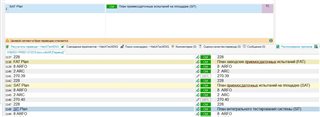
Screenshot of Trados Studio showing three highlighted segments with abbreviations FAT, SAT, SIT and the word 'plan'. Translation Results section incorrectly matches SIT with definition for SAT.

Best regards,

Aik


Generated Image Alt-Text
[edited by: Trados AI at 9:54 PM (GMT 0) on 28 Feb 2024]

emoji
Parents
  • The reason for Studio's behavior is this: SIT, SAT and FAT are considered placables, not words. Image they were numbers:

    123 Plan

    234 Plan

    564 Plan

    You can see that at the blue underline.

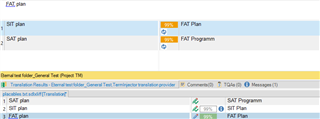
    So from Studio's perspective, the source segment has only the word "Plan". In order to make efficient use of TMs, it will update translations. First you translated it one way, which was saved, then you translated Plan a different way, which replaced the first translation etc. So what you have to do is add the additional meanings of "Plan" as additional TUs (CTRL+Shift+U).

    Screenshot of Trados Studio showing source segment 'SIT plan' with blue underline indicating it's considered a placable, and target segment 'SIT Program'.

    I did this, so for the third appearance of Acronym + "Plan" I get both suggestions from the TM, and it does not autopropagate anymore, since there are two TM hits:

    Screenshot of Trados Studio translation memory (TM) results showing 'FAT plan' matched with 'FAT Plan' and 'SAT plan' with 'FAT Programm', indicating different translations for the same source.

    I would suggest you enter these terms into your termbase as well.

    Daniel

    emoji


    Generated Image Alt-Text
    [edited by: Trados AI at 9:54 PM (GMT 0) on 28 Feb 2024]
Reply
  • The reason for Studio's behavior is this: SIT, SAT and FAT are considered placables, not words. Image they were numbers:

    123 Plan

    234 Plan

    564 Plan

    You can see that at the blue underline.

    So from Studio's perspective, the source segment has only the word "Plan". In order to make efficient use of TMs, it will update translations. First you translated it one way, which was saved, then you translated Plan a different way, which replaced the first translation etc. So what you have to do is add the additional meanings of "Plan" as additional TUs (CTRL+Shift+U).

    Screenshot of Trados Studio showing source segment 'SIT plan' with blue underline indicating it's considered a placable, and target segment 'SIT Program'.

    I did this, so for the third appearance of Acronym + "Plan" I get both suggestions from the TM, and it does not autopropagate anymore, since there are two TM hits:

    Screenshot of Trados Studio translation memory (TM) results showing 'FAT plan' matched with 'FAT Plan' and 'SAT plan' with 'FAT Programm', indicating different translations for the same source.

    I would suggest you enter these terms into your termbase as well.

    Daniel

    emoji


    Generated Image Alt-Text
    [edited by: Trados AI at 9:54 PM (GMT 0) on 28 Feb 2024]
Children