


The Trados cloud platform will be undergoing maintenance on Saturday, 9th May 2026 between 05:00 to 17:00 UTC. During this time, you will not be able to log in to the Trados platform.

Trados 2019 uses too much CPU (90%) and freezes

Hi, I would appreciate if anyone can help me with the following problem:

I am working in a project (single file, single TM, two TB (main one online), and whenever I came into a project with several chemical names, Trados starts to use approximately 90 % of CPU and I have to wait several minutes for each segment. Until now, it had worked fine with projects involving numerous files, TMs and TBs.

I would appreciate any help.

Thanks in advance.

Pablo Mones


Project characteristics:

  • Words: 39,626
  • Segments: 2,222
  • TM: 1,347 units


PC:

  • Windows 10 64 bit
  • Memory: 16 GB
  • Processor speed: 4.19 GHz
  • Processor: AMD A8-5600K
  • Antivirus: Bitdefender
  • Antimalware: Malwarebytes

Example of chemical compound (for confidentiality reasons I just made it, it is not a real one from the file, but they are all like this)

R-2-allyl-1-(7-ethyl-7-hydroxy-6,7-(7-ethyl-7-hydroxy-6,7-dihydro-5H-cyclopenta[b]pyridin-2-yl)-6-((3-methyl-4-phenyl)amino)-1,2-dihydro-3H-pyrazolo[3,4-d]pyrimidin-3-one
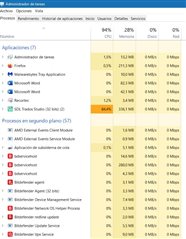
Task Manager showing high CPU usage by Trados Studio at 87.5%.


Generated Image Alt-Text
[edited by: Trados AI at 9:43 PM (GMT 0) on 28 Feb 2024]

emoji
Parents
  • Hello ,

    I think the first thing to look at is where and how your resources are stored.

    am working in a project (single file, single TM, two TB (main one online),

    A possible cause for high RAM usage and very sluggish performance could be that part of your resources are online and that your AntiVirus is blocking the access.

    Please ensure that both Studio and MultiTerm are added to your AntiVirus providers 'exception list'- otherwise this may be blocking correct access to the online resources.

    Should the problem persists, remove the online TB from the project, close and reopen the project and proceed with just your local TB.

    If everything appears to have normalised, add back into the project the online TB and check the performance.

    Oana Nagy | QA Engineer | RWS Group

  • Thank you, Steven.

    Both Studio and Multiterm were already in the antivirus "Exception list" (with all the other *.exe files in the SDL and Multiterm folders).

    As for the RAM memory, this is not the issue, the problem is CPU usage.

    I have removed the online TB from the project and the problem persists (I am working with a high-speed, fiber optic connection).

    On a deeper examination, the problem seems to mount gradually, as initially the program works fine, and after a few translations it starts to gradually "slow down". The first symptom is that grammatical mistakes stop to appear underlined, then the TM coincidences take some time to appear, until it finally crashes. In order to prevent this, I have to close and restart the program every few minutes.

    Although I am far from being a computer expert, seems to be something related with the content: the file is full of chemical formulas, that are full of hyphens and commas, and maybe that is causing the program to fail (as it sometimes points a 99% coincidence for segments that are very different). Nevertheless, I wonder why it takes some minutes/new translations for the problem to appear. ¿Temporary files?

    Best regards.

Reply
  • Thank you, Steven.

    Both Studio and Multiterm were already in the antivirus "Exception list" (with all the other *.exe files in the SDL and Multiterm folders).

    As for the RAM memory, this is not the issue, the problem is CPU usage.

    I have removed the online TB from the project and the problem persists (I am working with a high-speed, fiber optic connection).

    On a deeper examination, the problem seems to mount gradually, as initially the program works fine, and after a few translations it starts to gradually "slow down". The first symptom is that grammatical mistakes stop to appear underlined, then the TM coincidences take some time to appear, until it finally crashes. In order to prevent this, I have to close and restart the program every few minutes.

    Although I am far from being a computer expert, seems to be something related with the content: the file is full of chemical formulas, that are full of hyphens and commas, and maybe that is causing the program to fail (as it sometimes points a 99% coincidence for segments that are very different). Nevertheless, I wonder why it takes some minutes/new translations for the problem to appear. ¿Temporary files?

    Best regards.

Children