 Translate



こんにちは。
置換をしていると、よく「指定された引数は、有効な値の範囲内にありません。パラメーター名:この文書の「検索元」の位置が無効です」という表示がでて、それ以降は検索・置換ができなくなり、毎回Tradosを再起動しなければなりません。
これはどのようにして解決したらいいでしょうか?
よろしくお願いいたします。

こんにちは。
置換をしていると、よく「指定された引数は、有効な値の範囲内にありません。パラメーター名:この文書の「検索元」の位置が無効です」という表示がでて、それ以降は検索・置換ができなくなり、毎回Tradosを再起動しなければなりません。
これはどのようにして解決したらいいでしょうか?
よろしくお願いいたします。

投稿いただき、ありがとうございます。
SDL Freshstartというツールをお試しいただき、Trados Studioの挙動をリセットしていただけますでしょうか。
入手方法および使用手順は下記のブログをお読みください。
https://www.sdltrados.com/jp/blog/sdl-freshstart.html
どうぞよろしくお願いいたします。
ご返信有難うございます。
試してみたのですが、やはり同じエラーメッセージが出て、それ以降は置換ができなくなりました。
どうすればよいか、ご教示の程、よろしくお願いいたします。
ご連絡ありがとうございます。
Freshstartの画面にて、項目に全てをチェックを入れた状態で「Remove folders」を実行されましたでしょうか。ご教示のほど、よろしくお願いいたします。
はい、項目全てにチェックを入れた状態で「Remove folders」を実行しても同じ結果でした。
また、その後最初からFreshstartをやり直してみようとしたのですが、項目全てにチェックを入れて「Remove folders」を実行するとアプリケーションがおちてしていまいます。(デフォルトでチェックされている項目の場合は、「Remove folders」は問題なく行われます。)何度か試してみたのですが、毎回同じ状態です。
Freshstartをアンインストールし、再度インストールしても改善されませんでした。
よろしくお願いいたします。
ご偏印ありがとうございます。ご使用のTrados Studioのバージョン詳細をお知らせください。
あわせて、Freshstartの実行画面もお送りいただけますでしょうか。どうぞよろしくお願い申し上げます。
ご返信有難うございます。
私が使用しているTrados Studioのバージョンは、「2019 15.2.6.2831」です。
Freshstartの実行画面は以下のとおりです。
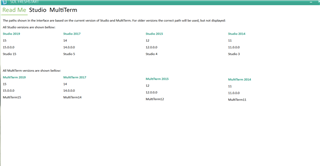
お手数をお掛けしますが、どうぞよろしくお願いいたします。

ご連絡いただきありがとうございました。手動にて、下記のフォルダを削除してください。
C:\Users\ktsuchida\Documents\Studio 2019\Projects\projects.xml
C:\Users\ktsuchida\Documents\Studio 2019\Project Templates\Default.sdltpl
C:\Users\ktsuchida\AppData\Roaming\SDL\ProjectApi\15.1.0.0\Sdl.ProjectApi.xml
その後、コントロール パネル\プログラム\プログラムと機能より、Trados Studio 2019 SR2をダブルクリックし、下記の画面で[Repair]を選んでください。
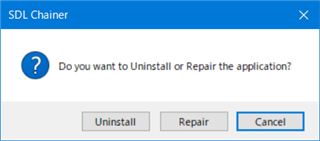
お手数をおかけいたしますがどうぞよろしくお願いいたします。

ご連絡いただきありがとうございました。手動にて、下記のフォルダを削除してください。
C:\Users\ktsuchida\Documents\Studio 2019\Projects\projects.xml
C:\Users\ktsuchida\Documents\Studio 2019\Project Templates\Default.sdltpl
C:\Users\ktsuchida\AppData\Roaming\SDL\ProjectApi\15.1.0.0\Sdl.ProjectApi.xml
その後、コントロール パネル\プログラム\プログラムと機能より、Trados Studio 2019 SR2をダブルクリックし、下記の画面で[Repair]を選んでください。
お手数をおかけいたしますがどうぞよろしくお願いいたします。
お世話になっております。
ご教示頂いた方法を数回試したのですが、やはり同じエラーが発生して、それ以降は検索・置換ができなくなります。
何度も申し訳ございませんが、解決法のご教示をよろしくお願いいたします。
ご不便をおかけしております。エラー画面のスクリーンショットをいただけますでしょうか。
また、もしも以下のような画面でしたら、保存のアイコンよりXMLファイルが保存できますかお確かめください。保存できる場合、併せて投稿していただければと存じます。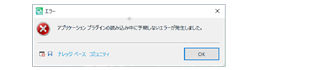
お手数をおかけいたしますが、よろしくお願いいたします。
ご返信有難うございます。
エラー画面のスクリーンショットをお送りします。
よろしくお願いいたします。
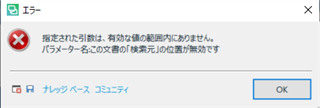

Rik Hi様
スクリーンショットをご提供いただきありがとうございました。下記の赤枠のボタンより、XMLファイルが保存できるかと存じます。こちらのXMLファイルもご提供ください。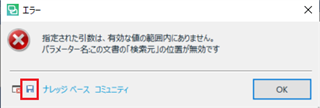
どうぞよろしくお願い申し上げます。
Tsuchida様
ご返信有難うございます。
このファイルに記載されている内容はこのコミュニティーにアップロードしても問題ないものでしょうか?
よろしくお願いいたします。
ご連絡ありがとうございました。XMLファイルが保存されますが、こちらにはコンピューター名およびウィンドウズのログインユーザー名が記載されます。
ご心配でしたら、下記のタグの行を削除してアップロードしていただければと存じます。
<LoggedOnUser>XXXXXXX</LoggedOnUser>
<ComputerName>XXXXXXX</ComputerName>
どうぞよろしくお願い申し上げます。
Tsuchida様
ご返信有難うございます。
エラーメッセージを送らせていただきます。
よろしくお願いいたします。
<?xml version="1.0"?>

-<SDLErrorDetails time="2020/07/27 15:30:11">

<ErrorMessage>指定された引数は、有効な値の範囲内にありません。 パラメーター名:この文書の「検索元」の位置が無効です</ErrorMessage>


-<Exception>

<Type>System.ArgumentOutOfRangeException, mscorlib, Version=4.0.0.0, Culture=neutral, PublicKeyToken=b77a5c561934e089</Type>

<ParamName>この文書の「検索元」の位置が無効です</ParamName>

<HelpLink/>

<Source>Sdl.TranslationStudio.Common</Source>

<HResult>-2146233086</HResult>


-<StackTrace>

-<![CDATA[   場所 Sdl.TranslationStudio.Common.SearchFramework.InteractiveFind.UpdateRangeFrom(Position from)
   場所 Sdl.TranslationStudio.Common.FindAndReplace.FindInDocument.UpdateRangeFrom(ContentRange range)
   場所 Sdl.TranslationStudio.Common.FindAndReplace.AbstractFindAndReplaceProvider.Replace(String replacementExpression)
   場所 Sdl.TranslationStudio.Common.FindAndReplace.FindAndReplaceDialog.ReplaceControl_ReplaceInvoked(Object sender, IReplaceEventArgs e)
   場所 Sdl.TranslationStudio.Common.FindAndReplace.ReplaceControl.replaceButton_Click(Object sender, EventArgs e)
   場所 System.Windows.Forms.Control.OnClick(EventArgs e)
   場所 System.Windows.Forms.Button.OnClick(EventArgs e)
   場所 System.Windows.Forms.Button.OnMouseUp(MouseEventArgs mevent)
   場所 System.Windows.Forms.Control.WmMouseUp(Message& m, MouseButtons button, Int32 clicks)
   場所 System.Windows.Forms.Control.WndProc(Message& m)
   場所 System.Windows.Forms.ButtonBase.WndProc(Message& m)
   場所 System.Windows.Forms.Button.WndProc(Message& m)
   場所 System.Windows.Forms.Control.ControlNativeWindow.OnMessage(Message& m)
   場所 System.Windows.Forms.Control.ControlNativeWindow.WndProc(Message& m)
   場所 System.Windows.Forms.NativeWindow.Callback(IntPtr hWnd, Int32 msg, IntPtr wparam, IntPtr lparam)]]>
</StackTrace>

</Exception>


-<Environment>

<ProductName>SDL Trados Studio</ProductName>

<ProductVersion>15.0.0.0</ProductVersion>

<EntryAssemblyFileVersion>15.2.6.2831</EntryAssemblyFileVersion>

<OperatingSystem>Microsoft Windows 10 Home</OperatingSystem>

<ServicePack>NULL</ServicePack>

<OperatingSystemLanguage>1041</OperatingSystemLanguage>

<CodePage>932</CodePage>

<DotNetFrameWork>4.0.30319.42000</DotNetFrameWork>

<ConnectedToNetwork>True</ConnectedToNetwork>

<PhysicalMemory>8284804 MB</PhysicalMemory>

</Environment>

</SDLErrorDetails>
Tsuchida様
その後ご返信をいただいておりませんが、上記の件はいかがでしょうか?
よろしくお願いいたします。
連絡が滞りまして、まことに申し訳ありません。原因の特定が難航しております。深くお詫び申し上げます。
下記より、Studio 2019の最新のアップデートをご入手いただけますでしょうか。
https://gateway.rws.com/csm?id=kb_article_view&sysparm_article=KB0027380
ページの下部にDownloading and Installing Cumulative Updatesというセクションがあり、その中にFTP siteへのリンクがございます。こちらがダウンロードリンクとなります。
引き続き調査をさせていただきますので、その前提といたしまして最新アップデートをお使いください。
ご不便をおかけしておりますが、どうぞよろしくお願い申し上げます。