Translate



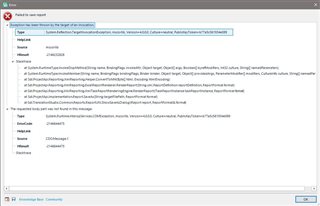
Hi everyone, For a few weeks now, when I create a project and want to save the report, I get an error message: Failed to save report. I usually want to save a copy in xls. I have gone through the Q&A I have seen here already, but nothing comes of it. I do not have Foxit PDF creator on my PC, Windows 10 by the way. I do not have Repair option to repair Studio in the Control Panel. I have Change option. Is that the same in this instance? I'm coying here the sdlerror-2020710-13h40m46s.sdlerror file if that helps: Failed to save report System.Reflection.TargetInvocationException, mscorlib, Version=4.0.0.0, Culture=neutral, PublicKeyToken=b77a5c561934e089 mscorlib -2146232828
at System.RuntimeType.InvokeDispMethod(String name, BindingFlags invokeAttr, Object target, Object[] args, Boolean[] byrefModifiers, Int32 culture, String[] namedParameters) at System.RuntimeType.InvokeMember(String name, BindingFlags bindingFlags, Binder binder, Object target, Object[] providedArgs, ParameterModifier[] modifiers, CultureInfo culture, String[] namedParams) at Sdl.ProjectApi.Reporting.XmlReporting.Helper.ConvertToMht(Byte[] html, Encoding htmlEncoding) at Sdl.ProjectApi.Reporting.XmlReporting.ExcelReportRenderer.RenderReport(String xml, ReportDefinition reportDefinition, ReportFormat format) at Sdl.ProjectApi.Reporting.XmlReporting.XmlTaskReportRenderingEngine.RenderReport(ITaskReportInstance taskReportInstance, ReportFormat format) at Sdl.ProjectApi.Implementation.Report.SaveAs(String targetFilePath, ReportFormat format) at Sdl.TranslationStudio.Common.Reports.ReportUtil.ShowSaveAsDialog(IReport report, ReportFormat& format)System.Runtime.InteropServices.COMException, mscorlib, Version=4.0.0.0, Culture=neutral, PublicKeyToken=b77a5c561934e089 -2146644475 CDO.Message.1 -2146644475 SDL Trados Studio 15.0.0.0 15.2.5.2145 Microsoft Windows 10 Pro NULL 1036 1252 PRODBRU1\User 4.0.30319.42000 PRODBRU1 True 12476288 MB Thanks in advance to anyone who may be able to help. Much appreciated, Valerie