The Trados cloud platform will be undergoing maintenance on Saturday, 9th May 2026 between 05:00 to 17:00 UTC. During this time, you will not be able to log in to the Trados platform.

Can no longer save report in Studio 2019 SR2 : Failed to save report

Hi everyone, For a few weeks now, when I create a project and want to save the report, I get an error message: Failed to save report. I usually want to save a copy in xls. I have gone through the Q&A I have seen here already, but nothing comes of it. I do not have Foxit PDF creator on my PC, Windows 10 by the way. I do not have Repair option to repair Studio in the Control Panel. I have Change option. Is that the same in this instance? I'm coying here the sdlerror-2020710-13h40m46s.sdlerror file if that helps: Failed to save report System.Reflection.TargetInvocationException, mscorlib, Version=4.0.0.0, Culture=neutral, PublicKeyToken=b77a5c561934e089 mscorlib -2146232828

at System.RuntimeType.InvokeDispMethod(String name, BindingFlags invokeAttr, Object target, Object[] args, Boolean[] byrefModifiers, Int32 culture, String[] namedParameters) at System.RuntimeType.InvokeMember(String name, BindingFlags bindingFlags, Binder binder, Object target, Object[] providedArgs, ParameterModifier[] modifiers, CultureInfo culture, String[] namedParams) at Sdl.ProjectApi.Reporting.XmlReporting.Helper.ConvertToMht(Byte[] html, Encoding htmlEncoding) at Sdl.ProjectApi.Reporting.XmlReporting.ExcelReportRenderer.RenderReport(String xml, ReportDefinition reportDefinition, ReportFormat format) at Sdl.ProjectApi.Reporting.XmlReporting.XmlTaskReportRenderingEngine.RenderReport(ITaskReportInstance taskReportInstance, ReportFormat format) at Sdl.ProjectApi.Implementation.Report.SaveAs(String targetFilePath, ReportFormat format) at Sdl.TranslationStudio.Common.Reports.ReportUtil.ShowSaveAsDialog(IReport report, ReportFormat& format)

System.Runtime.InteropServices.COMException, mscorlib, Version=4.0.0.0, Culture=neutral, PublicKeyToken=b77a5c561934e089 -2146644475 CDO.Message.1 -2146644475 SDL Trados Studio 15.0.0.0 15.2.5.2145 Microsoft Windows 10 Pro NULL 1036 1252 PRODBRU1\User 4.0.30319.42000 PRODBRU1 True 12476288 MB Thanks in advance to anyone who may be able to help. Much appreciated, Valerie

Parents
  • I suggest you start with a reset.  That often cures all ills when there isn't an obvious solution.

    Rename this folder (just add _old to the end or something, it's not important what you rename it to) and restart Studio:

    c:\Users\[USERNAME]\AppData\Roaming\SDL\SDL Trados Studio\15.0.0.0

    So the path would become this:

    c:\Users\[USERNAME]\AppData\Roaming\SDL\SDL Trados Studio\15.0.0.0_old

    If you can't find this folder then you need to unhide your hidden files/folders:

    www.howtogeek.com/.../

    Paul Filkin | RWS

    Design your own training!
    You've done the courses and still need to go a little further, or still not clear? 
    Tell us what you need in our Community Solutions Hub

  • Thanks Paul,

    I did what you suggest above, but I still get the same error message; Failed to save report.

    Does the sdlerror below peak to you?

    <SDLErrorDetails time="15/07/2020 16:16:54">
    <ErrorMessage>Failed to save report</ErrorMessage>
    <Exception>
    <Type>System.Reflection.TargetInvocationException, mscorlib, Version=4.0.0.0, Culture=neutral, PublicKeyToken=b77a5c561934e089</Type>
    <HelpLink />
    <Source>mscorlib</Source>
    <HResult>-2146232828</HResult>
    <StackTrace><![CDATA[ at System.RuntimeType.InvokeDispMethod(String name, BindingFlags invokeAttr, Object target, Object[] args, Boolean[] byrefModifiers, Int32 culture, String[] namedParameters)
    at System.RuntimeType.InvokeMember(String name, BindingFlags bindingFlags, Binder binder, Object target, Object[] providedArgs, ParameterModifier[] modifiers, CultureInfo culture, String[] namedParams)
    at Sdl.ProjectApi.Reporting.XmlReporting.Helper.ConvertToMht(Byte[] html, Encoding htmlEncoding)
    at Sdl.ProjectApi.Reporting.XmlReporting.ExcelReportRenderer.RenderReport(String xml, ReportDefinition reportDefinition, ReportFormat format)
    at Sdl.ProjectApi.Reporting.XmlReporting.XmlTaskReportRenderingEngine.RenderReport(ITaskReportInstance taskReportInstance, ReportFormat format)
    at Sdl.ProjectApi.Implementation.Report.SaveAs(String targetFilePath, ReportFormat format)
    at Sdl.TranslationStudio.Common.Reports.ReportUtil.ShowSaveAsDialog(IReport report, ReportFormat& format)]]></StackTrace>
    <InnerException>
    <Type>System.Runtime.InteropServices.COMException, mscorlib, Version=4.0.0.0, Culture=neutral, PublicKeyToken=b77a5c561934e089</Type>
    <ErrorCode>-2146644475</ErrorCode>
    <HelpLink />
    <Source>CDO.Message.1</Source>
    <HResult>-2146644475</HResult>
    <StackTrace><![CDATA[]]></StackTrace>
    </InnerException>
    </Exception>
    <Environment>
    <ProductName>SDL Trados Studio</ProductName>
    <ProductVersion>15.0.0.0</ProductVersion>
    <EntryAssemblyFileVersion>15.2.5.2145</EntryAssemblyFileVersion>
    <OperatingSystem>Microsoft Windows 10 Pro</OperatingSystem>
    <ServicePack>NULL</ServicePack>
    <OperatingSystemLanguage>1036</OperatingSystemLanguage>
    <CodePage>1252</CodePage>
    <LoggedOnUser>PRODBRU1\User</LoggedOnUser>
    <DotNetFrameWork>4.0.30319.42000</DotNetFrameWork>
    <ComputerName>PRODBRU1</ComputerName>
    <ConnectedToNetwork>True</ConnectedToNetwork>
    <PhysicalMemory>12476288 MB</PhysicalMemory>
    </Environment>
    </SDLErrorDetails>

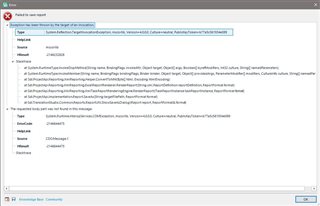
    Error message dialog in Trados Studio showing 'Failed to save report' with details of System.Reflection.TargetInvocationException and COMException errors.

    Thanks in advance for any available help.

    Much appreciated,

    emoji


    Generated Image Alt-Text
    [edited by: Trados AI at 9:51 PM (GMT 0) on 28 Feb 2024]
Reply
  • Thanks Paul,

    I did what you suggest above, but I still get the same error message; Failed to save report.

    Does the sdlerror below peak to you?

    <SDLErrorDetails time="15/07/2020 16:16:54">
    <ErrorMessage>Failed to save report</ErrorMessage>
    <Exception>
    <Type>System.Reflection.TargetInvocationException, mscorlib, Version=4.0.0.0, Culture=neutral, PublicKeyToken=b77a5c561934e089</Type>
    <HelpLink />
    <Source>mscorlib</Source>
    <HResult>-2146232828</HResult>
    <StackTrace><![CDATA[ at System.RuntimeType.InvokeDispMethod(String name, BindingFlags invokeAttr, Object target, Object[] args, Boolean[] byrefModifiers, Int32 culture, String[] namedParameters)
    at System.RuntimeType.InvokeMember(String name, BindingFlags bindingFlags, Binder binder, Object target, Object[] providedArgs, ParameterModifier[] modifiers, CultureInfo culture, String[] namedParams)
    at Sdl.ProjectApi.Reporting.XmlReporting.Helper.ConvertToMht(Byte[] html, Encoding htmlEncoding)
    at Sdl.ProjectApi.Reporting.XmlReporting.ExcelReportRenderer.RenderReport(String xml, ReportDefinition reportDefinition, ReportFormat format)
    at Sdl.ProjectApi.Reporting.XmlReporting.XmlTaskReportRenderingEngine.RenderReport(ITaskReportInstance taskReportInstance, ReportFormat format)
    at Sdl.ProjectApi.Implementation.Report.SaveAs(String targetFilePath, ReportFormat format)
    at Sdl.TranslationStudio.Common.Reports.ReportUtil.ShowSaveAsDialog(IReport report, ReportFormat& format)]]></StackTrace>
    <InnerException>
    <Type>System.Runtime.InteropServices.COMException, mscorlib, Version=4.0.0.0, Culture=neutral, PublicKeyToken=b77a5c561934e089</Type>
    <ErrorCode>-2146644475</ErrorCode>
    <HelpLink />
    <Source>CDO.Message.1</Source>
    <HResult>-2146644475</HResult>
    <StackTrace><![CDATA[]]></StackTrace>
    </InnerException>
    </Exception>
    <Environment>
    <ProductName>SDL Trados Studio</ProductName>
    <ProductVersion>15.0.0.0</ProductVersion>
    <EntryAssemblyFileVersion>15.2.5.2145</EntryAssemblyFileVersion>
    <OperatingSystem>Microsoft Windows 10 Pro</OperatingSystem>
    <ServicePack>NULL</ServicePack>
    <OperatingSystemLanguage>1036</OperatingSystemLanguage>
    <CodePage>1252</CodePage>
    <LoggedOnUser>PRODBRU1\User</LoggedOnUser>
    <DotNetFrameWork>4.0.30319.42000</DotNetFrameWork>
    <ComputerName>PRODBRU1</ComputerName>
    <ConnectedToNetwork>True</ConnectedToNetwork>
    <PhysicalMemory>12476288 MB</PhysicalMemory>
    </Environment>
    </SDLErrorDetails>

    Error message dialog in Trados Studio showing 'Failed to save report' with details of System.Reflection.TargetInvocationException and COMException errors.

    Thanks in advance for any available help.

    Much appreciated,

    emoji


    Generated Image Alt-Text
    [edited by: Trados AI at 9:51 PM (GMT 0) on 28 Feb 2024]
Children
No Data