The Trados cloud platform will be undergoing maintenance on Saturday, 9th May 2026 between 05:00 to 17:00 UTC. During this time, you will not be able to log in to the Trados platform.

object reference not set to an instance of an object - verification

I am using Trados 2019. Every time I choose the option ''Translate single file'' when starting a translation, I cannot confirm the segments. This function is gray.

  • Are you sure you have got an active segment?  Try this:

    1. click into the target translation of your work so it becomes active
    2. press the Ctrl+Enter key combination

    Does that work?

    Paul Filkin | RWS

    Design your own training!
    You've done the courses and still need to go a little further, or still not clear? 
    Tell us what you need in our Community Solutions Hub

  • Drop me an email, pfilkin@sdl.com, and perhaps we can take a quick look at this over Skype.  It may be easier to see what the problem is this way.

    Paul Filkin | RWS

    Design your own training!
    You've done the courses and still need to go a little further, or still not clear? 
    Tell us what you need in our Community Solutions Hub

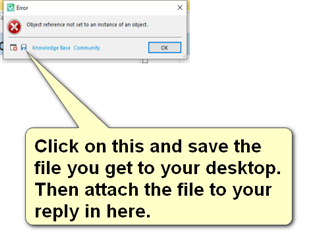
  • Thanks for your email.  The problem you mention in the email is not what you have explained here.  Please can you provide the error stack for the message you receive as this might shed some light on the problem:

    Error dialog box in Trados Studio with message 'Object reference not set to an instance of an object.' and an 'OK' button. A yellow arrow points to the 'Knowledge Base Community' link with instructions to click, save the file, and attach it to a reply.

    Paul Filkin | RWS

    Design your own training!
    You've done the courses and still need to go a little further, or still not clear? 
    Tell us what you need in our Community Solutions Hub

    emoji


    Generated Image Alt-Text
    [edited by: Trados AI at 9:55 PM (GMT 0) on 28 Feb 2024]
  • <SDLErrorDetails time="20/07/2020 12:41:41">
      <ErrorMessage>Object reference not set to an instance of an object.</ErrorMessage>
      <Exception>
        <Type>System.NullReferenceException, mscorlib, Version=4.0.0.0, Culture=neutral, PublicKeyToken=b77a5c561934e089</Type>
        <HelpLink />
        <Source>Sdl.TranslationStudio.Editor</Source>
        <HResult>-2147467261</HResult>
        <StackTrace><![CDATA[   at Sdl.TranslationStudio.Editor.TranslationMemory.TranslationMemoryViewPart.UpdateIcon()
       at Sdl.TranslationStudio.Editor.TranslationMemory.TranslationMemoryViewPart.UpdateTranslationProvider()
       at Sdl.TranslationStudio.Editor.TranslationMemory.TranslationMemoryViewPart.OnActiveDocumentChanged()
       at Sdl.TranslationStudio.Editor.TranslationMemory.TranslationMemoryViewPart.editorService_ActiveDocumentChanged(IDocument document)
       at Sdl.TranslationStudio.Api.Editor.DocumentEventHandler.Invoke(IDocument document)
       at Sdl.TranslationStudio.Editor.EditorService.set_ActiveDocument(IDocument value)
       at Sdl.TranslationStudio.Editor.EditorView.OnActiveViewPartChanged(IViewPartReference viewPartReference)
       at Sdl.Desktop.Platform.AbstractViewWithParts.Control_ActiveViewPartChanged(IViewWithParts view, IViewPartReference viewPartReference)
       at Sdl.Desktop.Platform.WinForms.DockingViewContentControl.OnActiveViewPartChanged(IViewPartReference viewPartReference)
       at Sdl.Desktop.Platform.WinForms.DockingViewContentControl.InternalActivateViewPart(IViewPartReference viewPartToActivate)
       at Sdl.Desktop.Platform.WinForms.DockingViewContentControl._tabControl_SelectedTabChanged(Object sender, SelectedTabChangedEventArgs e)
       at Infragistics.Win.UltraWinTabControl.UltraTabControlBase.OnSelectedTabChanged(SelectedTabChangedEventArgs e)
       at Infragistics.Win.UltraWinTabControl.UltraTabControlBase.RaiseEvent(UltraTabControlEventId id, EventArgs e)
       at Infragistics.Win.UltraWinTabControl.UltraTabControlBase.OnManagerSelectedTabItemChanged(Object sender, SelectedTabItemChangedEventArgs e)
       at Infragistics.Win.UltraWinTabs.TabManager.set_SelectedTabItem(ITabItem value)
       at Infragistics.Win.UltraWinTabControl.UltraTabControlBase.SetSelectedTab(UltraTab tab)
       at Infragistics.Win.UltraWinTabControl.UltraTabControlBase.set_SelectedTab(UltraTab value)
       at Sdl.Desktop.Platform.WinForms.DockingViewContentControl.AddViewPartTab(IViewPartReference viewPartReference)
       at Sdl.Desktop.Platform.WinForms.DockingViewContentControl.AddViewPart(IViewPartReference viewPartReference)
       at Sdl.Desktop.Platform.WinForms.DockingViewContentControl.NotifyViewPartAdded(IViewPartReference viewPartReference)
       at Sdl.Desktop.Platform.AbstractViewWithParts.AddViewPart(IViewPartReference viewPartReference)
       at Sdl.Desktop.Platform.AbstractDockingView.AddViewPart(IViewPartReference viewPartReference)
       at Sdl.TranslationStudio.Editor.Shared.InternalEditorContext.AddDocumentViewPart(IDocumentViewPart documentViewPart)
       at Sdl.TranslationStudio.Api.Editor.AbstractInternalDocument.AfterLoad(IJob job)]]></StackTrace>
      </Exception>
      <Environment>
        <ProductName>SDL Trados Studio</ProductName>
        <ProductVersion>15.0.0.0</ProductVersion>
        <EntryAssemblyFileVersion>15.2.7.2849</EntryAssemblyFileVersion>
        <OperatingSystem>Microsoft Windows 10 Pro</OperatingSystem>
        <ServicePack>NULL</ServicePack>
        <OperatingSystemLanguage>1033</OperatingSystemLanguage>
        <CodePage>1252</CodePage>
        <LoggedOnUser>DESKTOP-CE0KHKG\life_</LoggedOnUser>
        <DotNetFrameWork>4.0.30319.42000</DotNetFrameWork>
        <ComputerName>DESKTOP-CE0KHKG</ComputerName>
        <ConnectedToNetwork>True</ConnectedToNetwork>
        <PhysicalMemory>8179916 MB</PhysicalMemory>
      </Environment>
    </SDLErrorDetails>

  • Two things worth trying I think.

    1. make sure the TMs in your default template are all valid and accessible.
    2. rename your default template:
      c:\Users\[USERNAME]\Documents\Studio 2019\Project Templates\Default.sdltpl

    Paul Filkin | RWS

    Design your own training!
    You've done the courses and still need to go a little further, or still not clear? 
    Tell us what you need in our Community Solutions Hub

  • I tried what you suggested. The problem seems to have been solved. Thank you!