The Trados cloud platform will be undergoing maintenance on Saturday, 9th May 2026 between 05:00 to 17:00 UTC. During this time, you will not be able to log in to the Trados platform.

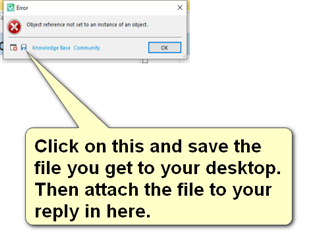
object reference not set to an instance of an object - verification

I am using Trados 2019. Every time I choose the option ''Translate single file'' when starting a translation, I cannot confirm the segments. This function is gray.

Parents Reply Children
  • <SDLErrorDetails time="20/07/2020 12:41:41">
      <ErrorMessage>Object reference not set to an instance of an object.</ErrorMessage>
      <Exception>
        <Type>System.NullReferenceException, mscorlib, Version=4.0.0.0, Culture=neutral, PublicKeyToken=b77a5c561934e089</Type>
        <HelpLink />
        <Source>Sdl.TranslationStudio.Editor</Source>
        <HResult>-2147467261</HResult>
        <StackTrace><![CDATA[   at Sdl.TranslationStudio.Editor.TranslationMemory.TranslationMemoryViewPart.UpdateIcon()
       at Sdl.TranslationStudio.Editor.TranslationMemory.TranslationMemoryViewPart.UpdateTranslationProvider()
       at Sdl.TranslationStudio.Editor.TranslationMemory.TranslationMemoryViewPart.OnActiveDocumentChanged()
       at Sdl.TranslationStudio.Editor.TranslationMemory.TranslationMemoryViewPart.editorService_ActiveDocumentChanged(IDocument document)
       at Sdl.TranslationStudio.Api.Editor.DocumentEventHandler.Invoke(IDocument document)
       at Sdl.TranslationStudio.Editor.EditorService.set_ActiveDocument(IDocument value)
       at Sdl.TranslationStudio.Editor.EditorView.OnActiveViewPartChanged(IViewPartReference viewPartReference)
       at Sdl.Desktop.Platform.AbstractViewWithParts.Control_ActiveViewPartChanged(IViewWithParts view, IViewPartReference viewPartReference)
       at Sdl.Desktop.Platform.WinForms.DockingViewContentControl.OnActiveViewPartChanged(IViewPartReference viewPartReference)
       at Sdl.Desktop.Platform.WinForms.DockingViewContentControl.InternalActivateViewPart(IViewPartReference viewPartToActivate)
       at Sdl.Desktop.Platform.WinForms.DockingViewContentControl._tabControl_SelectedTabChanged(Object sender, SelectedTabChangedEventArgs e)
       at Infragistics.Win.UltraWinTabControl.UltraTabControlBase.OnSelectedTabChanged(SelectedTabChangedEventArgs e)
       at Infragistics.Win.UltraWinTabControl.UltraTabControlBase.RaiseEvent(UltraTabControlEventId id, EventArgs e)
       at Infragistics.Win.UltraWinTabControl.UltraTabControlBase.OnManagerSelectedTabItemChanged(Object sender, SelectedTabItemChangedEventArgs e)
       at Infragistics.Win.UltraWinTabs.TabManager.set_SelectedTabItem(ITabItem value)
       at Infragistics.Win.UltraWinTabControl.UltraTabControlBase.SetSelectedTab(UltraTab tab)
       at Infragistics.Win.UltraWinTabControl.UltraTabControlBase.set_SelectedTab(UltraTab value)
       at Sdl.Desktop.Platform.WinForms.DockingViewContentControl.AddViewPartTab(IViewPartReference viewPartReference)
       at Sdl.Desktop.Platform.WinForms.DockingViewContentControl.AddViewPart(IViewPartReference viewPartReference)
       at Sdl.Desktop.Platform.WinForms.DockingViewContentControl.NotifyViewPartAdded(IViewPartReference viewPartReference)
       at Sdl.Desktop.Platform.AbstractViewWithParts.AddViewPart(IViewPartReference viewPartReference)
       at Sdl.Desktop.Platform.AbstractDockingView.AddViewPart(IViewPartReference viewPartReference)
       at Sdl.TranslationStudio.Editor.Shared.InternalEditorContext.AddDocumentViewPart(IDocumentViewPart documentViewPart)
       at Sdl.TranslationStudio.Api.Editor.AbstractInternalDocument.AfterLoad(IJob job)]]></StackTrace>
      </Exception>
      <Environment>
        <ProductName>SDL Trados Studio</ProductName>
        <ProductVersion>15.0.0.0</ProductVersion>
        <EntryAssemblyFileVersion>15.2.7.2849</EntryAssemblyFileVersion>
        <OperatingSystem>Microsoft Windows 10 Pro</OperatingSystem>
        <ServicePack>NULL</ServicePack>
        <OperatingSystemLanguage>1033</OperatingSystemLanguage>
        <CodePage>1252</CodePage>
        <LoggedOnUser>DESKTOP-CE0KHKG\life_</LoggedOnUser>
        <DotNetFrameWork>4.0.30319.42000</DotNetFrameWork>
        <ComputerName>DESKTOP-CE0KHKG</ComputerName>
        <ConnectedToNetwork>True</ConnectedToNetwork>
        <PhysicalMemory>8179916 MB</PhysicalMemory>
      </Environment>
    </SDLErrorDetails>

  • Two things worth trying I think.

    1. make sure the TMs in your default template are all valid and accessible.
    2. rename your default template:
      c:\Users\[USERNAME]\Documents\Studio 2019\Project Templates\Default.sdltpl

    Paul Filkin | RWS

    Design your own training!
    You've done the courses and still need to go a little further, or still not clear? 
    Tell us what you need in our Community Solutions Hub

  • I tried what you suggested. The problem seems to have been solved. Thank you!