


SDL Studio modified XML after completing translation

Dear community team,

I have some challenges with XML files that I got from the client.

I've created a specific filetype for this XML type and Studio presented all text perfectly. However, once we complete the translation and save the target XML, we see additional code in the XML, as well as a CODE for "apostrophe > '", "Dash > –".

Is there any specific settings I need to do in the filetype in order to solve this problem?

I'm using SDL Trados Studio 2017 SR1 - 14.1.10018.54792

Screenshots:

SDL Studio Editor
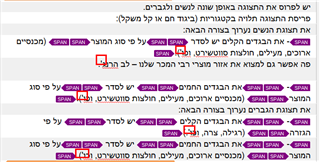
Screenshot of SDL Trados Studio Editor showing text with highlighted errors where apostrophes and dashes are replaced with ' and – codes.

Target XML (Please notice the ' and – additions)
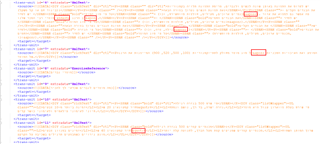
Screenshot of target XML code with multiple lines highlighted indicating the presence of ' and – codes instead of the correct apostrophe and dash characters.

Please advise how to proceed. The target XML can't be uploaded to client's platform.

Thanks

Fouad


Generated Image Alt-Text
[edited by: Trados AI at 10:00 PM (GMT 0) on 28 Feb 2024]

emoji
Parents
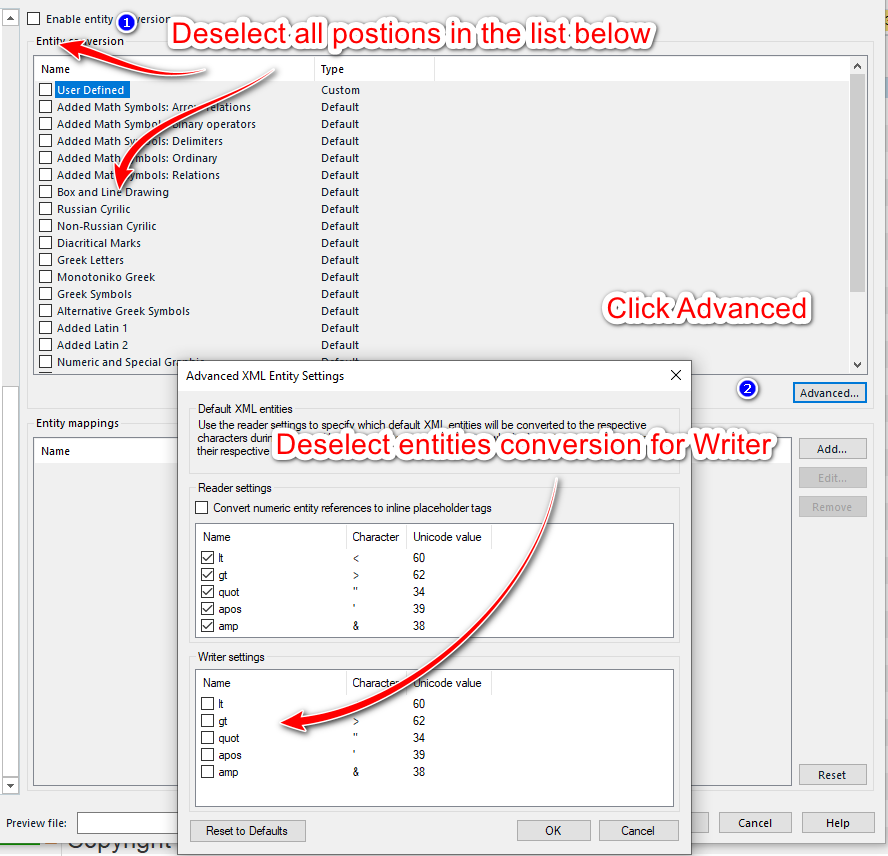
  • You need to play with the entity conversion settings in the corresponding file type to avoid & being converted to &amp; or < being converted to &lt;

    To do so, go to Project settings, File types, select the XML file type used, click Entities and switch off the entities conversion:

    Trados Studio screenshot showing the 'Advanced XML Entity Settings' dialog box with instructions to deselect all positions in the list and to click 'Advanced'.

    You need to experiment a bit with these settings, if the changes applied will not resolve the problems immediately. If you used any embedded content processors, similar actions might be also needed there.

    _________________________________________________________

    When asking for help here, please be as accurate as possible. Please always remember to give the exact version of product used and all possible error messages received. The better you describe your problem, the better help you will get.

    Want to learn more about Trados Studio? Visit the Community Hub. Have a good idea to make Trados Studio better? Publish it here.

    emoji


    Generated Image Alt-Text
    [edited by: Trados AI at 10:00 PM (GMT 0) on 28 Feb 2024]
Reply
  • You need to play with the entity conversion settings in the corresponding file type to avoid & being converted to &amp; or < being converted to &lt;

    To do so, go to Project settings, File types, select the XML file type used, click Entities and switch off the entities conversion:

    Trados Studio screenshot showing the 'Advanced XML Entity Settings' dialog box with instructions to deselect all positions in the list and to click 'Advanced'.

    You need to experiment a bit with these settings, if the changes applied will not resolve the problems immediately. If you used any embedded content processors, similar actions might be also needed there.

    _________________________________________________________

    When asking for help here, please be as accurate as possible. Please always remember to give the exact version of product used and all possible error messages received. The better you describe your problem, the better help you will get.

    Want to learn more about Trados Studio? Visit the Community Hub. Have a good idea to make Trados Studio better? Publish it here.

    emoji


    Generated Image Alt-Text
    [edited by: Trados AI at 10:00 PM (GMT 0) on 28 Feb 2024]
Children
