SDL Studio modified XML after completing translation

Dear community team,

I have some challenges with XML files that I got from the client.

I've created a specific filetype for this XML type and Studio presented all text perfectly. However, once we complete the translation and save the target XML, we see additional code in the XML, as well as a CODE for "apostrophe > '", "Dash > –".

Is there any specific settings I need to do in the filetype in order to solve this problem?

I'm using SDL Trados Studio 2017 SR1 - 14.1.10018.54792

Screenshots:

SDL Studio Editor
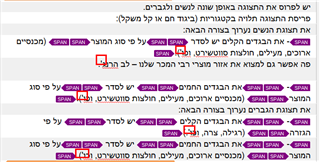
Screenshot of SDL Trados Studio Editor showing text with highlighted errors where apostrophes and dashes are replaced with ' and – codes.

Target XML (Please notice the ' and – additions)
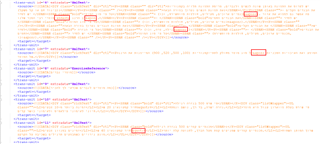
Screenshot of target XML code with multiple lines highlighted indicating the presence of ' and – codes instead of the correct apostrophe and dash characters.

Please advise how to proceed. The target XML can't be uploaded to client's platform.

Thanks

Fouad


Generated Image Alt-Text
[edited by: Trados AI at 10:00 PM (GMT 0) on 28 Feb 2024]

emoji
Parents Reply
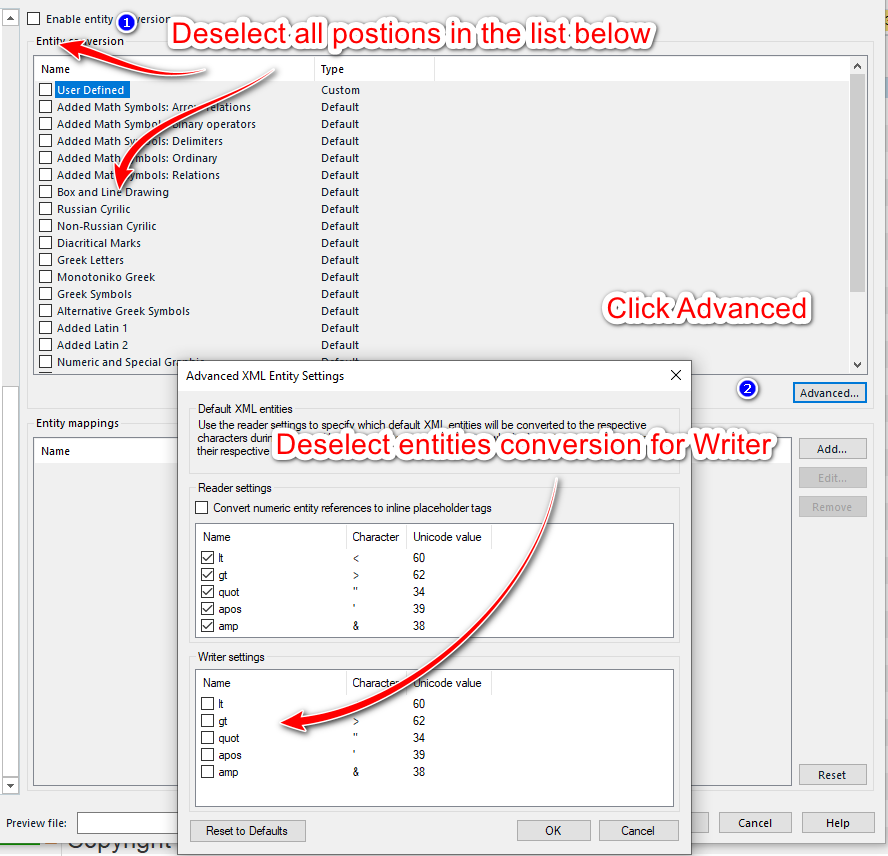
  • Please make sure, that you are changing the settings mentioned (entity conversion) within the Project settings and not via File -> Options. You MUST change this settings in the project and in the corresponding xml file type and in the embedded content processor. Only then it can take effect. I am quite certain it will change the results, as I have had a very similar case just the other day, where the change in the settings brought the desired result.

    _________________________________________________________

    When asking for help here, please be as accurate as possible. Please always remember to give the exact version of product used and all possible error messages received. The better you describe your problem, the better help you will get.

    Want to learn more about Trados Studio? Visit the Community Hub. Have a good idea to make Trados Studio better? Publish it here.

Children
No Data