The Trados cloud platform will be undergoing maintenance on Saturday, 9th May 2026 between 05:00 to 17:00 UTC. During this time, you will not be able to log in to the Trados platform.

Is there any way to exclude printer specs from extraction on an IDML file?

Hi there,

The printer specs that appear in some IDML files (pictured below with the file name blocked out) do not need to be translated but I have not been able to find a way to exclude them from extraction.

Screenshot of Trados Studio showing printer specs in an IDML file with the file name redacted.

Is there a setting in Studio 2019 to exclude these from extraction for translation? Here are my settings as they are now:
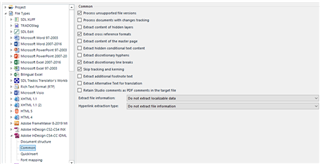
Screenshot of Trados Studio settings with options for file extraction, including 'Do not extract locked content' selected.

And here is how they appear in the XLIFF (in case it's relevant):
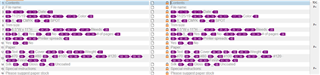
Screenshot of an XLIFF file in Trados Studio displaying segments of text with printer specs, highlighted in purple.

TIA for any insight or advice!


Generated Image Alt-Text
[edited by: Trados AI at 10:01 PM (GMT 0) on 28 Feb 2024]

emoji
Parents
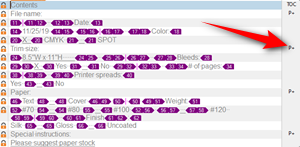
  • I'm not that knowledgeable about InDesign but I think that to prevent these from being extracted at all Studio would need to be able to identify them in some way, and have a setting in Studio to manage this.  Your screenshot shows P+:

    Screenshot of Trados Studio showing a list of contents with a red arrow pointing to a P+ symbol indicating additional information for an item.

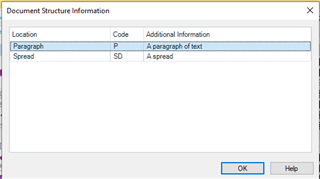
    If you click on the P+ what other information is in there?

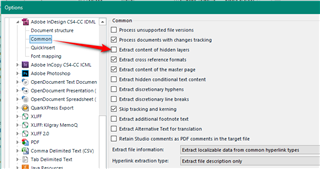
    Maybe it's possible to make this content a hidden layer in InDesign before you process the file perhaps?  Then using this option you could exclude it:

    Screenshot of Trados Studio's options menu with a red arrow pointing to the 'Extract content of hidden layers' option in the Adobe InDesign CS4-C6 section.

    I don't know how much control you have over this file, or if you have the right tools and knowledge to manipulate the source file.  But it might just be easier to do what you have done... lock them and then exclude them using the display filter.

    Paul Filkin | RWS

    Design your own training!
    You've done the courses and still need to go a little further, or still not clear? 
    Tell us what you need in our Community Solutions Hub

    emoji


    Generated Image Alt-Text
    [edited by: Trados AI at 10:02 PM (GMT 0) on 28 Feb 2024]
Reply
  • I'm not that knowledgeable about InDesign but I think that to prevent these from being extracted at all Studio would need to be able to identify them in some way, and have a setting in Studio to manage this.  Your screenshot shows P+:

    Screenshot of Trados Studio showing a list of contents with a red arrow pointing to a P+ symbol indicating additional information for an item.

    If you click on the P+ what other information is in there?

    Maybe it's possible to make this content a hidden layer in InDesign before you process the file perhaps?  Then using this option you could exclude it:

    Screenshot of Trados Studio's options menu with a red arrow pointing to the 'Extract content of hidden layers' option in the Adobe InDesign CS4-C6 section.

    I don't know how much control you have over this file, or if you have the right tools and knowledge to manipulate the source file.  But it might just be easier to do what you have done... lock them and then exclude them using the display filter.

    Paul Filkin | RWS

    Design your own training!
    You've done the courses and still need to go a little further, or still not clear? 
    Tell us what you need in our Community Solutions Hub

    emoji


    Generated Image Alt-Text
    [edited by: Trados AI at 10:02 PM (GMT 0) on 28 Feb 2024]
Children