 Translate



お世話になります。
元のファイル形式がエクセルだった場合の、「訳文の生成」について教えて下さい。
Tradosで翻訳作業中に原文を編集(ミスの訂正など)しました。
翻訳作業終了後、「訳文の生成」でエクセルファイルに変換したところ、原文の編集は反映されていませんでした。
編集した原文を反映した形で、「訳文の生成」をすることは出来ますか?

お世話になります。
元のファイル形式がエクセルだった場合の、「訳文の生成」について教えて下さい。
Tradosで翻訳作業中に原文を編集(ミスの訂正など)しました。
翻訳作業終了後、「訳文の生成」でエクセルファイルに変換したところ、原文の編集は反映されていませんでした。
編集した原文を反映した形で、「訳文の生成」をすることは出来ますか?
The way to get the source is to use File -> Advanced Save -> Save Source As:
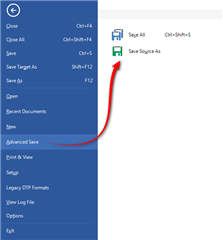
It's only available when the file is open in the Editor.
Paul Filkin | RWS
Design your own training!
You've done the courses and still need to go a little further, or still not clear?
Tell us what you need in our Community Solutions Hub

The way to get the source is to use File -> Advanced Save -> Save Source As:
It's only available when the file is open in the Editor.
Paul Filkin | RWS
Design your own training!
You've done the courses and still need to go a little further, or still not clear?
Tell us what you need in our Community Solutions Hub

ご回答ありがとうございました。
ご指摘の方法を試してみましたが、やはり編集した原文が反映されません。

Then I think you need to provide a better explanation of what you are doing. Can you tell us step by step please and maybe even provide screenshots.
Paul Filkin | RWS
Design your own training!
You've done the courses and still need to go a little further, or still not clear?
Tell us what you need in our Community Solutions Hub