The Trados cloud platform will be undergoing maintenance on Saturday, 9th May 2026 between 05:00 to 17:00 UTC. During this time, you will not be able to log in to the Trados platform.

Term recognition not working in Trados Studio 2017

Hello everyone,

I have an issue with a termbase I'm using for a project that comes in in batches. It has about 350 entries.

I created it from a glossary and, with the first two batches, it worked fine. The client sends each batch in a different project package.

The TB is in a project-specific folder on a separate hard drive.

Starting from the third batch, even though the TB is attached and the TB file is not in read-only mode, terms will not be recognized while translating segments.

Entries are visible in the termbase viewer, but won't be highlighted in the editor.

Please see the screenshot as a reference.

Screenshot of Trados Studio showing a segment being translated with a term highlighted in blue, but no term recognition in the termbase viewer on the right.

I already tried to reorganize the TB or any other suggestions found on this community, but nothing worked.

Any help is welcome.


Generated Image Alt-Text
[edited by: Trados AI at 10:18 PM (GMT 0) on 28 Feb 2024]
emoji
Parents Reply
  • Hi 

    is right, if the PM sent you the wrong language pair that would cause issues. This could happen if your language pair is one of a couple or more if the job's being translated into more than one language.

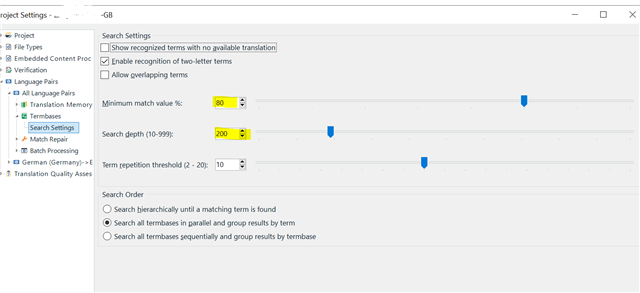
    Also, did you check that the Match Value and the Search Depth hadn't been adjusted incorrectly?:

    Screenshot of Trados Studio project settings showing Search Settings with sliders for minimum match value at 80%, search depth at 200%, and term repetition threshold at 10.

    Sorry this is a 2021 screenshot, to save me opening 2015... If the minimum match value slider had somehow been dragged up to 100% or the Depth dragged to 10, ah, and the repetition threshold dragged down to 2, it would give inconsistent results but not NO results...

    I would recommend that you try recreating the termbase. Did you use Glossary Converter for this, if so it's not a lengthy process.

    As this is an old version of Studio it could be being affected by more recent software somehow... If your Windows environment is the latest version for example.

    The answer to this would be to run a Windows Repair on all the SDL components, as follows:

    1. Close all SDL applications.
    2. Open the Control Panel:
      • Windows Vista/7Start > Control Panel > Programs > Programs and Features.
      • Windows 8: Right-click on the screen at bottom-left corner and choose Control Panel > Uninstall a Program.
      • Windows 10: Right-click on Start > Control Panel > Select View by: Small Icons > Programs and Features
      • - or type 'Control Panel' in the search line on your bottom Windows toolbar.
    3. Click/highlight the relevant SDL product from the list (e.g. SDL Trados Studio 2017 SR1) and click 'Repair' or 'Uninstall/Change' (then Yes then Repair) either on the top toolbar or on the right-click dropdown menu.
    4. Restart Studio/MultiTerm.

    This iwll take longer for Studio than for the MultiTerm - I don't recall whether MultiTerm was still just one entry in the Programs list with 2017 or whether it had become 'Desktop', Core and 'Convert' in which case you only have to do these 3 and not the 'Remove suite...' entry.

    See if that sorts things out for you...

    All the best,

    Ali Slight smile

    emoji


    Generated Image Alt-Text
    [edited by: Trados AI at 10:18 PM (GMT 0) on 28 Feb 2024]
Children