Context menu bug in SDL Studio 2021

In SDL Studio 2021 there is a problem with context menus. You are unable to select context menu options using the Enter key on keyboard. Instead you are forced to use the mouse to select an option.

For me this one of the most frequently used features and inability to use the keyboard significantly reduces efficiency.

Let me demonstrate:

Thank you!

Parents Reply
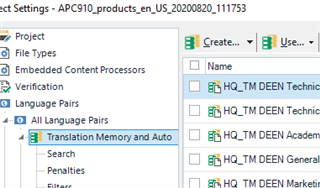
  • I have the same issue with Mariusz after updating to Studio 2021 but in a different place. If you are in the project settings (possibly even in the project template settings), just easier to show:

    Trados Studio project settings window showing Translation Memory and AutoSuggest options with 'Use' menu activated but not responding to arrow keys.

    And you press Alt+U, then the Use menu opens but you can't use the arrow keys to e.g. select DeepL or any of the other options. You have to use the mouse. I noticed this as a result of my autohotkey script that I run for all new projects to add DeepL. Since I've reverted back to TS 2019, it works again; therefore, I don't think it's a computer-related problem.

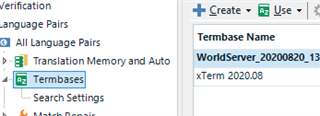
    Alt+U also affected here:

    Trados Studio verification settings window with 'Use' menu open next to TermBase options, not allowing arrow key navigation.

    emoji


    Generated Image Alt-Text
    [edited by: Trados AI at 10:58 PM (GMT 0) on 28 Feb 2024]
Children