Translate



I'm used to working with other CAT tools, but I'm currently working in an institution that uses Trados Studio. I've just come across some behaviour that I find astonishing, and I'm wondering if there's something wrong with my settings, as I'm pretty sure it can't be by design.
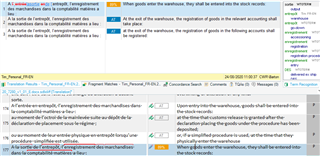
In the screenshot, row 177 is a fuzzy match with row 174. Trados has inserted my translation of row 174, but what it has inserted, and what appears in the TM hits, is the first translation I did, before I made some changes. I assumed that when I edit a row, Trados would overwrite the original version (as occurs in other CAT tools). But it doesn't. In fact, it doesn't even write my new translation. Only my first draft is stored in the TM. Fortunately this occurred where two rows appear close together, but if this happened elsewhere, where the two rows are not so close together, I might have inconsistencies in my text.
Is this behaviour normal? Anyone know how to prevent it?
Generated Image Alt-Text
[edited by: Trados AI at 12:49 AM (GMT 0) on 29 Feb 2024]