Translation segments not overwritten?

I'm used to working with other CAT tools, but I'm currently working in an institution that uses Trados Studio. I've just come across some behaviour that I find astonishing, and I'm wondering if there's something wrong with my settings, as I'm pretty sure it can't be by design.

In the screenshot, row 177 is a fuzzy match with row 174. Trados has inserted my translation of row 174, but what it has inserted, and what appears in the TM hits, is the first translation I did, before I made some changes. I assumed that when I edit a row, Trados would overwrite the original version (as occurs in other CAT tools). But it doesn't. In fact, it doesn't even write my new translation. Only my first draft is stored in the TM. Fortunately this occurred where two rows appear close together, but if this happened elsewhere, where the two rows are not so close together, I might have inconsistencies in my text.

Is this behaviour normal? Anyone know how to prevent it?
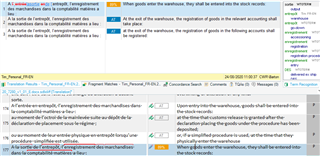
Screenshot of Trados Studio showing row 177 as a fuzzy match with row 174. The translation memory (TM) hits display the initial translation instead of the edited version.


Generated Image Alt-Text
[edited by: Trados AI at 12:49 AM (GMT 0) on 29 Feb 2024]

emoji
Parents
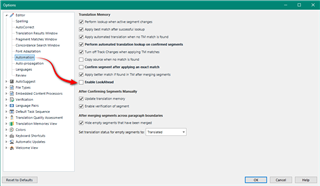
  • This might be elated to the use of lookahead which caches three segments ahead to make the lookup faster... especially when working with machine translation.  The downside of this approach is that even though you changed the entry you will still see the cached result when the segments are so close to each other.

    Try turning off lookahead and see if this results in the same behaviour for you:

    Trados Studio options menu with 'Lookahead' feature highlighted and an arrow pointing to the checkbox to turn it off.

    Paul Filkin | RWS

    Design your own training!
    You've done the courses and still need to go a little further, or still not clear? 
    Tell us what you need in our Community Solutions Hub

    emoji


    Generated Image Alt-Text
    [edited by: Trados AI at 12:49 AM (GMT 0) on 29 Feb 2024]
  • Thanks. That was the problem. Perhaps a warning message could be given when this option is activated? It's pretty dangerous if you're unaware of the behaviour. I've also been reading that you should only use it if the translation will be completed in one session. My current text is 6,000 words long, meaning I can't possibly finish in one session. Does this mean the organization will be re-charged every time I open the file? Why not limit LookAhead to the next 10 segments? That way, people don't get charged multiple times. It's nice having TM hits appear immediately, but not if, every time it does, I have to double-check that it's not a segment I've made changes to.

  • I've also been reading that you should only use it if the translation will be completed in one session.

    Where did you read that?  News to me.

    Does this mean the organization will be re-charged every time I open the file?

    Charged for what?

    Why not limit LookAhead to the next 10 segments?

    It's already limited to the next three segments if we made it ten it would be slower and defeat the purpose, and it would undoubtedly be more problematic for more users.

    This feature could definitely be improved... no arguments from me here.  But I don't really follow what you mean in this case.

    Paul Filkin | RWS

    Design your own training!
    You've done the courses and still need to go a little further, or still not clear? 
    Tell us what you need in our Community Solutions Hub

  • I've also been reading that you should only use it if the translation will be completed in one session.

    Where did you read that?  News to me.

    Here: docs.sdl.com/.../lookahead-and-the-mt-quota

    The warning about completing the translation in a single session made me assume the LookAhead operated on the entire document. If it only does three rows, that seems sensible, and I should always be able to detect any issues like the one I encountered. I'm therefore mystified as to why your site recommends translating the entire document in one session, as we're only ever going to get charged twice for three rows.

    In any case, my organization uses its own MT engine, so is not being charged anything. I'd originally misunderstood and thought that it was the actual use of Lookahead that was being charged for, not the resulting MT.

  • I see what you mean now... although you may have taken it slightly in the wrong way.  The advice is simply meant to ensure you don't spend time going over the same document more than once since some MT engines (if you're using MT) charge by the word, or use up free quotas, every time you enter a segment irrespective of whether it's been translated or not.

    Worth noting however that there are things you can do to ensure this doesn't happen even if you are working with machine translation:

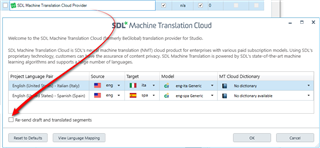
    1. use the SDL MT Cloud plugin as opposed to the out of the box SDL Language Cloud
      Screenshot of SDL Machine Translation Cloud settings with a red arrow pointing to the 'Project Languages' section, highlighting the source and target language options.

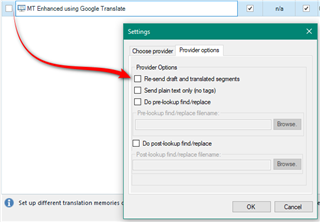
    2. use a 3rd party MT Provider that has an option not to resend the segments:
      Screenshot of MT Enhanced using Google Translate settings with a red arrow pointing to the 'Provider options' section, specifically highlighting the 'Re-send draft and translated segments' checkbox.

    3. use a 3rd party MT provider that offers a flat fee

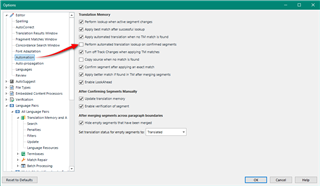
    4. turn off the option to apply MT to confirmed segments.  Not as effective as the first two since these will also apply to draft segments, but still useful:
      Screenshot of Trados Studio options menu with a red arrow pointing to the 'Translation Memory' settings, highlighting various options for segment translation.

    5. use your own MT... which you do :-)

    I'd also clarify that the way lookahead works is if you start from the top it does this:

    1. segment #1: returns three segments and caches them
    2. segment#2: returns one more segment as you already have the next two cached

    So it basically just stays ahead of you, so it's not as bad as multiplying up the file by three.

    Paul Filkin | RWS

    Design your own training!
    You've done the courses and still need to go a little further, or still not clear? 
    Tell us what you need in our Community Solutions Hub

    emoji


    Generated Image Alt-Text
    [edited by: Trados AI at 12:49 AM (GMT 0) on 29 Feb 2024]
Reply
  • I see what you mean now... although you may have taken it slightly in the wrong way.  The advice is simply meant to ensure you don't spend time going over the same document more than once since some MT engines (if you're using MT) charge by the word, or use up free quotas, every time you enter a segment irrespective of whether it's been translated or not.

    Worth noting however that there are things you can do to ensure this doesn't happen even if you are working with machine translation:

    1. use the SDL MT Cloud plugin as opposed to the out of the box SDL Language Cloud
      Screenshot of SDL Machine Translation Cloud settings with a red arrow pointing to the 'Project Languages' section, highlighting the source and target language options.

    2. use a 3rd party MT Provider that has an option not to resend the segments:
      Screenshot of MT Enhanced using Google Translate settings with a red arrow pointing to the 'Provider options' section, specifically highlighting the 'Re-send draft and translated segments' checkbox.

    3. use a 3rd party MT provider that offers a flat fee

    4. turn off the option to apply MT to confirmed segments.  Not as effective as the first two since these will also apply to draft segments, but still useful:
      Screenshot of Trados Studio options menu with a red arrow pointing to the 'Translation Memory' settings, highlighting various options for segment translation.

    5. use your own MT... which you do :-)

    I'd also clarify that the way lookahead works is if you start from the top it does this:

    1. segment #1: returns three segments and caches them
    2. segment#2: returns one more segment as you already have the next two cached

    So it basically just stays ahead of you, so it's not as bad as multiplying up the file by three.

    Paul Filkin | RWS

    Design your own training!
    You've done the courses and still need to go a little further, or still not clear? 
    Tell us what you need in our Community Solutions Hub

    emoji


    Generated Image Alt-Text
    [edited by: Trados AI at 12:49 AM (GMT 0) on 29 Feb 2024]

Children
No Data