


The "50-74%" in your Analysis is actually "70-74%" by default

By default, the "Minimum match value" setting is set to 70 as shown below.
I'm not sure if many people realize this, but when this is set to 70 and you run "Analyze Files", the word count shown under "50-74%" is actually "70-74%".
The "50-69%" matches actually get counted as New. I believe this behavior is true for all versions of Trados Studio.
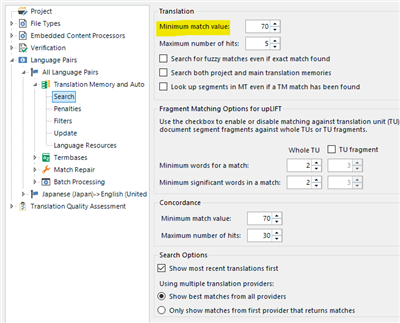
Screenshot of Trados Studio settings showing 'Minimum match value' set to 70 under Translation section.

<My Conclusion>
1. In order for the analysis to be correct, I think SDL should change the behavior so that the analysis is not affected by the "Minimum match value". "50-74%" should show the word count for matches between 50 to 74% as expected.
2. I believe the "Minimum match value" is set to 70 by default to ignore poor matches while you are translating and also to speed up retrieving the results.

I am open for discussion, but would be great to hear what other people think of this problem.


Generated Image Alt-Text
[edited by: Trados AI at 10:28 PM (GMT 0) on 28 Feb 2024]

emoji
Parents Reply
  • ... although while I was writing up the steps to reproduce this I started to have second thoughts :-)

    The analysis is designed to show you the effort required to translate the file based on what will be made available to you in the TM.  So on this basis what is the point in having an analysis that shows you what you could get if you lowered the minimum match value when you work?  If you want to do that then lower the value before you run the analysis.

    I actually think it's working as it should and it also makes sense.

    What do you think?

    Paul Filkin | RWS Group

    ________________________
    Design your own training!

    You've done the courses and still need to go a little further, or still not clear? 
    Tell us what you need in our Community Solutions Hub

Children