


The "50-74%" in your Analysis is actually "70-74%" by default

By default, the "Minimum match value" setting is set to 70 as shown below.
I'm not sure if many people realize this, but when this is set to 70 and you run "Analyze Files", the word count shown under "50-74%" is actually "70-74%".
The "50-69%" matches actually get counted as New. I believe this behavior is true for all versions of Trados Studio.
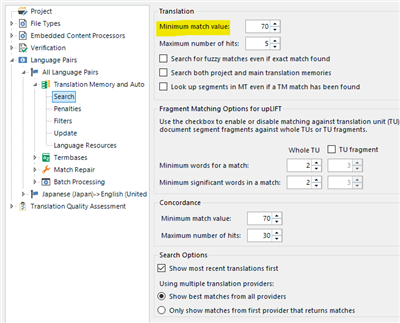
Screenshot of Trados Studio settings showing 'Minimum match value' set to 70 under Translation section.

<My Conclusion>
1. In order for the analysis to be correct, I think SDL should change the behavior so that the analysis is not affected by the "Minimum match value". "50-74%" should show the word count for matches between 50 to 74% as expected.
2. I believe the "Minimum match value" is set to 70 by default to ignore poor matches while you are translating and also to speed up retrieving the results.

I am open for discussion, but would be great to hear what other people think of this problem.


Generated Image Alt-Text
[edited by: Trados AI at 10:28 PM (GMT 0) on 28 Feb 2024]

emoji
Parents Reply
  • If you create your translation quotes based on the analysis, you would be billing the client for "50-69%" matches at the same rate as "New"...

    I would never allow matches lower than 75% to be weighted in any way. Since I know CAT tools, 75% was the lowest value for weighing. Even in times of Trados 3 to Trados 2007, when a 30% match could be similar to what we now have in partial matches, I always charged 100% for matches lower than 75%. This has changed nowadays, so that I try to get fully paid for matches up to 84%. This reflects the real amount of work needed to adapt such low matches.

    So from my point of view there is no difference Slight smile

    _________________________________________________________

    When asking for help here, please be as accurate as possible. Please always remember to give the exact version of product used and all possible error messages received. The better you describe your problem, the better help you will get.

    Want to learn more about Trados Studio? Visit the Community Hub. Have a good idea to make Trados Studio better? Publish it here.

Children