 Translate



Hi,
I just realized once more that export for bilingual review is not working with my Trados 2019. I always get the "Could not find part of the path" error. As a result, the usual folder is created but it is empty.
Can someone help me?
Thanks!
Chris

Hi,
I just realized once more that export for bilingual review is not working with my Trados 2019. I always get the "Could not find part of the path" error. As a result, the usual folder is created but it is empty.
Can someone help me?
Thanks!
Chris


Hello Paul,
thank you for your reply. Unfortunately the error window doesn't appear, it looks like this: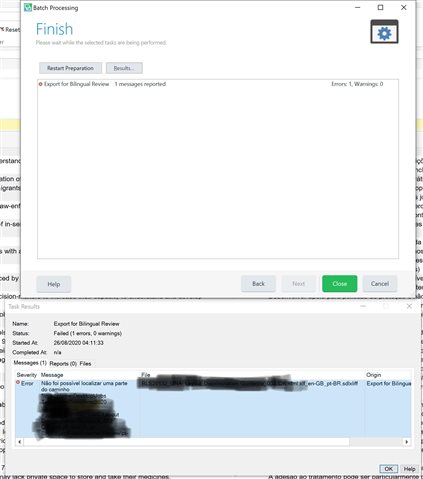

Your screenshot almost helps but you obscured the information that might clarify the issue. Are you using an external drive or network for your projects? It looks like you might be. If this is the case please try again but put your projects on your local machine and see if the same problem occurs.
Paul Filkin | RWS
Design your own training!
You've done the courses and still need to go a little further, or still not clear?
Tell us what you need in our Community Solutions Hub
Dear Paul,
I found the xml file you asked for. Please find it attached.
I am working on my local machine but with Parallels Desktop on a Mac. But it's been years I'm working with this and I never had a problem before...do you have an idea?
Thanks!
<SDLErrorDetails time="26/08/2020 06:56:24">
<ErrorMessage>Não foi possível localizar uma parte do caminho '\\mac\Home\Desktop\Jobs Temporary\Trabalhos 2020\Oneliner\03 de agosto\BLS20132_UNA_Layout Discrimination Guidance_003 OK.idml.xlf_en-GB_pt-BR.ProjectFiles\External Review\pt-BR\BLS20132_UNA_Layout Discrimination Guidance_003 OK.idml.xlf_en-GB_pt-BR.review.docx'.</ErrorMessage>
<Exception>
<Type>System.IO.DirectoryNotFoundException, mscorlib, Version=4.0.0.0, Culture=neutral, PublicKeyToken=b77a5c561934e089</Type>
<HelpLink />
<Source>mscorlib</Source>
<HResult>-2147024893</HResult>
<StackTrace><
em Sdl.FileTypeSupport.Bilingual.SdlXliff.SdlXliffFeeder.ContinueScanning()
em Sdl.FileTypeSupport.Bilingual.SdlXliff.XliffFileReader.ContinueParsing()
em Sdl.FileTypeSupport.Bilingual.SdlXliff.XliffFileReader.ParseNext()
em Sdl.FileTypeSupport.Framework.Integration.FileExtractor.ParseNext()
em Sdl.FileTypeSupport.Framework.Integration.MultiFileConverter.ParseNext()
em Sdl.FileTypeSupport.Framework.Integration.MultiFileConverter.Parse()
em Sdl.ProjectApi.Implementation.TaskExecution.ContentProcessingTaskImplementation.TaskFileExecuter.Parse(String targetFilePath)]]></StackTrace>
</Exception>
<Environment>
<ProductName>SDL Trados Studio</ProductName>
<ProductVersion>15.0.0.0</ProductVersion>
<EntryAssemblyFileVersion>15.1.0.44109</EntryAssemblyFileVersion>
<OperatingSystem>Microsoft Windows 10 Pro</OperatingSystem>
<ServicePack>NULL</ServicePack>
<OperatingSystemLanguage>1046</OperatingSystemLanguage>
<CodePage>1252</CodePage>
<LoggedOnUser>CHRISTINAMA191B\christinamaria</LoggedOnUser>
<DotNetFrameWork>4.0.30319.42000</DotNetFrameWork>
<ComputerName>CHRISTINAMA191B</ComputerName>
<ConnectedToNetwork>True</ConnectedToNetwork>
<PhysicalMemory>8365396 MB</PhysicalMemory>
</Environment>
</SDLErrorDetails>
Dear Paul,
I found the xml file you asked for. Please find it attached.
I am working on my local machine but with Parallels Desktop on a Mac. But it's been years I'm working with this and I never had a problem before...do you have an idea?
Thanks!
<SDLErrorDetails time="26/08/2020 06:56:24">
<ErrorMessage>Não foi possível localizar uma parte do caminho '\\mac\Home\Desktop\Jobs Temporary\Trabalhos 2020\Oneliner\03 de agosto\BLS20132_UNA_Layout Discrimination Guidance_003 OK.idml.xlf_en-GB_pt-BR.ProjectFiles\External Review\pt-BR\BLS20132_UNA_Layout Discrimination Guidance_003 OK.idml.xlf_en-GB_pt-BR.review.docx'.</ErrorMessage>
<Exception>
<Type>System.IO.DirectoryNotFoundException, mscorlib, Version=4.0.0.0, Culture=neutral, PublicKeyToken=b77a5c561934e089</Type>
<HelpLink />
<Source>mscorlib</Source>
<HResult>-2147024893</HResult>
<StackTrace><
em Sdl.FileTypeSupport.Bilingual.SdlXliff.SdlXliffFeeder.ContinueScanning()
em Sdl.FileTypeSupport.Bilingual.SdlXliff.XliffFileReader.ContinueParsing()
em Sdl.FileTypeSupport.Bilingual.SdlXliff.XliffFileReader.ParseNext()
em Sdl.FileTypeSupport.Framework.Integration.FileExtractor.ParseNext()
em Sdl.FileTypeSupport.Framework.Integration.MultiFileConverter.ParseNext()
em Sdl.FileTypeSupport.Framework.Integration.MultiFileConverter.Parse()
em Sdl.ProjectApi.Implementation.TaskExecution.ContentProcessingTaskImplementation.TaskFileExecuter.Parse(String targetFilePath)]]></StackTrace>
</Exception>
<Environment>
<ProductName>SDL Trados Studio</ProductName>
<ProductVersion>15.0.0.0</ProductVersion>
<EntryAssemblyFileVersion>15.1.0.44109</EntryAssemblyFileVersion>
<OperatingSystem>Microsoft Windows 10 Pro</OperatingSystem>
<ServicePack>NULL</ServicePack>
<OperatingSystemLanguage>1046</OperatingSystemLanguage>
<CodePage>1252</CodePage>
<LoggedOnUser>CHRISTINAMA191B\christinamaria</LoggedOnUser>
<DotNetFrameWork>4.0.30319.42000</DotNetFrameWork>
<ComputerName>CHRISTINAMA191B</ComputerName>
<ConnectedToNetwork>True</ConnectedToNetwork>
<PhysicalMemory>8365396 MB</PhysicalMemory>
</Environment>
</SDLErrorDetails>
Thanks Christina Maria Müller
I think the first thing to do is make sure you are up to date, as you are not. You should have these builds:
SDL Trados Studio 2019 SR2 - 15.2.7.2849
SDL MultiTerm 2019 - 15.0.6.56482
The autoupdate should help you with this but if you can't manage that then you can find the latest builds here (scroll to the bottom):
https://gateway.rws.com/csm?id=kb_article_view&sysparm_article=KB0027380
https://gateway.rws.com/csm?id=kb_article_view&sysparm_article=KB0027380
Paul Filkin | RWS
Design your own training!
You've done the courses and still need to go a little further, or still not clear?
Tell us what you need in our Community Solutions Hub
Thank you, Paul, I'm going to do that first thing and get back to you!
Hi Paul,
so I updated Studio and MultiTerm but the error is still there...
<SDLErrorDetails time="26/08/2020 07:17:57">
<ErrorMessage>Não foi possível localizar uma parte do caminho '\\mac\Home\Desktop\Jobs Temporary\Trabalhos 2020\Oneliner\03 de agosto\BLS20132_UNA_Layout Discrimination Guidance_003 OK.idml.xlf_en-GB_pt-BR.ProjectFiles\External Review\pt-BR\BLS20132_UNA_Layout Discrimination Guidance_003 OK.idml.xlf_en-GB_pt-BR.review.docx'.</ErrorMessage>
<Exception>
<Type>System.IO.DirectoryNotFoundException, mscorlib, Version=4.0.0.0, Culture=neutral, PublicKeyToken=b77a5c561934e089</Type>
<HelpLink />
<Source>mscorlib</Source>
<HResult>-2147024893</HResult>
<StackTrace><
em Sdl.FileTypeSupport.Bilingual.SdlXliff.SdlXliffFeeder.ContinueScanning()
em Sdl.FileTypeSupport.Bilingual.SdlXliff.XliffFileReader.ContinueParsing()
em Sdl.FileTypeSupport.Bilingual.SdlXliff.XliffFileReader.ParseNext()
em Sdl.FileTypeSupport.Framework.Integration.FileExtractor.ParseNext()
em Sdl.FileTypeSupport.Framework.Integration.MultiFileConverter.ParseNext()
em Sdl.FileTypeSupport.Framework.Integration.MultiFileConverter.Parse()
em Sdl.ProjectApi.Implementation.TaskExecution.ContentProcessingTaskImplementation.TaskFileExecuter.Parse(String targetFilePath)]]></StackTrace>
</Exception>
<Environment>
<ProductName>SDL Trados Studio</ProductName>
<ProductVersion>15.0.0.0</ProductVersion>
<EntryAssemblyFileVersion>15.2.7.2849</EntryAssemblyFileVersion>
<OperatingSystem>Microsoft Windows 10 Pro</OperatingSystem>
<ServicePack>NULL</ServicePack>
<OperatingSystemLanguage>1046</OperatingSystemLanguage>
<CodePage>1252</CodePage>
<LoggedOnUser>CHRISTINAMA191B\christinamaria</LoggedOnUser>
<DotNetFrameWork>4.0.30319.42000</DotNetFrameWork>
<ComputerName>CHRISTINAMA191B</ComputerName>
<ConnectedToNetwork>True</ConnectedToNetwork>
<PhysicalMemory>8365396 MB</PhysicalMemory>
</Environment>
</SDLErrorDetails>
That was fast...
So, let's look at where the projects are. Please can you make sure you are storing the projects on the windows partition and not on the MAC. I'm not familiar with the way this should look in a MAC but this is the place I'd start if a path cannot be found.
Paul Filkin | RWS
Design your own training!
You've done the courses and still need to go a little further, or still not clear?
Tell us what you need in our Community Solutions Hub
;-)
Great, yes it is definitely on the Windows partition.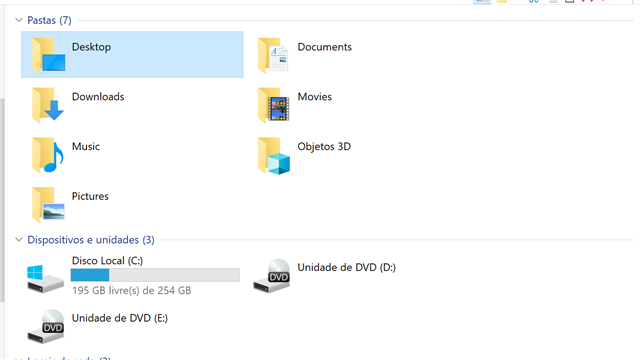

Can you try to recreate the project, and immediately export for Bilingual review? Does this work?
Paul Filkin | RWS
Design your own training!
You've done the courses and still need to go a little further, or still not clear?
Tell us what you need in our Community Solutions Hub
Hi Paul,
I recreated the project and also tried with a totally different one. The export for bilingual review for the second file worked just fine. The problem still exists for the current one. Maybe it has something to do with the fact that I extracted the file from XTM?
Thanks!
I think it's likely that something has happened to the temp files Studio uses between the time you created the project and then got around to exporting for bilingual review. This can happen, if you leave Studio open for long periods at a time, or overnight even, then this increases the chances of your security software (anti-virus for example) "cleaning up" the files Studio needs.
I doubt we'll find out for sure, but this seems the likely reason, or in that area anyway. So the only solution will be to do what you have done this time and recreate the project.
Paul Filkin | RWS
Design your own training!
You've done the courses and still need to go a little further, or still not clear?
Tell us what you need in our Community Solutions Hub
I think that might very well be the problem and I'm happy that it continues to work for all other projects. Thank you for your help and support, Paul!