The Trados cloud platform will be undergoing maintenance on Saturday, 9th May 2026 between 05:00 to 17:00 UTC. During this time, you will not be able to log in to the Trados platform.

Dependency file not found - can't find a solution :(

I know this has been covered a million times but I can't seem to resolve my issue. My client sent me a package with two files to translate (and a TM). I opened it with Trados just minutes after downloading the package (my PC had not had a change to 'sleep' and/or delete any temp. files - as I understand it) but straight away, I see the 'dependency file not found error' for this package. I have tried to open the individual files separately and translate as individual documents but the same error comes up. The files are quite large but I simply cannot find a solution. 

I have had this issue before and clicked 'navigate to file', found the relevant file but then my client wasn't happy because it wouldn't update at her end. I'm worried about doing it again - I don't want another upset client!!

PLEASE HELP!

Parents
  • The files are quite large but I simply cannot find a solution. 

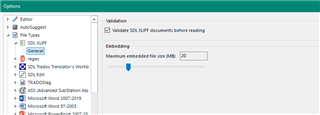
    This is most likely the problem, and there is nothing you can do about it unless your client prepares the package with the source file embedded into the sdlxliff, or attaches it for you.  It relates to this setting:

    Trados Studio settings window showing the 'Embedding' section with 'Maximum embedded file size MB' set to 20.

    So if the source file exceeds 20 MB, or whatever value your client used, then the source will not be included.  You can still translate the file and create the return package so there isn't really a problem, you just can't generate the target file.  Your client will be able to.

    Paul Filkin | RWS

    Design your own training!
    You've done the courses and still need to go a little further, or still not clear? 
    Tell us what you need in our Community Solutions Hub

    emoji


    Generated Image Alt-Text
    [edited by: Trados AI at 10:37 PM (GMT 0) on 28 Feb 2024]
  • Hi Paul,

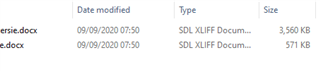
    Thanks for your prompt response, I have increased the setting you mention to 100MB as I saw this on another thread, when I had the same issue. The xliff files they have sent are not massive:

    File explorer showing two SDL XLIFF documents, one named 'serie.docx' with a size of 3,560 KB and another unnamed with a size of 571 KB, both last modified on 09092020 at 07:50.

    They should just open shouldn't they? 

    I have just opened one of the two files they sent (individually) and translated a few sentences. It seemed to work ok but then I get an error when I use the 'finalizing' feature, which refers back to the same issue - the dependency file.

    How should I proceed if I use the package, should I just click 'no' to 'navigate to source file'? Will that 100% let me translate and save the file to deliver to the client? She got really mad when this error occurred last time and I don't want to upest her again Slight smile 

    Thanks.

    emoji


    Generated Image Alt-Text
    [edited by: Trados AI at 10:37 PM (GMT 0) on 28 Feb 2024]
Reply
  • Hi Paul,

    Thanks for your prompt response, I have increased the setting you mention to 100MB as I saw this on another thread, when I had the same issue. The xliff files they have sent are not massive:

    File explorer showing two SDL XLIFF documents, one named 'serie.docx' with a size of 3,560 KB and another unnamed with a size of 571 KB, both last modified on 09092020 at 07:50.

    They should just open shouldn't they? 

    I have just opened one of the two files they sent (individually) and translated a few sentences. It seemed to work ok but then I get an error when I use the 'finalizing' feature, which refers back to the same issue - the dependency file.

    How should I proceed if I use the package, should I just click 'no' to 'navigate to source file'? Will that 100% let me translate and save the file to deliver to the client? She got really mad when this error occurred last time and I don't want to upest her again Slight smile 

    Thanks.

    emoji


    Generated Image Alt-Text
    [edited by: Trados AI at 10:37 PM (GMT 0) on 28 Feb 2024]
Children