The Trados cloud platform will be undergoing maintenance on Saturday, 9th May 2026 between 05:00 to 17:00 UTC. During this time, you will not be able to log in to the Trados platform.

Excel number cells turn to #REF! or #VALUE!

When I translate an excel file with SDL Studio, and Save Target As, the excell file now has many number cells turn to #REF! or #VALUE! instead of the actual number. Thousands of such cells, so impossible to correct manually. What do I do?!!!

Help, please.

Vytautas

Parents Reply
  • ok - I think this explains the problem.  Metinis atlyginimas and Annual remuneration are the names of Worksheets in your Workbook.  You probably translated them so the names in the forumula don't exist anymore.

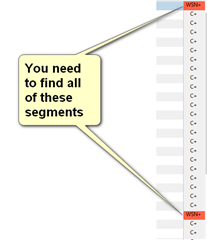
    The easiest solution to fix this is to filter on all the segments that are Worksheet names and copy source to target.  Then save the target file.  To do that:

    A yellow sticky note pointing to multiple segments labeled 'WSN-' in Trados Studio, indicating the need to find all these segments.

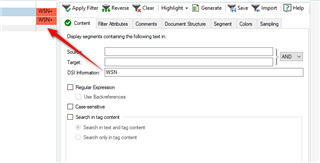
    Use the Advanced Display Filter if yo have 2021, or the Community Advanced Display Filter if you have 2019:

    Trados Studio Advanced Display Filter dialog box with 'WSN' entered in the text field, showing how to filter segments containing specific text.

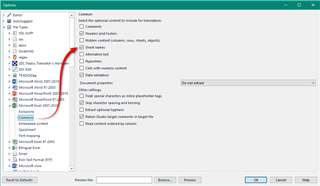
    Probably a good idea to uncheck this box when you translate Excel Workbooks that make use of formulae like this.  So always ask that question or inspect the files before you start:

    Trados Studio Options menu with 'Translate numbers, dates, details' unchecked, suggesting to disable this option when translating Excel Workbooks with formulas.

    Paul Filkin | RWS

    Design your own training!
    You've done the courses and still need to go a little further, or still not clear? 
    Tell us what you need in our Community Solutions Hub

    emoji


    Generated Image Alt-Text
    [edited by: Trados AI at 10:43 PM (GMT 0) on 28 Feb 2024]
Children