The Trados cloud platform will be undergoing maintenance on Saturday, 9th May 2026 between 05:00 to 17:00 UTC. During this time, you will not be able to log in to the Trados platform.

Excel number cells turn to #REF! or #VALUE!

When I translate an excel file with SDL Studio, and Save Target As, the excell file now has many number cells turn to #REF! or #VALUE! instead of the actual number. Thousands of such cells, so impossible to correct manually. What do I do?!!!

Help, please.

Vytautas

Parents Reply
  • That depends on the clients instructions.  They may have a workbook where the sheetnames need to be translated.  In this case you need to ask the right questions to make them aware of the implications... and also ensure you get paid for the time to resolve it if they also want you to make sure any formulae using sheet names still work.

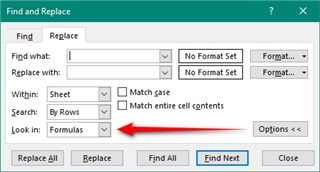
    You can do this in Excel using this option in the search and replace for example:

    Excel's Find and Replace dialog box with options to find and replace text within a sheet, specifically in formulas, as indicated by a red arrow pointing to the 'Look in: Formulas' option.

    But if you do this you are taking on the responsibility of making sure the spreadsheet still functions correctly.  I wouldn't do that unless specifically asked.

    Paul Filkin | RWS

    Design your own training!
    You've done the courses and still need to go a little further, or still not clear? 
    Tell us what you need in our Community Solutions Hub

    emoji


    Generated Image Alt-Text
    [edited by: Trados AI at 10:43 PM (GMT 0) on 28 Feb 2024]
Children