Any Support available?

I was redirected from contact form to here.

Nothing works on your platform. I am totally unsatisfied with your product.
I tried deinstalling the product and installing it again and it had saved all previous settings. It was of no use.
I read that there is a standalone installation called Freshstart. Tried that one also. And it doesn't work either. After restoring the files, everything is back as it was.
Your product has lost me much more time in figuring out how to fix my problems than it has helped me in translation.
Current issue - AnyTM doesn't work at all. Supposedly I have to be able to translate files in both directions. I have translated a BG-EN file and when I added an English file to the project - nothing happens. It doesn't create another reversed memory file. Google API gives me results in English, instead of in Bulgarian.
I would like to delete everything and install it anew without any bugs present. Is there any way except complete PC reinstallation?

Parents
  • Hi Inna,

    If I'm reading your post correctly, you're adding your English file to a BG-EN project, and that's the reason it's not working as you expect it to, but it's working the way it's supposed to, as the project language combination and direction determine how your resources will be used. If this is the case, what you need to do is create a new project with the right language direction, EN-BG, and add your file there. Then, to use a BG-EN translation memory in the reverse direction, add it to your project via AnyTM.

  • Thank you, Nora. You've actually helped me a lot. Sorry I accidentally hit "reject answer". I am really sorry.
    As far as reading first - I usually do, but as recently I became a mother I don't have the time to find my way through the ocean of info about this product  (500 pages - come on!!!). Too much links, too complicated schemes. Keep it nice, simple and easy and everybody will be happy. Where actually can I read about this - because I have 2 user manuals, but there is no info in them both about this?

  • It's a bit old, but perhaps this article will help a bit:

    https://multifarious.filkin.com/2014/02/12/supertm/

    The app isn't a separate plugin anymore so ignore that part... but the features are the same.

    Paul Filkin | RWS

    Design your own training!
    You've done the courses and still need to go a little further, or still not clear? 
    Tell us what you need in our Community Solutions Hub

  • Keep it simple, this is a good way to start.

    Before you try to work with Studio, create a folder structure first. Do this NOT on the drive c:\, do not use the folder Documents. Create an extra partition on your HDD (easy with Windows 10, takes 5 minutes). I will refer to this with D:\ later.

    Create an extra folder for your translation memories. Sort those by language pair (and then maybe by customer). Example

    D:\TMs\EN-PT\Customer 1
    D:\TMs\EN-PT\Customer 2
    ...

    Another folder for TBs (these are multilingual and multidirectional, so don't need to be separated by language pairs)
    D:\TBs\Customer 1
    D:\TBs\Customer 2
    ...

    Now create another folder for jobs by customer

    D:\Jobs\Customer 1
    D:\Jobs\Customer 2
    D:\Jobs\Customer 3

    Place the resources accordingly. Store your translation files in the specified folders.

    I assume, you will take the single file approach, as it seems to be easier. This is not the case, if you work for many customers, but for the start it will suffice. It is also a good way of working, if you have just one or two language pairs.

    In Studio, go to File -> Options -> Editor -> Languages and chose the language pair, which is the most common for you. This way Studio will suggest you to translate in this language pair, when you start to translate a single file.

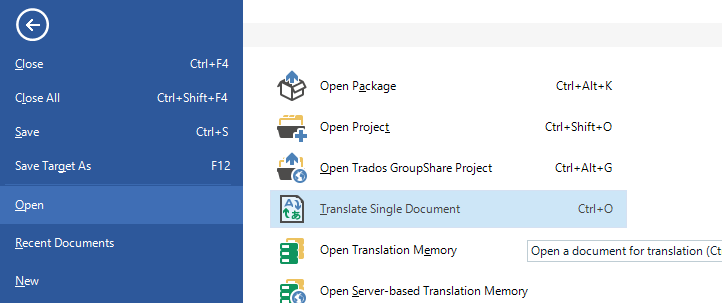
    Please DO NOT use the drag&drop option, but go to File -> Open -> Translate single document (the default shortcut is CTRL+SHIFT+O):

    Trados Studio menu with 'Translate Single Document' option highlighted, showing the shortcut Ctrl+O.

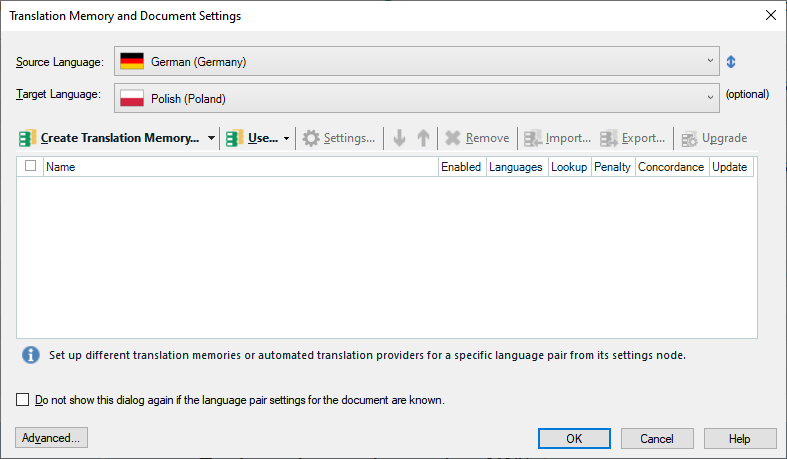
    You will see a window to navigate to your file. After having found the file press Open. You will see this:

    Translation Memory and Document Settings window in Trados Studio with options to create and select translation memories for German to Polish language pair.

    Please select here the TM (or TMs) you want to use for this language pair. Then press advanced and select a termbase (some termbases) (optional). Make sure, that when selecting multiple TMs only a SINGLE ONE has a check mark in the column "Update". Also make sure, that there is ONE checkmark there. If you miss that, no translations will be stored in your TM(s).

    When you then press OK, your file will open for translation. First step: press CTRL+S to save this file. Do not change any paths, just press CTRL+S and OK. This will store your translation file and the project file in the same folder, where the source file was. This will help you to maintain order in your PC.

    When the file has been stored, your translation project is ready to go. Translate the file, confirming segments.

    When you're done use File -> Save Target As. Chose another file name or another file location. Your translated file is ready.

    For the start this should suffice.

    On a side note: with or without child the process is the same and needs patience. And most of all it needs a systematical approach. Do not create chaos. If some steps don't work, start again, but do not repeat the same mistakes again and again. This is the most common error in the beginning.

    _________________________________________________________

    When asking for help here, please be as accurate as possible. Please always remember to give the exact version of product used and all possible error messages received. The better you describe your problem, the better help you will get.

    Want to learn more about Trados Studio? Visit the Community Hub. Have a good idea to make Trados Studio better? Publish it here.

    emoji


    Generated Image Alt-Text
    [edited by: Trados AI at 11:08 PM (GMT 0) on 28 Feb 2024]
  • What is your reason for not storing all of Studio's files (TMs, Projects, TBs) on the C drive under Documents?

    Danie

  • I do not store ANYTHING work-related there. If you look at my age, you might note, that I have been working with Windows since Win3.1 And this means, anything on C: could go away with a Windows crash. So for this reason I have a drive c:\ for programs and drive d:\ for documents. This configuration does exist since 1993... Now for other reasons all files are stored on a NAS, only TMs and TBs are local, on a M2 SSD (due to speed).

    On top of this, my libraries (Documents, Download, Pictures, Music and so on) are moved to a second physical drive in my computer and placed in OneDrive. Not the best solution, but it does what I need for most of the files there.

    _________________________________________________________

    When asking for help here, please be as accurate as possible. Please always remember to give the exact version of product used and all possible error messages received. The better you describe your problem, the better help you will get.

    Want to learn more about Trados Studio? Visit the Community Hub. Have a good idea to make Trados Studio better? Publish it here.

  • I understand. I am also old enough to remember MS-DOS, Windows 3.1 ... ladiladila. Wrote my thesis on Linux & StarOffice and uploaded to web storage via ftp twice a day. Wow, that's long ago now...

    I have been thinking about data safety as well, so I just moved my TBs to our company's network drives, which are backed up every couple of hours. Might do the same with TMs and Projects after having moved them to the C drive in the hope to gain some speed. But speed is not so much the issue anymore with 2021 - the editor is really noticably faster.

    Daniel

  • If you look at my age, you might note, that I have been working with Windows since Win3.1 And this means, anything on C: could go away with a Windows crash.

    Me too ;-)  But I still use C and just ensure regular backups.  Frankly I liked your instructions above but I think you overcomplicated it by adding in your personal strategy for saving data and for a user who may already be confused I reckon that part might have just added to their concerns.  If they think the same way as you then you probably don't need to worry about where they save their data at all.

    Paul Filkin | RWS

    Design your own training!
    You've done the courses and still need to go a little further, or still not clear? 
    Tell us what you need in our Community Solutions Hub

  • Hi Daniel & Paul

    TBH I do not think keeping your computer tidy and having files and folders in a systematical order will make things complicated. To the contrary, once you learned how to sort your files and folders you never have a hassle of where what is.

    The most crucial problem of the majority of users I ever helped was chaos on their machines. Most people use computer because they must and so do not bother about how it works. So they throw their things here and there, speak about uploading and downloading files in Studio and so on. Talking that way makes them unable to find dedicated help on the web, as their questions do not fit to the language used in descriptions of these processes.

    A simple example. If you want to cook "bigos", you will not just pour cabbage, sauerkraut, meat, saussages and mushrooms into the pot all together and cook that. There is a process for this and you get a recipe, when you ask Google the right question. So the question will not be "how to upload bigos into a pot"...

    Knowledge about tools (and computer is the most basic tool a nowadays translator MUST use) is crucial for our work. And I am sorry, but I do not see any single excuse for the lack of this knowledge.
    We do not need to know how processors work or how a hard-disk is designed. But we MUST know (with no excuse) what a file and folder is.

    _________________________________________________________

    When asking for help here, please be as accurate as possible. Please always remember to give the exact version of product used and all possible error messages received. The better you describe your problem, the better help you will get.

    Want to learn more about Trados Studio? Visit the Community Hub. Have a good idea to make Trados Studio better? Publish it here.

  • Hello all three,

    We are progressively getting away from strictly Studio issues (but was it really a Studio issue at the start of this thread?); however, as regards the management of C:\, D:\ and possible additional drives, I am 100% on Jerzy's side (and I am not paid for writing soLaughing)

  • I agree Jerzy.  But you are missing my point.  The user said this:

    Too much links, too complicated schemes. Keep it nice, simple and easy and everybody will be happy.

    So why spend half the response talking about something that is not actually a problem here?  That's my point.

    I completely agree that it's important to understand how files and folders work, making sure you adopt a safe strategy for storing/saving working files/folders etc.  But in my opinion it was totally unnecessary to explain to this user about this in the context of this question because you make it sound like it's something the user now has to do to be able to work with the product.  This of course is nonsense, but the idea of partitioning your drive is something that would probably frighten the vast majority  of users in my opinion... irrespective of how easy it might be in practice.

    Overcomplicating things is the scourge of learning and productivity.

    Paul Filkin | RWS

    Design your own training!
    You've done the courses and still need to go a little further, or still not clear? 
    Tell us what you need in our Community Solutions Hub

  • I agree with you, Paul.

    But my approach is different. You cannot work with Studio, if you do not know how to manage files. So I start with this.

    You cannot use differential mathematics without having learned the basics. And file management is the basics for using Studio. If the user will not understand, why he/she does not have JUST one translation (Word) file, but a Word file, a sdlxliff file and a sdlproj file at the very least, there is no way to work efficiently with Studio. To understand what happens you need to overview the process. For this the freelance translator must admit, that he/she has processes and does project management. Until they do not accept, that translation with CAT is not just about language, you can do as many effort in explaining as you wish, the result will be chaos and moaning about bad tools.

    Again, if you do not know how to switch on the microwave oven and select the power and time, your food will remain cold. As simple as that.

    _________________________________________________________

    When asking for help here, please be as accurate as possible. Please always remember to give the exact version of product used and all possible error messages received. The better you describe your problem, the better help you will get.

    Want to learn more about Trados Studio? Visit the Community Hub. Have a good idea to make Trados Studio better? Publish it here.

Reply
  • I agree with you, Paul.

    But my approach is different. You cannot work with Studio, if you do not know how to manage files. So I start with this.

    You cannot use differential mathematics without having learned the basics. And file management is the basics for using Studio. If the user will not understand, why he/she does not have JUST one translation (Word) file, but a Word file, a sdlxliff file and a sdlproj file at the very least, there is no way to work efficiently with Studio. To understand what happens you need to overview the process. For this the freelance translator must admit, that he/she has processes and does project management. Until they do not accept, that translation with CAT is not just about language, you can do as many effort in explaining as you wish, the result will be chaos and moaning about bad tools.

    Again, if you do not know how to switch on the microwave oven and select the power and time, your food will remain cold. As simple as that.

    _________________________________________________________

    When asking for help here, please be as accurate as possible. Please always remember to give the exact version of product used and all possible error messages received. The better you describe your problem, the better help you will get.

    Want to learn more about Trados Studio? Visit the Community Hub. Have a good idea to make Trados Studio better? Publish it here.

Children
  • I agree with on this matter. Yes, there is a best practice, and it pays off. But if the initial threshold becomes too high, then it's not useful. Rather start humbly and progress, even if it would be more efficient if... 

    as recently I became a mother

    That's big stuff. So much to focus on, so much to learn. It's not the best time to acquire in-depth tech knowledge. You can store your stuff on C and don't have to learn how to partition your HDD for now.

    Daniel

  • Ok, so forget about partitioning. Still, you cannot trow all your documents into Documents (wherever it may be) regardless the customer you've got them from. So even if you will use documents, there must be an order there.

    Or, if we stick to being a parent, you cannot throw all your baby stuff in one single slider in your wardrobe just so. You will need to keep the glasses in one point, the trousers and other parts of clothing elsewhere and the pampers most probably in another place. Same with baby cosmetic - you'll certainly will sort these. So why not sort the files in the computer? This is a simple step and will help you to avoid chaos.

    Again, if you forget the basics, you will end up with chaos. Doing things right from the beginning pays of. Not doing so leads to a state, which is very hard to repair afterwards. Habits leading to chaos are very hard to change, because they are habits. So you better develop a habit to keep things in order. Having chaos in your tool and using it in chaotic manner means, that your translation will be worse than one you would produce, if you would not have to bother about the tool. In first case you are dealing with the tool in first place and trying to translate. In the second case you translate and use the tool. This is my experience. Yes, the learning curve with me will be very steep in the beginning, but this will take short time. Otherwise the learning curve will be very flat and may last forever.

    _________________________________________________________

    When asking for help here, please be as accurate as possible. Please always remember to give the exact version of product used and all possible error messages received. The better you describe your problem, the better help you will get.

    Want to learn more about Trados Studio? Visit the Community Hub. Have a good idea to make Trados Studio better? Publish it here.