Translate



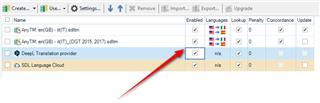
After upgrading to the SDL Trados Studio 2021 16.0.1.2917, the selection box(es) of Translation Memory and Automated Translation are automatically unticked if opening Project Settings -> Language Pairs -> All Language Pairs (or the language pair of project) -> Translation Memory and Automated Translation.
Before these were automatically ticked.
When opening the translatable file(s), all added translation memories appear and work as usual in the Translation Results section of Editor.
Picture about the unticked selection boxes:  .
.
Generated Image Alt-Text
[edited by: Trados AI at 11:19 PM (GMT 0) on 28 Feb 2024]