An unexpected error has occurred while loading the application plug-ins.

Dear SDL Team Support:

I just bought, installed, and activated my new SDL Trados Studio Freelance Plus 2021 license after upgrading it from SDL Trados Studio Freelance Plus 2017.

I found interesting to install some plug-ins such as Studio Subtitling, Jobs, SearchOnWeb, etc.

I did get to see, in the "Add-Ins" tab, some of these plug-ins that I installed.

However, when I restarted Studio once again, I started to get the error message mentioned in the subject line above and the plug-ins that I had installed are no longer shown on the "Add-Ins" tab.

I uninstalled ALL the plug-ins that I had installed, in order to see if I get this solved, and it did not work. I am still getting this error message.

I find this very upsetting since, like I said, I just bought, installed, and activated this new license. I am getting this error message on the same day I activate my new Studio upgrade. This is frustrating and upsetting.

What is the solution for this?

I thank you in advance for your help and replies.

Kind regards,

Nicolai CASTILLO

Parents
  • Was there an actual error message with this?  It's helpful to post it as it may point to where the problem is coming from, and it might even be coming from a plugin.

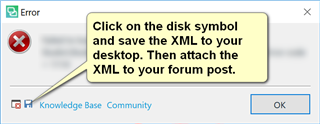
    Error dialog box in Trados Studio instructing to click on the disk symbol and save the XML to desktop, then attach the XML to forum post.

    Paul Filkin | RWS

    Design your own training!
    You've done the courses and still need to go a little further, or still not clear? 
    Tell us what you need in our Community Solutions Hub

    emoji


    Generated Image Alt-Text
    [edited by: Trados AI at 11:55 PM (GMT 0) on 28 Feb 2024]
  • Hi, Paul.

    Thank you so much for replying.

    The only error message that I am getting in the pop-up window is the one the subject line above, which is "An unexpected error has occurred while loading the application plug-ins." That is all I am getting.

    And, now, I just tried to click on the diskette icon shown on the error pop-up window image you attached to your reply, in order for me to save the XML to my desktop and thereafter attach the XML to this forum post, and it did not work. The error pop-up window shows a new error stating "Not responding". I tried twice and it is still "Not responding" and SDL Trados Studio 2021 is not responding. So, I closed the program without waiting for it to respond. I opened it again and it did open and respond by clicking "OK" on such error pop-up window, but, every time I open it, I keep on getting this now annoying error message stating "An unexpected error has occurred while loading the application plug-ins."

    The problem might be coming from a plugin as you said, but Trados is not giving me any clue, at all, about what the problematic plugin is. As I said in the previous forum post, I was installing some plug-ins such as Studio Subtitling, Jobs, SearchOnWeb, etc. I remember I did manage to see a "Jobs" tab on the lower part of the left-hand side of Trados Studio interface where "Welcome," "Projects," "Files," "Reports," "Editor," "Translation Memories" tabs are shown. And, now, neither this "Jobs" tab nor any plug-in icon under the "Add-Ins" tab is shown.

    What can I do?

    Shall I uninstall and reinstall SDL Trados Studio Freelance Plus 2021 on my Windows 10 desktop computer?

    I thank you in advance, Paul, for any further replies.

    Kind regards,

    Nicolai

Reply
  • Hi, Paul.

    Thank you so much for replying.

    The only error message that I am getting in the pop-up window is the one the subject line above, which is "An unexpected error has occurred while loading the application plug-ins." That is all I am getting.

    And, now, I just tried to click on the diskette icon shown on the error pop-up window image you attached to your reply, in order for me to save the XML to my desktop and thereafter attach the XML to this forum post, and it did not work. The error pop-up window shows a new error stating "Not responding". I tried twice and it is still "Not responding" and SDL Trados Studio 2021 is not responding. So, I closed the program without waiting for it to respond. I opened it again and it did open and respond by clicking "OK" on such error pop-up window, but, every time I open it, I keep on getting this now annoying error message stating "An unexpected error has occurred while loading the application plug-ins."

    The problem might be coming from a plugin as you said, but Trados is not giving me any clue, at all, about what the problematic plugin is. As I said in the previous forum post, I was installing some plug-ins such as Studio Subtitling, Jobs, SearchOnWeb, etc. I remember I did manage to see a "Jobs" tab on the lower part of the left-hand side of Trados Studio interface where "Welcome," "Projects," "Files," "Reports," "Editor," "Translation Memories" tabs are shown. And, now, neither this "Jobs" tab nor any plug-in icon under the "Add-Ins" tab is shown.

    What can I do?

    Shall I uninstall and reinstall SDL Trados Studio Freelance Plus 2021 on my Windows 10 desktop computer?

    I thank you in advance, Paul, for any further replies.

    Kind regards,

    Nicolai

Children