TQA nicht einsetzbar

In der Trados Professional 2021  Version ist zwar die Option TQA (Übersetzungsbewertung) integriert, wird mir auf der Menüleiste nicht angezeigt. Nach meiner Anpassung, werden weiterhiin die Schaltflächen für Bewertung hinzufügen, bearbeiten, löschen nicht angezeigt. Trotz Aktivierung, kann ich die Befehle weder sehen noch betätigen.

Was ist zu tun? Bug? Frage an den Support: Aus welchem Grund kann ich das nicht nutzen?
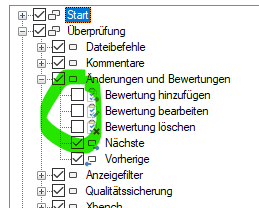
Trados Studio menu with TQA options 'Bewertung hinzufuegen', 'Bewertung bearbeiten', and 'Bewertung loeschen' greyed out and unclickable.


Generated Image Alt-Text
[edited by: Trados AI at 11:52 PM (GMT 0) on 28 Feb 2024]
emoji
Parents
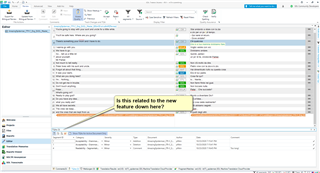
  • Took me a bit to figure out what you were doing.  I wonder f the reason they are not there is because the way TQA works has changed to make it possible to commit multiple changes in one go and generally work more efficiently when carrying out these tasks.  Is this what you were after?

    Screenshot of Trados Studio interface with an open project. A dialogue box with text 'Is this related to the new feature down here?' is pointing to the Translation Quality Assessment (TQA) feature.

    Might be that development forgot to remove them from that menu and they are not actually used there any more.  But I'm guessing a bit as I wasn't sure what your question was at first... perhaps you can confirm?

    Paul Filkin | RWS

    Design your own training!
    You've done the courses and still need to go a little further, or still not clear? 
    Tell us what you need in our Community Solutions Hub

    emoji


    Generated Image Alt-Text
    [edited by: Trados AI at 11:52 PM (GMT 0) on 28 Feb 2024]
  • Hi Paul,

    in meinem Fall geht es definitiv um Nutzung der TQA Funktionen, d. h. Bewertung von Übersetzungssegmenten. Die Schaltflächen werden in der Menüleiste nicht angezeigt, obwohl ich diese vorher aktiviert habe, somit kann keine Zuordnung grober/kleiner Fehler vorgenommen werden. Ist das ein Bug oder hat da jemand schlampig gearbeitet?!

    Deinen Screenshot werde ich mir noch genauer anschauen. 

  • You are using 2021 and the way TQA works has changed.  There is no point following an out of date guide with software it's not intended for.  Seeing as you won't provide the video showing how you are trying to use it I'll try and make some time to do this later and will try to answer your questions as you do it.  Then perhaps we can talk about something relatable together.

    Paul Filkin | RWS

    Design your own training!
    You've done the courses and still need to go a little further, or still not clear? 
    Tell us what you need in our Community Solutions Hub

  • In diesem Forum finde ich doch recht widersprüchliche Kommentare. Herr Brockmann hat angeblich früher die TQA immer über "Änderungen nachverfolgen" vorgenommen. Die frühere Manuals können dies nicht belegen. Ich wundere mich nur nach welchem Manual Herr Brockmann früher denn gearbeitet hat, denn Trados 2021 ist relativ neuwertig und wie ich sehe mit vielen Bugs. Ich finde die mir zugewiesene Rolle als "Versuchtskaninchen" unangemessen. Videos wird es von mir nicht geben, wir sind hier beim Fernsehsender! Ich erwarte eine aktuelle Beschreibung für TQA-Beurteilung einer Übersetzung unter Trados Professional 2021! LG Alide

  • Herr Brockmann hat angeblich früher die TQA immer über "Änderungen nachverfolgen" vorgenommen.

    I don't think so.  He said this:

    What has changed is that after enabling Assess Quality mode you can just work like in Tracked Changes mode (without having to add/edit TQA items explicitly like before).

    You need to put the emphasis on "like in Tracked Changes"; not "via tracked changes"  2021 does work differently, and if you are unable to use it then clearly we are missing something in the documentation to help you understand it.  So let's try to address this... starting with a video that I'll record and then we go from there.

    Paul Filkin | RWS

    Design your own training!
    You've done the courses and still need to go a little further, or still not clear? 
    Tell us what you need in our Community Solutions Hub

  • In fact, let's start with this video recorded by Daniel when we did the Beta testing for 2021.  This video explains what's different about the way you work with it.  Can you look at this and then clearly explain what your problem is please?

    Play this video

    On some other things you mentioned:

    An Daniel, das Kontextmenü in 2021 enthält bei mir keinen Punkt TQA. Warum habe Sie das und ich nicht?

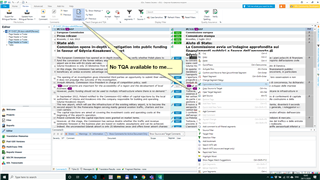
    This probably because you have not activated the TQA from the ribbon.  If I don't enable it I see this... like you:

    Screenshot of Trados Studio interface showing a context menu without the TQA option, indicating it is not activated.

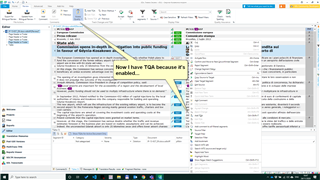
    If I enable it:

    Screenshot of Trados Studio interface with the TQA option now visible in the context menu, indicating it has been enabled.

    Einzelne Wörter aber auch Teilsegmente können nicht markiert werden, um eine TQA durchzuführen. Also meine Herren, wo ist der Teufel begraben?

    I think that the enablement of TQA above also solves this problem you have.

    Please advise what's still missing if you can validate the information in here works for you?

    Paul Filkin | RWS

    Design your own training!
    You've done the courses and still need to go a little further, or still not clear? 
    Tell us what you need in our Community Solutions Hub

    emoji


    Generated Image Alt-Text
    [edited by: Trados AI at 11:53 PM (GMT 0) on 28 Feb 2024]
  • Ребята, дaвайте жить дружно!!!

    Ihre Mitteilung über der aktuelle Beta-Entwicklung von Trados Professional 2021 ist nicht hilfreich, aber interessant und total umständlich.

    Ihr Video hat zwar die neuen Ansätze etwas optischer ins Bild gesetzt, das Problem bleibt: keine Integration von TQA-Befehle in der Menüleiste/Kontextmenü. Änderungen kann ich zwar vornehmen, aber nicht mit TQA Befehlen versehen. Es kommt weiterhin die Meldung: Ablehen/akzeptieren. TQA-Ansicht bleibt leer, obwohl eine TQA Modell unter Projekteinstellungen aktiviert ist.

    Nun, wann kann ich mit TQA-Freigabe unter meinem ABO rechnen? Software-Rohlinge sollte man nicht den Übersetzer ins Nest legen!!!

    Danke für das Video!

  • Maybe we're getting closer... I created a quick video so you can see my understanding of where your problem is.  No doubt you'll explain if I'm still missing your point.

    Paul Filkin | RWS

    Design your own training!
    You've done the courses and still need to go a little further, or still not clear? 
    Tell us what you need in our Community Solutions Hub

  • Ребята, дaвайте жить дружно!!!

    Ein ausgezeichnetes 2 Video. Das Problem bleibt weiterhin bestehen: Im Editormodus-TQA-Bewertung aktiviert-Segment abgelehnt - und genau hier gibt es einen BUG-das Segment wird komplett gelöscht ohne dass ich die Möglichkeit habe TQA Modus zu aktivieren, Tasten für TQA werden nicht angezeigt so dass alles weitere nciht mehr möglich ist.

    Wie das Supportteam schon verstanden hat, werde ich kein VIDEOS zur Verfügung stellen.

    Auf Kosten von meinem  Namen wird hier keine Vorführung an die andere Übersetzer präsentiert. 

    Braucht Trados etwa solche professionelle Übersetzer wie mich, um Ihre Software zu testen.

    Ich bitte um Entschuldigung, wenn ich Ihre Sprachkenntnisse testen würde, würden Sie vielleicht sprachlich gar nicht gut abschneiden. Ein Englischtest? Dieser Ist nicht notwendig. Das Trados-Software-Team soll vielleicht europäische Sprachen lernen und zu diesen gehört unausweichlich auch Russisch.

    Warum keine Fernwartung? Ein Rohling bleibt ein Rohling! Die Dokumentation vom Video1 wurde scheibchenweise durch Video 2 leicht ergänzt. Bitte um eine Wartung.

    Ближе к делу и по меньше болтавни!

  • Please send me your translated sdlxliff file and maybe then I can figure out what your problem is.  You can send this to pfilkin@sdl.com

    Paul Filkin | RWS

    Design your own training!
    You've done the courses and still need to go a little further, or still not clear? 
    Tell us what you need in our Community Solutions Hub

  • Ребята, дaвайте жить дружно!!

    Nö, ich warte auf eine Fernwartung.

  • An das Supportteam!

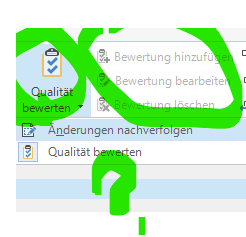
    Heute wird mir endlich nach mehreren Wochen TQA-Einstellung in der Menüleiste eingeblendet. Die Schalttasten für die TQA bleiben weiterhin ausgegraut. 

    Screenshot of Trados Studio menu with TQA options visible but greyed out, indicating they are not selectable. A green check mark is drawn over the menu.

    Wann kann ich mit der kompletten Funktionalität rechnen?

    emoji


    Generated Image Alt-Text
    [edited by: Trados AI at 11:53 PM (GMT 0) on 28 Feb 2024]
Reply Children
No Data