Cannot install plugins

Hi all.

I have just bought a license and installed Studio 2021.

I am trying to install MyMemory and MT Cloud Provider plugins, but after downloading them, I click on them and nothing happens.

I understand that the Plugin Installer is supposed to open but it does not. I also tried by manually open it in advance from the Program Files and then click again on the plugins downloaded but I had any effect.

Any suggestion please?

Thank you,

Paola

Parents
  • Hello ,

    After downloading them are you trying to install from the downloads folder?

    If so please move them to your desktop for example and then double click to install (some browsers will not allow you to execute an application from the downloads folder)

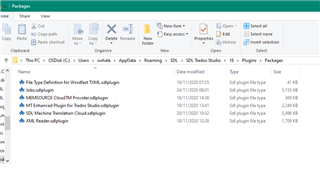
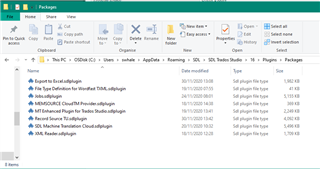
    Now when you double lick, the installation should start and you you should find the plugins in the following folders

    C:\Users\yourname\AppData\Roaming\SDL\SDL Trados Studio\16\Plugins\Packages

    C:\Users\yourname\AppData\Roaming\SDL\SDL Trados Studio\16\Plugins\Unpacked

    For example

    File Explorer window showing SDL Trados Studio plugins in the Packages folder with file names and types visible.

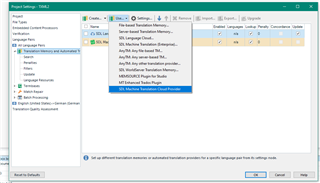
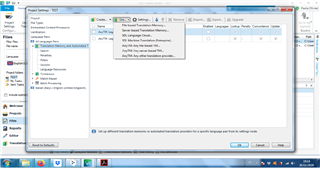
    Now when you start Studio, you should have the option of adding -

    Trados Studio Project Settings window with Translation Memory and Automated Translation tab open, showing a list of installed plugins.

    Does this now work for you?

    If not please let us know what operating system you are using and provide where possible screenshots.

    Oana Nagy | QA Engineer | RWS Group

    emoji


    Generated Image Alt-Text
    [edited by: Trados AI at 12:02 AM (GMT 0) on 29 Feb 2024]
  • Hi Steven,

    I followed your instructions, thank you, but nothing has changed.

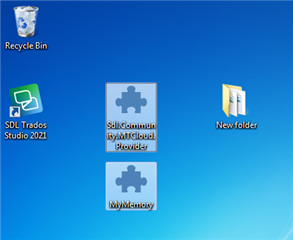
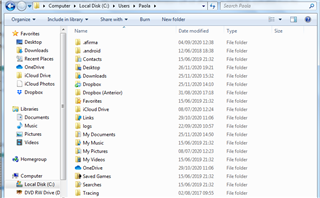
    Please find some screenshots below.

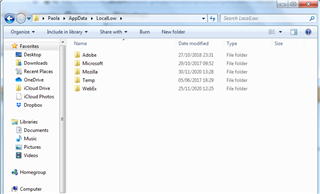
    The biggest difference compared to your screens seems to be that I do not have any AppData folder either where I should be supposed to find SDL plugins  Confounded

    I use Windows 7 32-bit (yes, I know it is no more being updated, but I hoped that I could still use Trados on it as stated in your System Requirements page).

    Desktop screenshot showing icons for Recycle Bin, SDL Trados Studio 2021, and two folders named 'SDL Community MT Cloud Provider' and 'MyMemory'.

    File Explorer window showing various folders, but the AppData folder is missing from the list under the user's profile directory.

    Trados Studio error message window stating 'No MyMemory key entered. Please enter your MyMemory key to make translation possible.'

    emoji


    Generated Image Alt-Text
    [edited by: Trados AI at 12:02 AM (GMT 0) on 29 Feb 2024]
Reply Children