


Lost TMs in Studio 2017 - please help!

Hi, I’m a very distressed Studio 2017 user who seems to have lost 3 million-word-plus worth of TMs.

Two days ago, when I opened Studio to work as usual, I was greeted by the message below, asking me to ‘set up Studio for first time use’:
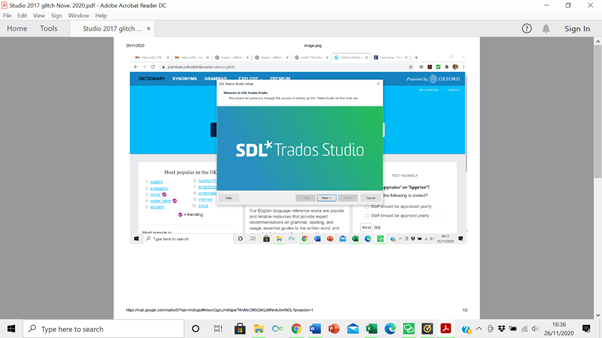
 

Screenshot of Trados Studio initial setup wizard with a message prompting to set up Studio for first-time use.


I tried a couple of times to circumvent the wizard - my Studio was set up nearly 3 years ago - by switching Studio off and on, to no avail.

So I went through the wizard, and Studio opened as normal BUT WITHOUT ANY OF MY TMs.

Since then, Studio is opening and functioning as normal, but I wasn’t able to recover the TMs.

They aren't - or at least I couldn't find them - in the SDL files saved on my pc, which for some reason only has the five TMs created since 2019, but none of the previous ones.

Please help me recover my TMs!! Thank you very much,

Nic Mira


Generated Image Alt-Text
[edited by: Trados AI at 11:49 PM (GMT 0) on 28 Feb 2024]
emoji
Parents Reply Children
  • Hi Paul,

    thank you so much! I found the TMs in what should have been an obvious place to look - most of them were created in Studio 2014, the previous Studio version I had, and still resided in the S. 2014 folders. Apologies for not thinking about it.

    The fact remains that the little stunt with the installation wizard which unaccountably popped up the other day seems to have 'erased' my S. 2017's short-term memory. When I open a new project and go to pick a TM, it no longer gives me prompts for the ones I'd been using most frequently prior to the wizard appearing - as it used to do until then.

    It's not a pressing issue, more like a curiosity, but is this normal? Are you aware of others S. 2017 users having the same problem, i.e. the installation wizard making an unbidden appearance and messing up with the TMs?

    Thank you very much for your valuable help,

    N