
 Translate



新しく翻訳者としてご登録いただいた者です。
指示書に従い、MSWordのスペルチェック機能をプラグインで設定したいのですが、
プラグインをインストールしても、Trados Studioを開くと以下のメッセージが出てしまい、
自動的に「検証」項目に組み込まれません。
どのように対応すればよいかご教示いただけますと幸いです。よろしくお願いいたします。
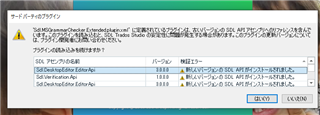 。
。
Generated Image Alt-Text
[edited by: Trados AI at 11:55 PM (GMT 0) on 28 Feb 2024]




