


MSWordスペルチェック機能のインストールについて

新しく翻訳者としてご登録いただいた者です。

指示書に従い、MSWordのスペルチェック機能をプラグインで設定したいのですが、

プラグインをインストールしても、Trados Studioを開くと以下のメッセージが出てしまい、

自動的に「検証」項目に組み込まれません。

どのように対応すればよいかご教示いただけますと幸いです。よろしくお願いいたします。
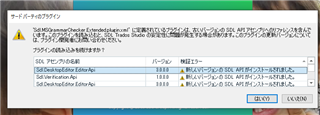
Error message in Trados Studio stating 'Failed to load plugin: SDL Verification Error Plugin' with details of the plugin version and status showing as 'Not loaded'. Two buttons at the bottom read 'OK' and 'Cancel'.


Generated Image Alt-Text
[edited by: Trados AI at 11:55 PM (GMT 0) on 28 Feb 2024]

emoji
Parents Reply
  • Thank you very much for your response, and I'm sorry for the late reply. 

    I tried to download the suggested app, but failed, and I received the following message. 

    =======================

    Download App
    Download not avaliable
    You have logged in successfully, however this app is not available for you to download because you don’t have a license for one of the supported products (SDL Trados Studio 2014 - SDL Trados Studio 2015 - SDL Trados Studio 2017 - SDL Trados Studio 2019 - SDL Trados Studio 2021) in your account. Please contact the administrator of your company licenses and they will be able to download the app for you. Alternatively contact SDL through your support account, or via the appstore forum in the SDL Community. For more information, please see the [language] Terms and Conditions
    =======================
    How can I solve this issue??
Children
