 Translate



I am having problems with Studio 2021. It often tells me that it cannot find or connect to one of my TMs. In addition, I have to delete SDL Cloud and re-enter it for each text.

RWS Community
I am having problems with Studio 2021. It often tells me that it cannot find or connect to one of my TMs. In addition, I have to delete SDL Cloud and re-enter it for each text.
So you are using Trados Live TMs? Is Studio connected to your account in the top right hand corner of Studio?
Paul Filkin | RWS
Design your own training!
You've done the courses and still need to go a little further, or still not clear?
Tell us what you need in our Community Solutions Hub
So you are using Trados Live TMs? Is Studio connected to your account in the top right hand corner of Studio?
Paul Filkin | RWS
Design your own training!
You've done the courses and still need to go a little further, or still not clear?
Tell us what you need in our Community Solutions Hub

No, it is mainly a problem with my TMs. I get the message that my main one has been deleted or no longer exists. In addition, when I finalize, the program does not carry out the second step, i.e., "Generate Target Translations".

ok - so you are going to have to provide a lot more information to be able to help you. Things like:
Paul Filkin | RWS
Design your own training!
You've done the courses and still need to go a little further, or still not clear?
Tell us what you need in our Community Solutions Hub
Hi Paul,
Thanks for your help.
Yes, the TM exists. I have been using it for years and can see it in my TM folder. It is on my computer, i.e., a local drive. Not sure what you mean by importing project templates from an older version of Studio, but all my settings appear in the new version.
Error message:
An error has occurred while using the translation ...
Took screen shots of the messages, but I am too stupid to figure out how to attach them here.
Thanks again,
Bill
To add a screenshot simply paste them right into your response after taking the screenshot. Works just like Word.
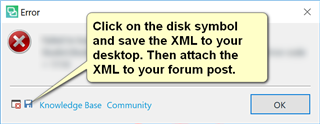
A full error message would be better which you can add if you can attach the error stack using the "Insert" menu when you reply. You get the file like this:
Paul Filkin | RWS
Design your own training!
You've done the courses and still need to go a little further, or still not clear?
Tell us what you need in our Community Solutions Hub

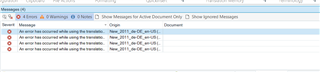



Getting there :-)
Can you click here and then provide the full error message as previously noted?

Paul Filkin | RWS
Design your own training!
You've done the courses and still need to go a little further, or still not clear?
Tell us what you need in our Community Solutions Hub

The program freezes at this point, and nothing happens when I click "Results"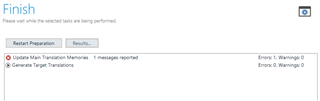
ok... so let's try a generic reset first as this often resolves many issues. Rename this folder (just add _old to the end or something, it's not important what you rename it to) and restart Studio:
c:\Users\[USERNAME]\AppData\Roaming\SDL\SDL Trados Studio\Studio16
So the path would become this:
c:\Users\[USERNAME]\AppData\Roaming\SDL\SDL Trados Studio\Studio16_old
If you can't find this folder then you need to unhide your hidden files/folders:
Paul Filkin | RWS
Design your own training!
You've done the courses and still need to go a little further, or still not clear?
Tell us what you need in our Community Solutions Hub
No luck. I have to go out for an hour, so will check back later.
And thank you for your help!