 Translate



I am having problems with Studio 2021. It often tells me that it cannot find or connect to one of my TMs. In addition, I have to delete SDL Cloud and re-enter it for each text.

RWS Community
I am having problems with Studio 2021. It often tells me that it cannot find or connect to one of my TMs. In addition, I have to delete SDL Cloud and re-enter it for each text.
So you are using Trados Live TMs? Is Studio connected to your account in the top right hand corner of Studio?
Paul Filkin | RWS
Design your own training!
You've done the courses and still need to go a little further, or still not clear?
Tell us what you need in our Community Solutions Hub

No, it is mainly a problem with my TMs. I get the message that my main one has been deleted or no longer exists. In addition, when I finalize, the program does not carry out the second step, i.e., "Generate Target Translations".

ok - so you are going to have to provide a lot more information to be able to help you. Things like:
Paul Filkin | RWS
Design your own training!
You've done the courses and still need to go a little further, or still not clear?
Tell us what you need in our Community Solutions Hub
Hi Paul,
Thanks for your help.
Yes, the TM exists. I have been using it for years and can see it in my TM folder. It is on my computer, i.e., a local drive. Not sure what you mean by importing project templates from an older version of Studio, but all my settings appear in the new version.
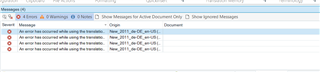
Error message:
An error has occurred while using the translation ...
Took screen shots of the messages, but I am too stupid to figure out how to attach them here.
Thanks again,
Bill
To add a screenshot simply paste them right into your response after taking the screenshot. Works just like Word.
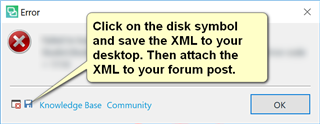
A full error message would be better which you can add if you can attach the error stack using the "Insert" menu when you reply. You get the file like this:
Paul Filkin | RWS
Design your own training!
You've done the courses and still need to go a little further, or still not clear?
Tell us what you need in our Community Solutions Hub




Getting there :-)
Can you click here and then provide the full error message as previously noted?

Paul Filkin | RWS
Design your own training!
You've done the courses and still need to go a little further, or still not clear?
Tell us what you need in our Community Solutions Hub

The program freezes at this point, and nothing happens when I click "Results"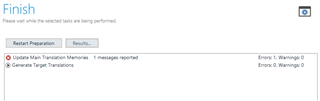
ok... so let's try a generic reset first as this often resolves many issues. Rename this folder (just add _old to the end or something, it's not important what you rename it to) and restart Studio:
c:\Users\[USERNAME]\AppData\Roaming\SDL\SDL Trados Studio\Studio16
So the path would become this:
c:\Users\[USERNAME]\AppData\Roaming\SDL\SDL Trados Studio\Studio16_old
If you can't find this folder then you need to unhide your hidden files/folders:
Paul Filkin | RWS
Design your own training!
You've done the courses and still need to go a little further, or still not clear?
Tell us what you need in our Community Solutions Hub
ok... so let's try a generic reset first as this often resolves many issues. Rename this folder (just add _old to the end or something, it's not important what you rename it to) and restart Studio:
c:\Users\[USERNAME]\AppData\Roaming\SDL\SDL Trados Studio\Studio16
So the path would become this:
c:\Users\[USERNAME]\AppData\Roaming\SDL\SDL Trados Studio\Studio16_old
If you can't find this folder then you need to unhide your hidden files/folders:
Paul Filkin | RWS
Design your own training!
You've done the courses and still need to go a little further, or still not clear?
Tell us what you need in our Community Solutions Hub
No luck. I have to go out for an hour, so will check back later.
And thank you for your help!