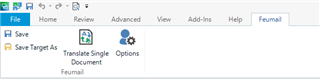
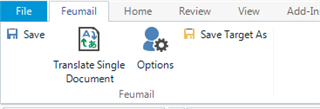
How to make Save Target As STICK on the ribbon?

I've had this problem before but through most of 2019 it seemed stable. Just upgraded to 2021 and yay, the problem is back. Not matter how many times I add the "Save target as" function to a custom tab/group, it never sticks. And no, it's not overloaded, I've only got 4 items on it.

Any idea what ails 2021 in this regard?

Parents Reply Children
  • I must have mis-interpreted what you wanted a screenshot of. But yes, the problem was that Advanced kept re-inserting itself between File and Home, even though I'd unticked it, then I tried moving down and unticking.

    I may have been able to fix this but it would be nice if this could be fixed within the product... I found an old sheet of notes I made for moving Studio and it mentions that ribbon changes don't seem to stick unless I make them while there's a file open for translation, i.e. if I just fire up Studio and make changes to the ribbon, they don't stick but if I open Studio, open a file for translation, save that as a project (keeping the file open) and THEN make ribbon changes, it seems more amenable to remembering my settings. For now, that seems to be working, touch wood...

    Which would be, ummm, a nuts path that a user has to take?