
 Translate



I have asked this question before (“Cannot create project templates on my new pc (Studio 2021)”), but unfortunately the problem still isn’t solved and because it is a very time-consuming problem that severely affects my productivity, I reach out to you again.
Since I have a new pc, I cannot create any project templates anymore. Somehow, Studio chooses the wrong path to search for the default template (or any other project template). Whenever I try to create a project, Studio freezes and I get the following error message:
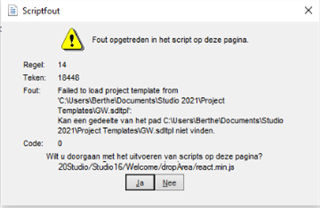
The path C:\Users\Berthe\Documents\Studio 2021\Project Templates\GW.sdltpl was the path on my previous pc, but if Studio wants to find something on my current pc, the path should start with: C:\Users\arbei\...
Already tried, with no success:
• Rename the template in question (GW.sdltpl)
• Rename the folder c:\Users\[USERNAME]\AppData\Roaming\SDL\SDL Trados Studio\Studio16 to c:\Users\[USERNAME]\AppData\Roaming\SDL\SDL Trados Studio\Studio16_old
• Reset Studio, using the SDL Freshstart app, version 1.0.3.2 (which did not work as it should: it did not open, there was only a short ‘flash’, even though I followed the instructions to the letter, and several times)
• Return license and reactivate license
• Uninstall and reinstall Studio 2021
I’m beginning to think the only solution might be to start all over with a completely new license, i.e. returning my current license, uninstalling Studio and completely removing it from my pc, and installing it again with a new license.
Or does anyone see any other options? I would really appreciate your help. Thank you in advance!
Generated Image Alt-Text
[edited by: Trados AI at 12:34 AM (GMT 0) on 29 Feb 2024]


