


After migrating to my new pc, Studio 2021 still tries to find templates on my previous pc

I have asked this question before (“Cannot create project templates on my new pc (Studio 2021)”), but unfortunately the problem still isn’t solved and because it is a very time-consuming problem that severely affects my productivity, I reach out to you again.


Since I have a new pc, I cannot create any project templates anymore. Somehow, Studio chooses the wrong path to search for the default template (or any other project template). Whenever I try to create a project, Studio freezes and I get the following error message:
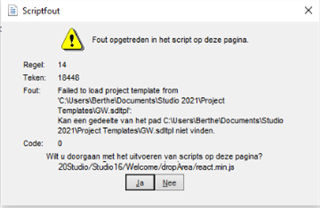
Error message in Trados Studio indicating 'Failed to load project template' with a file path pointing to a previous PC user directory.

The path C:\Users\Berthe\Documents\Studio 2021\Project Templates\GW.sdltpl was the path on my previous pc, but if Studio wants to find something on my current pc, the path should start with: C:\Users\arbei\...


Already tried, with no success:


• Rename the template in question (GW.sdltpl)
• Rename the folder c:\Users\[USERNAME]\AppData\Roaming\SDL\SDL Trados Studio\Studio16 to c:\Users\[USERNAME]\AppData\Roaming\SDL\SDL Trados Studio\Studio16_old
• Reset Studio, using the SDL Freshstart app, version 1.0.3.2 (which did not work as it should: it did not open, there was only a short ‘flash’, even though I followed the instructions to the letter, and several times)
• Return license and reactivate license
• Uninstall and reinstall Studio 2021

I’m beginning to think the only solution might be to start all over with a completely new license, i.e. returning my current license, uninstalling Studio and completely removing it from my pc, and installing it again with a new license.


Or does anyone see any other options? I would really appreciate your help. Thank you in advance!


Generated Image Alt-Text
[edited by: Trados AI at 12:34 AM (GMT 0) on 29 Feb 2024]
emoji
Parents
  • Hello ,

    As you have moved from one PC to another and stated

    Since I have a new pc, I cannot create any project templates anymore. Somehow, Studio chooses the wrong path to search for the default template (or any other project template). Whenever I try to create a project, Studio freezes and I get the following error message:

    This I think sounds very much like a permissions issue.

    First reboot your PC and make sure you are logged on as ADMIN and then check Windows USER accounts (depending on who and how your PC was set up- remotely perhaps),

    there is likely to be more than one user account.

    Once any excess accounts have been removed- Right Click on Studio and select 'Run as Admin'.

    Now go to File Options Setup and try editing/removing the templates.

    When moving from one PC to another, its a good idea to always create new project templates.

    Oana Nagy | QA Engineer | RWS Group

Reply
  • Hello ,

    As you have moved from one PC to another and stated

    Since I have a new pc, I cannot create any project templates anymore. Somehow, Studio chooses the wrong path to search for the default template (or any other project template). Whenever I try to create a project, Studio freezes and I get the following error message:

    This I think sounds very much like a permissions issue.

    First reboot your PC and make sure you are logged on as ADMIN and then check Windows USER accounts (depending on who and how your PC was set up- remotely perhaps),

    there is likely to be more than one user account.

    Once any excess accounts have been removed- Right Click on Studio and select 'Run as Admin'.

    Now go to File Options Setup and try editing/removing the templates.

    When moving from one PC to another, its a good idea to always create new project templates.

    Oana Nagy | QA Engineer | RWS Group

Children