Project Into 13 Langauges With Large IDML File Does Not Update Project TMs

Hi All,

I have had to manage a large project that was translated into 13 langauges - the client sent IDML files - which I imported into a new SDL Trados project.

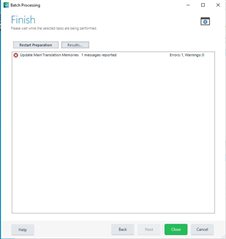
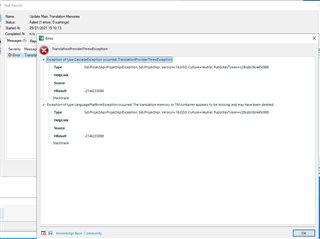
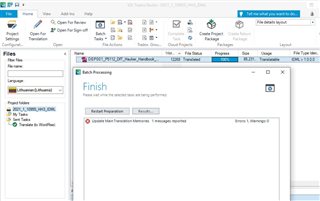
After translation, some of the 13 langauges and mainly - Welsh, Turkish and Lithuanian did not update the TMs showing a strange error.

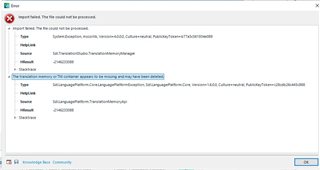
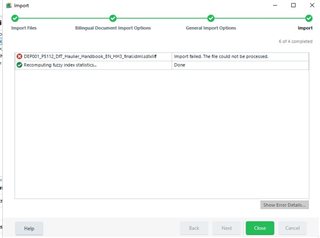
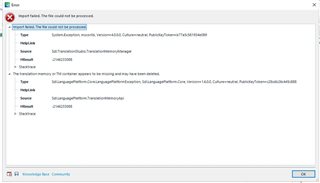
I have tried another option to update the 3 TMs - opening the TM, then importing the translated sdlxliff file, but still showed another error.

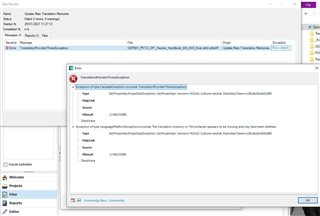
I am attaching to this post the error messages I received for the three langauges and hoping you can give me an advice on how to solve this for future projects with large IDML files to translate into many languages.

Strangely, the other 10 langauges update without any problem!

Thanks in advance,

Maria


MariaError message in Trados Studio stating 'TranslationProviderUriTranslationProviderException'.Detailed error message in Trados Studio with exception type 'Sdl.LanguagePlatform.TranslationMemoryApi.TranslationProviderUriTranslationProviderException'.Error message in Trados Studio during import stating 'The file could not be processed'.Error message in Trados Studio stating 'Exception of type 'System.OutOfMemoryException' was thrown'.Detailed error message in Trados Studio with stack trace for 'System.OutOfMemoryException'.Trados Studio batch processing window showing 'Update Main Translation Memories' with 1 message reported.Detailed error message in Trados Studio with exception type 'Sdl.LanguagePlatform.TranslationMemoryApi.TranslationProviderUriTranslationProviderException'.Trados Studio import window showing 'Import failed. The file could not be processed' and 'Recomputing fuzzy index statistics... Done'.Error message in Trados Studio during import stating 'The translation memory or TM container appears to be missing and may have been deleted'.Trados Studio batch processing window showing 'Update Main Translation Memories' with 1 message reported and 1 message in progress.


Generated Image Alt-Text
[edited by: Trados AI at 12:49 AM (GMT 0) on 29 Feb 2024]
emoji
Parents
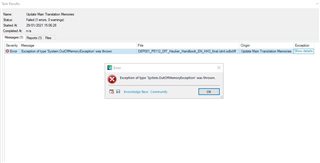
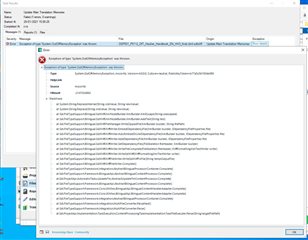
  • "Out of memory exception" means your computer has insufficient memory (RAM) to complete the task. You can try closing other programs that might be running at the same time (e.g. browsers, which can use quite a lot of memory). Or you install more memory.

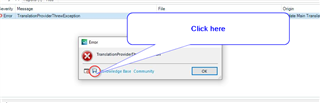
    Regarding how to report errors, it is more informative and convenient for everybody if you click on the little disk symbol on the error message:

    Error message in Trados Studio with a red circle highlighting the 'Save Report' icon and a blue arrow pointing to it with text 'Click here'.

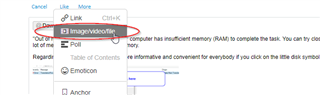
    You will be asked where to save a file, choose any location that makes sense for you, and post that file here using the "insert -> file" option.

    Trados Studio forum post with a red ellipse highlighting the 'insert -> file' option in the text editor menu.

    Daniel

    emoji


    Generated Image Alt-Text
    [edited by: Trados AI at 12:49 AM (GMT 0) on 29 Feb 2024]
  • Hi @Daniel

    Thank you for sharing this info.

    We will make sure to try using a different computer with more RAM and re-run the TM update and see if it works. Do you know approximately how much RAM should one computer have in order to be able to TM update large IDML files without any problem?

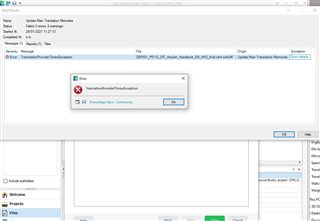
    What about the other issue which says Translation provider Threw Exception?

    What is causing this issue? Is it the insufficient RAM again?

    Kind regards,

    -

  • <SDLErrorDetails time="01/02/2021 15:43:46">
      <ErrorMessage>TranslationProviderThrewException</ErrorMessage>
      <Exception>
        <Type>Sdl.ProjectApi.ProjectApiException, Sdl.ProjectApi, Version=16.0.0.0, Culture=neutral, PublicKeyToken=c28cdb26c445c888</Type>
        <HelpLink />
        <Source />
        <HResult>-2146233088</HResult>
        <StackTrace><![CDATA[]]></StackTrace>
        <InnerException>
          <Type>Sdl.ProjectApi.ProjectApiException, Sdl.ProjectApi, Version=16.0.0.0, Culture=neutral, PublicKeyToken=c28cdb26c445c888</Type>
          <HelpLink />
          <Source />
          <HResult>-2146233088</HResult>
          <StackTrace><![CDATA[]]></StackTrace>
        </InnerException>
      </Exception>
      <Environment>
        <ProductName>SDL Trados Studio</ProductName>
        <ProductVersion>Studio16</ProductVersion>
        <EntryAssemblyFileVersion>16.1.3.4096</EntryAssemblyFileVersion>
        <OperatingSystem>Microsoft Windows 10 Pro</OperatingSystem>
        <ServicePack>NULL</ServicePack>
        <OperatingSystemLanguage>1033</OperatingSystemLanguage>
        <CodePage>1252</CodePage>
        <LoggedOnUser>PRESTIGENETWORK\Maria Daskalova</LoggedOnUser>
        <DotNetFrameWork>4.0.30319.42000</DotNetFrameWork>
        <ComputerName>PN-LAPTOP-27</ComputerName>
        <ConnectedToNetwork>True</ConnectedToNetwork>
        <PhysicalMemory>8244376 MB</PhysicalMemory>
      </Environment>
    </SDLErrorDetails>

  • Hi ,

    Minimum specs for Trados Studio 2021 is 16 GB of RAM. Your PC has got only 8 GB.

    https://www.sdltrados.com/products/trados-studio/faq.html

    When I've got this Out of memory error, I managed to solve it by closing any other RAM-hungry applications, like web browsers, restarting Trados Studio, and trying again. And I've got 16GB of RAM.

  • Hi Jesus,

    I don't have the OutofMemory error anymore.

    Now I am only getting the TranslationProviderThrewException error that I shared with you above.

    Can you please confirm on what it means and how to resolve it?

    Thanks!

  • Hi ,

    There is a problem with the TM translation provider.

    I'd start with this information:

    - How many TM's you use for any of the problematic languages, like Welsh? If there are more than one TM, disable all but one and try to repro the problem.

    - Are TM's locally stored or using a cloud service such as Dropbox, OneDrive…? If they are, try disabling sincying the cloud service and try again.

    - Do you use any other TM translation provider, apart from the file-based TM? If so, try disabling them one each time and check if the problem is solved.

    The key is isolate the problem. For example, if the culprit was a specific TM, then we could try to repair it, but we need to confirm that first.

    Please come back and post the answers. You can also try the solutions mentioned in this post:

    https://community.sdl.com/product-groups/translationproductivity/f/studio/33056/tms-and-tbs-in-studio-2021---tms-shutdown-randomly-and-old-tbs-simply-do-not-work/108762#108762

Reply Children