Where can I find documentation about the SDLFTSETTINGS format

I'm setting up file types on my computer. I export them to SDLFTSETTINGS files and send them over to my clients. When I import the file types, I notice some odd behavior.

For example, I specified embedded content processor rules in my file type. I can see them in the SDLFTSETTINGS files. When I import them in Studio, the embedded content processor rules disappear.

I would like to understand the structure of the SDLFTSETTINGS better. For example, how does Studio interpret these elements:

<Setting Id="DefaultOverridesList">True</Setting>
<Setting Id="RemoveDefaultOverridesList">True</Setting>
<Setting Id="CdataProcessorId" />

Can anyone point me to a document that explains how Studio interprets the SDLFTSETTINGS files?

Parents Reply Children
  • They seem to be. This is an section of the export:

    <Setting Id="ProcessEmbeddedContent">True</Setting>
    <Setting Id="ProcessDocStructInfoEmbeddedContent">True</Setting>
    <Setting Id="RegexEmbeddingEnabled">True</Setting>
    <Setting Id="StructureInfoList2">sdl:title</Setting>
    <Setting Id="StructureInfoList1">x-tm-table-cell</Setting>
    <Setting Id="StructureInfoList0">sdl:paragraph</Setting>
    <Setting Id="StructureInfoList">True</Setting>
    <Setting Id="MatchRuleList0WordStop">True</Setting>
    <Setting Id="MatchRuleList0StartTagRegex">\[%=.*?%\]</Setting>
    <Setting Id="MatchRuleList0SegmentationHint">IncludeWithText</Setting>
    <Setting Id="MatchRuleList0">True</Setting>
    <Setting Id="MatchRuleList">True</Setting>
    <Setting Id="CdataProcessorId" />

    I can find my RegEx in the export, and the Structure info types to which I assigned it. However, when I import this file in another Studio 2021 instance, they don't appear.

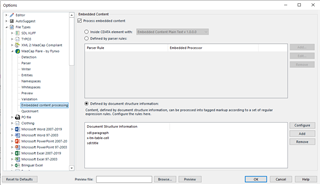
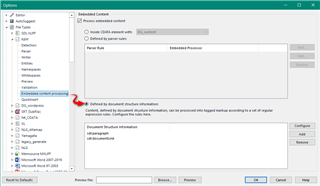
  • ok.  I just made up a file and added some embedded content processing rules using the XML2 filetype:

    Trados Studio options menu with XML2 filetype selected, showing embedded content processing rules with a red circled warning about document structure information.

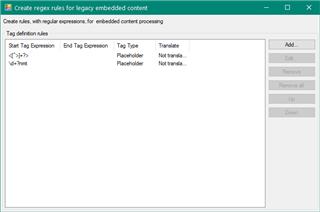
    I then added some rules:

    Create regex rules dialog box for legacy embedded content in Trados Studio with fields for start tag, end tag expressions, and tag type.

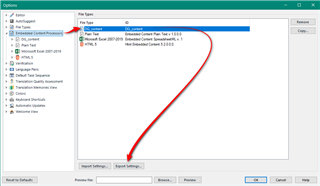
    Then exported the settings file to a colleague:

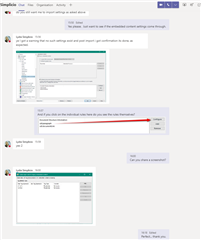
    Email conversation with screenshots of Trados Studio settings, highlighting the export of a settings file and a red arrow pointing to a 'KdW.zip' file attachment.

    So that seems to work for me when using the UI to create the rules.  Strange it doesn't work for you.  Maybe test with the same file... total nonsense but just wanted to validate the process:

    KdW.zip

    Paul Filkin | RWS

    Design your own training!
    You've done the courses and still need to go a little further, or still not clear? 
    Tell us what you need in our Community Solutions Hub

    emoji


    Generated Image Alt-Text
    [edited by: Trados AI at 1:01 AM (GMT 0) on 29 Feb 2024]