Object reference not set to an instance of an object

Hi everyone,

Why am I getting the "Object reference not set to an instance of an object" when trying to upgrade the TM? Actually, not just when trying to upgrade it, the TM is completely unusable because every time I click on a target segment, I get the same error message, which reappears right after closing its window.
I'm using the newest version of SDL Trados Studio 2021 Freelance.

Here are the Upgrade TM log file and error details:

-----------------------------------------------------------
Update translation memories started. (11-Feb-21 8:27:17 PM)
-----------------------------------------------------------

Working folder: C:\Users\x\Desktop\x


------------------------------------------------
Backup Translation Memory (11-Feb-21 8:27:17 PM)
------------------------------------------------

Backup location: C:\Users\x\Desktop\x\TM.sdltm.000.bak

Process completed (11-Feb-21 8:27:17 PM)


-------------------------------------------------
Upgrade Translation Memory (11-Feb-21 8:27:17 PM)
-------------------------------------------------

Translation memory: C:\Users\x\Desktop\x\TM.sdltm

Process completed (11-Feb-21 8:27:19 PM)


-------------------------------------------------
Reindex Translation Memory (11-Feb-21 8:27:19 PM)
-------------------------------------------------

Translation memory: C:\Users\x\Desktop\x\TM.sdltm
Translation units : 194632

Process failed (11-Feb-21 8:27:21 PM)
Sdl.LanguagePlatform.Core.LanguagePlatformException: Object reference not set to an instance of an object.
at Sdl.LanguagePlatform.TranslationMemoryApi.FileBasedTranslationMemoryLanguageDirection.ReindexTranslationUnits(RegularIterator& iterator)
at Sdl.TranslationStudio.Common.TranslationMemory.TranslationMemoryAutomation.Jobs.ReIndexTranslationMemoryJobRequest.Execute(IJobExecutionContext context)

------------------------------------------------------------
Update translation memories finished. (11-Feb-21 8:27:21 PM)
------------------------------------------------------------

The error details file: 

<SDLErrorDetails time="11-Feb-21 8:27:56 PM">
  <ErrorMessage>An error occurred while processing.</ErrorMessage>
  <Exception>
    <Type>Sdl.LanguagePlatform.Core.LanguagePlatformException, Sdl.LanguagePlatform.Core, Version=1.6.0.0, Culture=neutral, PublicKeyToken=c28cdb26c445c888</Type>
    <HelpLink />
    <Source>Sdl.LanguagePlatform.TranslationMemoryApi</Source>
    <HResult>-2146233088</HResult>
    <StackTrace><![CDATA[   at Sdl.LanguagePlatform.TranslationMemoryApi.FileBasedTranslationMemoryLanguageDirection.ReindexTranslationUnits(RegularIterator& iterator)
   at Sdl.TranslationStudio.Common.TranslationMemory.TranslationMemoryAutomation.Jobs.ReIndexTranslationMemoryJobRequest.Execute(IJobExecutionContext context)
   at Sdl.Desktop.Platform.Implementation.Services.Job.<_worker_DoWork>b__47_0()
   at Sdl.Desktop.Logger.Log.Resources(Object message, Action action)
   at Sdl.Desktop.Platform.Implementation.Services.Job._worker_DoWork(Object sender, DoWorkEventArgs e)
   at System.ComponentModel.BackgroundWorker.OnDoWork(DoWorkEventArgs e)
   at System.ComponentModel.BackgroundWorker.WorkerThreadStart(Object argument)]]></StackTrace>
  </Exception>
  <Environment>
    <ProductName>SDL Trados Studio</ProductName>
    <ProductVersion>Studio16</ProductVersion>
    <EntryAssemblyFileVersion>16.1.3.4096</EntryAssemblyFileVersion>
    <OperatingSystem>Microsoft Windows 10 Pro</OperatingSystem>
    <ServicePack>NULL</ServicePack>
    <OperatingSystemLanguage>1033</OperatingSystemLanguage>
    <CodePage>1252</CodePage>
    <LoggedOnUser>DBHP\Dorde1</LoggedOnUser>
    <DotNetFrameWork>4.0.30319.42000</DotNetFrameWork>
    <ComputerName>DBHP</ComputerName>
    <ConnectedToNetwork>True</ConnectedToNetwork>
    <PhysicalMemory>8299628 MB</PhysicalMemory>
  </Environment>
</SDLErrorDetails>

Thanks!

  • UPDATE: I downloaded the 30-day free trial version of Studio 2017, where everything works fine, but I still need a solution for this problem.

  • Hello @

    I would first suggest removing the TM from the project  and try running a repair

    https://appstore.sdl.com/language/app/sdltm-repair/298/

    If this doesn't work, try exporting your TM to TMX and then import into a new TM

    Oana Nagy | QA Engineer | RWS Group

  • Hello, Steven,

    Thanks for the suggestions, but, unfortunately, none of them worked.

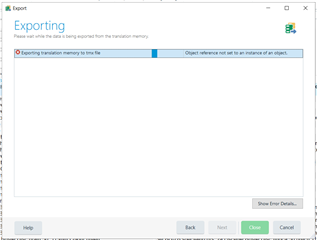
    When I try to export the TM, I get the same error.

    Screenshot of Trados Studio export error message stating 'Object reference not set to an instance of an object' during translation memory export.

    <SDLErrorDetails time="12-Feb-21 9:25:18 PM">
      <ErrorMessage>Object reference not set to an instance of an object.</ErrorMessage>
      <Exception>
        <Type>System.NullReferenceException, mscorlib, Version=4.0.0.0, Culture=neutral, PublicKeyToken=b77a5c561934e089</Type>
        <HelpLink />
        <Source>Sdl.Core.Globalization</Source>
        <HResult>-2147467261</HResult>
        <StackTrace><![CDATA[   at Sdl.Core.Globalization.UnitMetadata.UnitMetadataRegistry.TryHierachy[T](Func`2 f, String languageCode)
       at Sdl.Core.Globalization.UnitMetadata.UnitMetadataRegistry.UnitMetadataFromLabel(String label, String languageCode)
       at Sdl.Core.LanguageProcessing.Tokenization.MeasureFSTRecognizer.Parse(String surface, String output)
       at Sdl.Core.LanguageProcessing.Tokenization.MeasureFSTRecognizer.Recognize(String s, Int32 from, Boolean allowTokenBundles, Int32& consumedLength)
       at Sdl.Core.LanguageProcessing.Tokenization.Tokenizer.TokenizeInternal(String s, Int32 currentRun, Boolean createWhitespaceTokens, Boolean allowTokenBundles, List`1 recognizers)
       at Sdl.Core.LanguageProcessing.Tokenization.Tokenizer.GetTokens(Segment s, Boolean allowTokenBundles, Boolean enhancedAsian)
       at Sdl.LanguagePlatform.Lingua.LanguageTools.ComputeIdentityString(Segment segment, TokenToFeatureMappingMode mode, List`1& positionTokenAssociation)
       at Sdl.LanguagePlatform.IO.TMX.AbstractEmitter.EmitTranslationUnit(TranslationUnit tu, Boolean plainText)
       at Sdl.LanguagePlatform.IO.TMX.TMXWriter.Emit(Event e)
       at Sdl.Core.TM.ImportExport.Exporter.Export(IExportOrigin exportOrigin, IEventReceiver writer)
       at Sdl.Core.TM.ImportExport.Exporter.Export(IExportOrigin exportOrigin, String fileName, Boolean overwriteExisting)
       at Sdl.LanguagePlatform.TranslationMemoryApi.TranslationMemoryExporter.Export(String fileName, Boolean overwriteExisting)
       at Sdl.TranslationStudio.Common.Jobs.ExportSdltmToTmxJobRequest.ExportFileBasedTranslationMemory()
       at Sdl.TranslationStudio.Common.Jobs.ExportSdltmToTmxJobRequest.Execute(IJobExecutionContext context)
       at Sdl.Desktop.Platform.Implementation.Services.Job.<_worker_DoWork>b__47_0()
       at Sdl.Desktop.Logger.Log.Resources(Object message, Action action)
       at Sdl.Desktop.Platform.Implementation.Services.Job._worker_DoWork(Object sender, DoWorkEventArgs e)
       at System.ComponentModel.BackgroundWorker.OnDoWork(DoWorkEventArgs e)
       at System.ComponentModel.BackgroundWorker.WorkerThreadStart(Object argument)]]></StackTrace>
      </Exception>
      <Environment>
        <ProductName>SDL Trados Studio</ProductName>
        <ProductVersion>Studio16</ProductVersion>
        <EntryAssemblyFileVersion>16.1.3.4096</EntryAssemblyFileVersion>
        <OperatingSystem>Microsoft Windows 10 Pro</OperatingSystem>
        <ServicePack>NULL</ServicePack>
        <OperatingSystemLanguage>1033</OperatingSystemLanguage>
        <CodePage>1252</CodePage>
        <LoggedOnUser>DBHP\Dorde1</LoggedOnUser>
        <DotNetFrameWork>4.0.30319.42000</DotNetFrameWork>
        <ComputerName>DBHP</ComputerName>
        <ConnectedToNetwork>True</ConnectedToNetwork>
        <PhysicalMemory>8299628 MB</PhysicalMemory>
      </Environment>
    </SDLErrorDetails>


    Generated Image Alt-Text
    [edited by: Trados AI at 1:05 AM (GMT 0) on 29 Feb 2024]