Out of Memory Exception

I am just so tired of this happening and there seemingly being no answer to this issue. 

Has there been any answer to this yet beyond the "close chrome" in that knowledge base article. I am currently working on 10 files which in total have 46MB, so it's big and I open them individually and close them when done (which is super annoying since I would prefer to open them all at ones due to repetitions and making overall changes), but even when I open them individually the bigger ones around 6MB throw that exception. Had to email the client to split the excel file in half and send two sdlxiff files. I get the same type job each week. Same size roughly. And yet, some weeks it just works fine other weeks, like this week it throws an exception. 

I am just so fed up with this. I am using Trados 2019, my laptop has 16GB Ram which should be overkill.

Are there any answers? Anything that actually works? 

Parents Reply Children
  • Thanks Daniel, 

    well it might not be overkill but the system requirements for the software are 8GB so you would not expect this kind of problem with file sizes of 6MB, especially as this is pretty much the norm these days. And as I said, last week the 6MB files worked just fine. 

    And for your other tip: I no longer work Trados whilst anything else is open. No chrome, no other application. I perform lookup if I need it on a tablet which is next to the laptop. 

    I know I am not the only person who encounters this problem. Every time I save Trados, the CPU graph in task manager spikes up to near the top, I doubt this has anything to do with me and probably a lot to do with the software. And at times, this is just incredibly frustrating, as you can probably well imagine, with deadlines looming. 

  • I've got the same Trados Studio version and the same RAM as you.

    Whenever I've this out of memory exception error, I “solve” it somehow:

    - Restarting Trados Studio.

    - Closing any RAM-hungry application (watch out web browsers!, but you said they are closed).

    - Processing files individually, as you do, when anything else fails. Yes, I know..

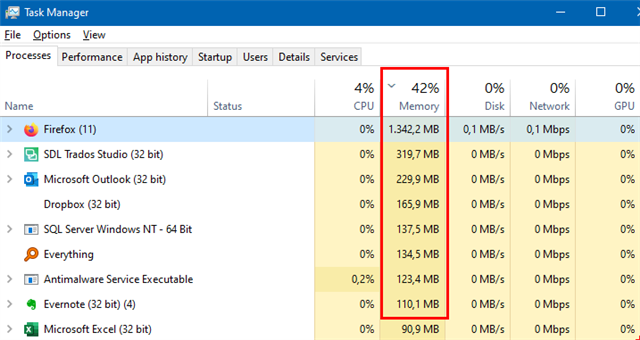
    By the way, CPU peaks are not that relevant here. Instead check the top apps at the Memory column in Task Manager:

    Task Manager showing high memory usage with Firefox using 1,342.2 MB and SDL Trados Studio using 319.7 MB.

    I wish you good luck. Don't forget to share your experience if you find out how to solve the problem.

    emoji


    Generated Image Alt-Text
    [edited by: Trados AI at 1:14 AM (GMT 0) on 29 Feb 2024]