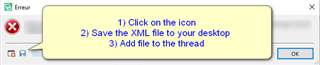
Error message when confirming a segment

Hi,

I have a problem with my SDL Trados Studio: When I confirm a segment with Ctrl+Enter, it closes with an error message, does not even ask to save changes, nothing. The shortcut options are in order. It is probably important that I had downloaded some add-ons yesterday.

Any idea how to solve this will be much appreciated!

Parents Reply Children
  • Right, the plugins are: LanguageToolStudioPlugi, #YourProductivity.

    I use SDL Trados Studio 2021 Freelance.

    The message is: The specified file could not be found.

    Error stack:

    <SDLErrorDetails time="19.02.2021 14:09:57">
      <ErrorMessage>Nie można odnaleźć określonego pliku</ErrorMessage>
      <Exception>
        <Type>System.ComponentModel.Win32Exception, System, Version=4.0.0.0, Culture=neutral, PublicKeyToken=b77a5c561934e089</Type>
        <NativeErrorCode>2</NativeErrorCode>
        <ErrorCode>-2147467259</ErrorCode>
        <HelpLink />
        <Source>System</Source>
        <HResult>-2147467259</HResult>
        <StackTrace><![CDATA[   w System.Diagnostics.Process.StartWithShellExecuteEx(ProcessStartInfo startInfo)
       w System.Diagnostics.Process.Start()
       w LanguageToolStudioPlugin.LanguageToolStudioPluginMain.validLang(String lang)
       w LanguageToolStudioPlugin.LanguageToolStudioPluginMain.Initialize(IDocumentProperties documentInfo)
       w Sdl.FileTypeSupport.Framework.Core.Utilities.BilingualApi.BilingualContentHandlerAdapter.Initialize(IDocumentProperties documentInfo)
       w Sdl.FileTypeSupport.Framework.Core.Utilities.BilingualApi.BilingualContentHandlerAdapter.Initialize(IDocumentProperties documentInfo)
       w Sdl.FileTypeSupport.Framework.Core.Utilities.BilingualApi.BilingualContentHandlerAdapter.Initialize(IDocumentProperties documentInfo)
       w Sdl.FileTypeSupport.Framework.Core.Utilities.BilingualApi.BilingualContentHandlerAdapter.Initialize(IDocumentProperties documentInfo)
       w Sdl.FileTypeSupport.Framework.Integration.AbstractBilingualProcessorContainer.Initialize(IDocumentProperties documentInfo)
       w Sdl.FileTypeSupport.Framework.Integration.MultiFileConverter.Initialize(IDocumentProperties documentInfo)
       w Sdl.FileTypeSupport.Framework.BilingualApi.AbstractBilingualContentProcessor.Initialize(IDocumentProperties documentInfo)
       w Sdl.FileTypeSupport.Framework.Integration.AbstractBilingualProcessorContainer.Initialize(IDocumentProperties documentInfo)
       w Sdl.TranslationStudio.Editor.TranslationEditor.SingleParagraphUnitBilingualParser.ParseNext()
       w Sdl.FileTypeSupport.Framework.Integration.FileExtractor.ParseNext()
       w Sdl.FileTypeSupport.Framework.Integration.MultiFileConverter.ParseNext()
       w Sdl.FileTypeSupport.Framework.Integration.MultiFileConverter.Parse()
       w Sdl.TranslationStudio.Editor.TranslationEditor.SegmentVerifier.Verify(ISegmentContainerNode segmentContainerNode, IParagraphUnitContainerNode paragraphContainerNode, IFileContainerNode fileContainerNode)
       w Sdl.TranslationStudio.Editor.TranslationEditor.TranslatableDocument.VerifySegment(ISegmentContainerNode segmentContainerNode, IParagraphUnitContainerNode paragraphContainerNode, IFileContainerNode fileContainerNode)
       w Sdl.TranslationStudio.Editor.TranslationEditor.SideBySideDocumentEditingView.VerifySegment()
       w Sdl.TranslationStudio.Editor.TranslationEditor.Actions.AbstractConfirmSegmentAction.ExecuteActiveSegment()
       w Sdl.TranslationStudio.Editor.TranslationEditor.Actions.AbstractConfirmSegmentAction.Execute()
       w Sdl.Desktop.Platform.Implementation.CommandBars.ActionService.<>c__DisplayClass30_0.<ExecuteAction>b__0()
       w Sdl.Desktop.Logger.Log.Resources(Object message, Action action)
       w Sdl.Desktop.Platform.Implementation.CommandBars.ActionService.ExecuteAction(IAction action, ActionOrigin origin, Boolean allowToggle)
       w Sdl.Desktop.Platform.Implementation.CommandBars.ActionService.ExecuteActionForShortcut(Keys shortcut)
       w Sdl.Desktop.Platform.WinForms.StudioWindowForm.OnPreviewKeyDown(Keys keys)
       w Sdl.Desktop.Platform.WinForms.GlobalKeysMessageFilter.PreFilterMessage(Message& m)
       w System.Windows.Forms.Application.ThreadContext.ProcessFilters(MSG& msg, Boolean& modified)
       w System.Windows.Forms.Application.ThreadContext.PreTranslateMessage(MSG& msg)
       w System.Windows.Forms.Application.ThreadContext.System.Windows.Forms.UnsafeNativeMethods.IMsoComponent.FPreTranslateMessage(MSG& msg)
       w System.Windows.Forms.Application.ComponentManager.System.Windows.Forms.UnsafeNativeMethods.IMsoComponentManager.FPushMessageLoop(IntPtr dwComponentID, Int32 reason, Int32 pvLoopData)
       w System.Windows.Forms.Application.ThreadContext.RunMessageLoopInner(Int32 reason, ApplicationContext context)
       w System.Windows.Forms.Application.ThreadContext.RunMessageLoop(Int32 reason, ApplicationContext context)
       w Sdl.TranslationStudio.Application.Launcher.RunApplication()]]></StackTrace>
      </Exception>
      <Environment>
        <ProductName>SDL Trados Studio</ProductName>
        <ProductVersion>Studio16</ProductVersion>
        <EntryAssemblyFileVersion>16.1.3.4096</EntryAssemblyFileVersion>
        <OperatingSystem>Microsoft Windows 10 Pro</OperatingSystem>
        <ServicePack>NULL</ServicePack>
        <OperatingSystemLanguage>1045</OperatingSystemLanguage>
        <CodePage>1250</CodePage>
        <LoggedOnUser>DESKTOP-SCRCKC7\User</LoggedOnUser>
        <DotNetFrameWork>4.0.30319.42000</DotNetFrameWork>
        <ComputerName>DESKTOP-SCRCKC7</ComputerName>
        <ConnectedToNetwork>True</ConnectedToNetwork>
        <PhysicalMemory>8067736 MB</PhysicalMemory>
      </Environment>
    </SDLErrorDetails>

  • I deleted the LanguageTool Add-on and Studio works again, you can consider this issue solved, and sorry for the trouble.