Error message when confirming a segment

Hi,

I have a problem with my SDL Trados Studio: When I confirm a segment with Ctrl+Enter, it closes with an error message, does not even ask to save changes, nothing. The shortcut options are in order. It is probably important that I had downloaded some add-ons yesterday.

Any idea how to solve this will be much appreciated!

Parents
  • Hello ,

    It would be useful to know what the error message is.

    Please save the error stack and attach to this thread please and provide any relevant screenshots-

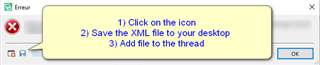
    Error dialog box with an 'X' icon indicating an error. Instructions are listed: 1) Click on the icon, 2) Save the XML file to your desktop, 3) Add file to the thread. An 'OK' button is at the bottom.

    Please also let us know what version of Studio you are running and which plugins you installed.

    Oana Nagy | QA Engineer | RWS Group

    emoji


    Generated Image Alt-Text
    [edited by: Trados AI at 1:16 AM (GMT 0) on 29 Feb 2024]
  • Right, the plugins are: LanguageToolStudioPlugi, #YourProductivity.

    I use SDL Trados Studio 2021 Freelance.

    The message is: The specified file could not be found.

    Error stack:

    <SDLErrorDetails time="19.02.2021 14:09:57">
      <ErrorMessage>Nie można odnaleźć określonego pliku</ErrorMessage>
      <Exception>
        <Type>System.ComponentModel.Win32Exception, System, Version=4.0.0.0, Culture=neutral, PublicKeyToken=b77a5c561934e089</Type>
        <NativeErrorCode>2</NativeErrorCode>
        <ErrorCode>-2147467259</ErrorCode>
        <HelpLink />
        <Source>System</Source>
        <HResult>-2147467259</HResult>
        <StackTrace><![CDATA[   w System.Diagnostics.Process.StartWithShellExecuteEx(ProcessStartInfo startInfo)
       w System.Diagnostics.Process.Start()
       w LanguageToolStudioPlugin.LanguageToolStudioPluginMain.validLang(String lang)
       w LanguageToolStudioPlugin.LanguageToolStudioPluginMain.Initialize(IDocumentProperties documentInfo)
       w Sdl.FileTypeSupport.Framework.Core.Utilities.BilingualApi.BilingualContentHandlerAdapter.Initialize(IDocumentProperties documentInfo)
       w Sdl.FileTypeSupport.Framework.Core.Utilities.BilingualApi.BilingualContentHandlerAdapter.Initialize(IDocumentProperties documentInfo)
       w Sdl.FileTypeSupport.Framework.Core.Utilities.BilingualApi.BilingualContentHandlerAdapter.Initialize(IDocumentProperties documentInfo)
       w Sdl.FileTypeSupport.Framework.Core.Utilities.BilingualApi.BilingualContentHandlerAdapter.Initialize(IDocumentProperties documentInfo)
       w Sdl.FileTypeSupport.Framework.Integration.AbstractBilingualProcessorContainer.Initialize(IDocumentProperties documentInfo)
       w Sdl.FileTypeSupport.Framework.Integration.MultiFileConverter.Initialize(IDocumentProperties documentInfo)
       w Sdl.FileTypeSupport.Framework.BilingualApi.AbstractBilingualContentProcessor.Initialize(IDocumentProperties documentInfo)
       w Sdl.FileTypeSupport.Framework.Integration.AbstractBilingualProcessorContainer.Initialize(IDocumentProperties documentInfo)
       w Sdl.TranslationStudio.Editor.TranslationEditor.SingleParagraphUnitBilingualParser.ParseNext()
       w Sdl.FileTypeSupport.Framework.Integration.FileExtractor.ParseNext()
       w Sdl.FileTypeSupport.Framework.Integration.MultiFileConverter.ParseNext()
       w Sdl.FileTypeSupport.Framework.Integration.MultiFileConverter.Parse()
       w Sdl.TranslationStudio.Editor.TranslationEditor.SegmentVerifier.Verify(ISegmentContainerNode segmentContainerNode, IParagraphUnitContainerNode paragraphContainerNode, IFileContainerNode fileContainerNode)
       w Sdl.TranslationStudio.Editor.TranslationEditor.TranslatableDocument.VerifySegment(ISegmentContainerNode segmentContainerNode, IParagraphUnitContainerNode paragraphContainerNode, IFileContainerNode fileContainerNode)
       w Sdl.TranslationStudio.Editor.TranslationEditor.SideBySideDocumentEditingView.VerifySegment()
       w Sdl.TranslationStudio.Editor.TranslationEditor.Actions.AbstractConfirmSegmentAction.ExecuteActiveSegment()
       w Sdl.TranslationStudio.Editor.TranslationEditor.Actions.AbstractConfirmSegmentAction.Execute()
       w Sdl.Desktop.Platform.Implementation.CommandBars.ActionService.<>c__DisplayClass30_0.<ExecuteAction>b__0()
       w Sdl.Desktop.Logger.Log.Resources(Object message, Action action)
       w Sdl.Desktop.Platform.Implementation.CommandBars.ActionService.ExecuteAction(IAction action, ActionOrigin origin, Boolean allowToggle)
       w Sdl.Desktop.Platform.Implementation.CommandBars.ActionService.ExecuteActionForShortcut(Keys shortcut)
       w Sdl.Desktop.Platform.WinForms.StudioWindowForm.OnPreviewKeyDown(Keys keys)
       w Sdl.Desktop.Platform.WinForms.GlobalKeysMessageFilter.PreFilterMessage(Message& m)
       w System.Windows.Forms.Application.ThreadContext.ProcessFilters(MSG& msg, Boolean& modified)
       w System.Windows.Forms.Application.ThreadContext.PreTranslateMessage(MSG& msg)
       w System.Windows.Forms.Application.ThreadContext.System.Windows.Forms.UnsafeNativeMethods.IMsoComponent.FPreTranslateMessage(MSG& msg)
       w System.Windows.Forms.Application.ComponentManager.System.Windows.Forms.UnsafeNativeMethods.IMsoComponentManager.FPushMessageLoop(IntPtr dwComponentID, Int32 reason, Int32 pvLoopData)
       w System.Windows.Forms.Application.ThreadContext.RunMessageLoopInner(Int32 reason, ApplicationContext context)
       w System.Windows.Forms.Application.ThreadContext.RunMessageLoop(Int32 reason, ApplicationContext context)
       w Sdl.TranslationStudio.Application.Launcher.RunApplication()]]></StackTrace>
      </Exception>
      <Environment>
        <ProductName>SDL Trados Studio</ProductName>
        <ProductVersion>Studio16</ProductVersion>
        <EntryAssemblyFileVersion>16.1.3.4096</EntryAssemblyFileVersion>
        <OperatingSystem>Microsoft Windows 10 Pro</OperatingSystem>
        <ServicePack>NULL</ServicePack>
        <OperatingSystemLanguage>1045</OperatingSystemLanguage>
        <CodePage>1250</CodePage>
        <LoggedOnUser>DESKTOP-SCRCKC7\User</LoggedOnUser>
        <DotNetFrameWork>4.0.30319.42000</DotNetFrameWork>
        <ComputerName>DESKTOP-SCRCKC7</ComputerName>
        <ConnectedToNetwork>True</ConnectedToNetwork>
        <PhysicalMemory>8067736 MB</PhysicalMemory>
      </Environment>
    </SDLErrorDetails>

  • I deleted the LanguageTool Add-on and Studio works again, you can consider this issue solved, and sorry for the trouble.

Reply Children
No Data