The Trados cloud platform will be undergoing maintenance on Saturday, 9th May 2026 between 05:00 to 17:00 UTC. During this time, you will not be able to log in to the Trados platform.

Message "Parameter is not valid" in SDL Trados Studio 2021 constantly popping up

Good morning,

recently, when I was translating a memoQ XLIFF source file in SDL Trados Studio 2021 the message "Parameter is not valid" was constantly popping up. I was not able to type the further text (Trados "froze") and had to close Trados and open it again in order to continue.

I have tried to rename the folder in C:\Users\User\AppData\Roaming\SDL\SDL Trados Studio, but it hasn't solved the problem.

Disabling AutoSuggest helped, but this of course cannot be a permanent solution.

Do you know how to fix this error permanently? Or has it something to do with the source file?

Kind regards,

Malgorzata

Parents Reply Children
  • The full error stack looks like this:

    <SDLErrorDetails time="04.03.2021 17:41:11">
      <ErrorMessage>Parametr jest nieprawidłowy.</ErrorMessage>
      <Exception>
        <Type>System.ArgumentException, mscorlib, Version=4.0.0.0, Culture=neutral, PublicKeyToken=b77a5c561934e089</Type>
        <ParamName />
        <HelpLink />
        <Source>System.Drawing</Source>
        <HResult>-2147024809</HResult>
        <StackTrace><![CDATA[   w System.Drawing.Font.GetHeight(Graphics graphics)
       w System.Drawing.Font.GetHeight()
       w System.Drawing.Font.get_Height()
       w Sdl.TranslationStudio.Editor.TranslationEditor.Intellisense.AbstractSuggestionWindow.SetLocation()
       w Sdl.TranslationStudio.Editor.TranslationEditor.Intellisense.SuggestionWindow..ctor(ISuggestionDataProvider suggestionDataProvider, List`1 suggestionData, Form parentForm, SideBySideEditor editor, SuggestionSite site, Boolean isInternal, SuggestionMode mode, ITranslatableDocumentEditorSettings settings, Int32 imeBehavior)
       w Sdl.TranslationStudio.Editor.TranslationEditor.Intellisense.SuggestionWindow.ShowSuggestionWindow(Form parent, ISideBySideDocumentEditingView view, SideBySideEditor editor, ISuggestionDataProvider suggestionDataProvider, SuggestionSite site, Char firstChar, Int32 sourceStartPosition, SuggestionMode mode, ITranslatableDocumentEditorSettings settings, Boolean requireCaseResolving, Boolean incrementTextOffset, Int32 imeBehavior)
       w Sdl.TranslationStudio.Editor.TranslationEditor.Intellisense.IntellisenseEditing.ShowSuggestionWindow(Form parent, ISideBySideDocumentEditingView view, SideBySideEditor editor, ISuggestionDataProvider suggestionDataProvider, SuggestionSite site, Char firstChar, Int32 sourceStartPosition, SuggestionMode mode, ITranslatableDocumentEditorSettings settings, Boolean requireCaseResolving, Boolean incrementTextOffset)
       w Sdl.TranslationStudio.Editor.TranslationEditor.Intellisense.IntellisenseEditing.LaunchIntellisenseWindow(Boolean keyPressed, Char lastChar, Boolean afterImeCompositionUpdate)
       w Sdl.TranslationStudio.Editor.TranslationEditor.Intellisense.IntellisenseEditing.ProcessDocumentContentChanged(List`1 operations, Boolean afterImeCompositionUpdate)
       w Sdl.TranslationStudio.Editor.TranslationEditor.Intellisense.IntellisenseEditing.Document_ContentChanged(Object sender, FrameworkDocumentContentChangedEventArgs e)
       w System.EventHandler`1.Invoke(Object sender, TEventArgs e)
       w AbstractFrameworkDocument.raise_ContentChanged(Object value0, FrameworkDocumentContentChangedEventArgs value1)
       w AbstractFrameworkDocument.OnContentChanged(Object sender, FrameworkDocumentContentChangedEventArgs args)
       w FrameworkDocumentEventSource.RaiseContentChanged(FrameworkDocumentEventSource* )
       w FrameworkDocumentEventSource.vv_AfterCompositeCommandCompleted(FrameworkDocumentEventSource* )
       w Tree.DocumentControl.vl_WindowProc(DocumentControl* , HWND__* , UInt32 , UInt32 , Int32 )
       w FrameworkDocumentControl.vl_WindowProc(FrameworkDocumentControl* , HWND__* h_wnd, UInt32 n_msg, UInt32 w_p, Int32 l_p)
       w System.Windows.Forms.UnsafeNativeMethods.CallWindowProc(IntPtr wndProc, IntPtr hWnd, Int32 msg, IntPtr wParam, IntPtr lParam)
       w System.Windows.Forms.NativeWindow.DefWndProc(Message& m)
       w System.Windows.Forms.Control.DefWndProc(Message& m)
       w System.Windows.Forms.Control.WmKeyChar(Message& m)
       w System.Windows.Forms.Control.WndProc(Message& m)
       w System.Windows.Forms.Control.ControlNativeWindow.OnMessage(Message& m)
       w System.Windows.Forms.Control.ControlNativeWindow.WndProc(Message& m)
       w System.Windows.Forms.NativeWindow.Callback(IntPtr hWnd, Int32 msg, IntPtr wparam, IntPtr lparam)]]></StackTrace>
      </Exception>
      <Environment>
        <ProductName>SDL Trados Studio</ProductName>
        <ProductVersion>Studio16</ProductVersion>
        <EntryAssemblyFileVersion>16.1.4.4184</EntryAssemblyFileVersion>
        <OperatingSystem>Microsoft Windows 10 Pro</OperatingSystem>
        <ServicePack>NULL</ServicePack>
        <OperatingSystemLanguage>1045</OperatingSystemLanguage>
        <CodePage>1250</CodePage>
        <LoggedOnUser>DESKTOP-R2CAALD\User</LoggedOnUser>
        <DotNetFrameWork>4.0.30319.42000</DotNetFrameWork>
        <ComputerName>DESKTOP-R2CAALD</ComputerName>
        <ConnectedToNetwork>True</ConnectedToNetwork>
        <PhysicalMemory>8199140 MB</PhysicalMemory>
      </Environment>
    </SDLErrorDetails>

    <?xml v
    <?xml version="
  • Hello ,

    The error looks to be graphics related.

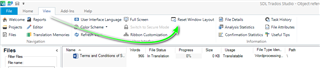
    First, try a simple Windows Layout Reset in Studio

    Trados Studio screenshot showing the 'Reset Window Layout' option highlighted with a green arrow pointing towards it.

    If this doesn't help, please ensure everything is up to date- (including graphic card drivers).

    The following Wiki's should help you do this-

    https://community.sdl.com/product-groups/translationproductivity/w/customer-experience/3392/how-to-part-1-trouble-shoot-unexplained-errors-and-unwanted-behaviour-in-studio-multiterm

    Parts 1 and 2

    Oana Nagy | QA Engineer | RWS Group

    emoji


    Generated Image Alt-Text
    [edited by: Trados AI at 1:26 AM (GMT 0) on 29 Feb 2024]