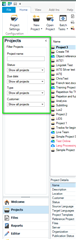
Why doesn't my project appear on the list after I close and reopen the program? Instead, I have to search for it on my PC.

Hello,

I have only worked on one project so far. When I close the program and reopen it, the project does not appear on the list. I have to search it on my PC and create a new project again in order to see it and fill the TM again.

How can I see my project on the list with its corresponding full TM?

Thank you!

Joan

Parents Reply Children
  • Hi Steven,

    I looked through the questions on the link you suggested.

    One of them seemed to be close enough to my problem, so I followed the instructions here: https://gateway.rws.com/csm?id=kb_article_view&sysparm_article=KB0038682.

    I even tried to create a brand new project, with a brand new file and TM (all local file-based).

    However, I'm still getting the same error, both while creating a new project and saving the target, even after whitelisting SDL in my Avast antivirus. 

    I had not noticed before that I was getting the same error upon creating the project because it allowed me continue with the process, but I was paying more attention this time and that seems to be the case.

    How should I proceed?

    Thank you!

    Joan

  • I am unable to upload an XML file in this forum and when I try to copy paste its content it tells me it's spam and it doesn't send the message...

  • Hello ,

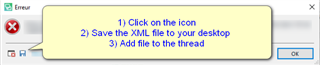
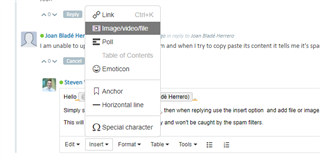
    Simply save the xml file to your deskop, then when replying use the insert option  and add file or image.

    This will now upload properly into the community and won't be caught by the spam filters.

    Screenshot of a community forum post with a user named Joan Blade Herrero being instructed to save an XML file and use the insert option to add a file or image in a reply.

    Oana Nagy | QA Engineer | RWS Group

    emoji


    Generated Image Alt-Text
    [edited by: Trados AI at 1:29 AM (GMT 0) on 29 Feb 2024]
  • <SDLErrorDetails time="09/03/2021 12:11:06">
      <ErrorMessage>Failed to save target content: Access to the path 'C:\Users\joana\Desktop\f u tradoss.docx' is denied.</ErrorMessage>
      <Exception>
        <Type>System.UnauthorizedAccessException, mscorlib, Version=4.0.0.0, Culture=neutral, PublicKeyToken=b77a5c561934e089</Type>
        <HelpLink />
        <Source>mscorlib</Source>
        <HResult>-2147024891</HResult>
        <StackTrace><![CDATA[   at System.IO.__Error.WinIOError(Int32 errorCode, String maybeFullPath)
       at System.IO.FileStream.Init(String path, FileMode mode, FileAccess access, Int32 rights, Boolean useRights, FileShare share, Int32 bufferSize, FileOptions options, SECURITY_ATTRIBUTES secAttrs, String msgPath, Boolean bFromProxy, Boolean useLongPath, Boolean checkHost)
       at System.IO.FileStream..ctor(String path, FileMode mode, FileAccess access, FileShare share, Int32 bufferSize)
       at Sdl.FileTypeSupport.Filters.MicrosoftOffice.Core.Services.FileService.Compress(String folderPath, String outputFilePath)
       at Sdl.FileTypeSupport.Filters.MicrosoftOffice.Word.Writer.DocxWriter.FileComplete()
       at Sdl.FileTypeSupport.Framework.BilingualApi.AbstractBilingualContentProcessor.FileComplete()
       at Sdl.FileTypeSupport.Framework.BilingualApi.AbstractBilingualContentProcessor.FileComplete()
       at Sdl.FileTypeSupport.Framework.BilingualApi.AbstractBilingualContentProcessor.FileComplete()
       at Sdl.FileTypeSupport.Framework.BilingualApi.AbstractBilingualContentProcessor.FileComplete()
       at Sdl.FileTypeSupport.Framework.BilingualApi.AbstractBilingualContentProcessor.FileComplete()
       at Sdl.FileTypeSupport.Framework.Integration.AbstractBilingualProcessorContainer.FileComplete()
       at Sdl.FileTypeSupport.Framework.Integration.FileGenerator.FileComplete()
       at Sdl.FileTypeSupport.Framework.Integration.AbstractBilingualProcessorContainer.FileComplete()
       at Sdl.FileTypeSupport.Framework.Integration.MultiFileConverter.FileComplete()
       at Sdl.FileTypeSupport.Framework.BilingualApi.AbstractBilingualContentProcessor.FileComplete()
       at Sdl.FileTypeSupport.Framework.Integration.AbstractBilingualProcessorContainer.FileComplete()
       at Sdl.FileTypeSupport.Bilingual.Tmfc.TmfcReaderImpl.vv_Visit(TmfcReaderImpl* , FrameworkFileContainerField* field)
       at FrameworkFileContainerField.vv_AcceptFrameworkVisitor(FrameworkFileContainerField* , FrameworkFieldVisitor* visitor)
       at Sdl.FileTypeSupport.Bilingual.Tmfc.TmfcReaderImpl.vv_VisitStartEndField(TmfcReaderImpl* , StartEndField* startEnd)
       at Sdl.FileTypeSupport.Bilingual.Tmfc.TmfcReaderImpl.b_VisitNext(TmfcReaderImpl* )
       at Sdl.FileTypeSupport.Bilingual.Tmfc.TmfcReader.ParseNext()
       at Sdl.FileTypeSupport.Framework.Integration.FileExtractor.ParseNext()
       at Sdl.FileTypeSupport.Framework.Integration.MultiFileConverter.ParseNext()
       at Sdl.FileTypeSupport.Framework.Integration.MultiFileConverter.Parse()
       at Sdl.TranslationStudio.Editor.TranslationEditor.SaveMonolingualAsJobRequest.Execute(IJobExecutionContext context)
       at Sdl.Desktop.Platform.Implementation.Services.Job.<_worker_DoWork>b__47_0()
       at Sdl.Desktop.Logger.Log.Resources(Object message, Action action)
       at Sdl.Desktop.Platform.Implementation.Services.Job._worker_DoWork(Object sender, DoWorkEventArgs e)
       at System.ComponentModel.BackgroundWorker.OnDoWork(DoWorkEventArgs e)
       at System.ComponentModel.BackgroundWorker.WorkerThreadStart(Object argument)]]></StackTrace>
      </Exception>
      <Environment>
        <ProductName>SDL Trados Studio</ProductName>
        <ProductVersion>Studio16</ProductVersion>
        <EntryAssemblyFileVersion>16.1.3.4096</EntryAssemblyFileVersion>
        <OperatingSystem>Microsoft Windows 10 Home</OperatingSystem>
        <ServicePack>NULL</ServicePack>
        <OperatingSystemLanguage>3082</OperatingSystemLanguage>
        <CodePage>1252</CodePage>
        <LoggedOnUser>DESKTOP-6989EN2\Joan</LoggedOnUser>
        <DotNetFrameWork>4.0.30319.42000</DotNetFrameWork>
        <ComputerName>DESKTOP-6989EN2</ComputerName>
        <ConnectedToNetwork>True</ConnectedToNetwork>
        <PhysicalMemory>16589268 MB</PhysicalMemory>
      </Environment>
    </SDLErrorDetails>

  • Hi ,

    Does the path C:\Users\joana\Desktop\ exist in your computer? Here Trados looks for a nicely named DOCX file.

    Or is it C:\Users\joan\Desktop\? This should be your desktop folder according to your user name.

  • Hello ,

    Further to Jesús reply below- please remove the spaces in the address \f u tradoss.docx to form f_u_tradoss.docx.

    and also check in the default project folder (C:\Users\yourname\Documents\Studio 2021\Projects and see if this is also saved there.

    I also keep a separate folder at the above location (Documents) to save client files and don't save them to the desktop at all. 

    Oana Nagy | QA Engineer | RWS Group

  • Hola Jesús, the username "joana" is correct. Unfortunately, Microsoft seems to have grabbed that username from part of the email address I used to sign up with them and cannot be convinced to change it.

  • I have made a copy of the document with no spaces in the name. As with the regularly named document, this new one appears in Workbench and in Editor without a problem--but neither file is anywhere in the project folder (as an original, bilingual, or target file type).

    Of course I'm willing to do whatever is necessary to get this figured out, but I must admit that I'm a little skeptical at the implication that the problem lies with the original file having been saved on the Desktop or with there being spaces in the filename. Surely, software of this caliber can handle that, as it has done over the past 15 years that I've been using Trados/SDL.