


Issue and question about trados

I recently started working for a company that uses trados. After encountering some issues with a corrupted translation memory I had to change several file locations. The problem I’m having is in File>Setup>Project Templates I tried to change the default template location which worked but every time I start trados it creates another studio 2019 folder where I don’t want it and automatically lists the default template in that folder. I deleted it several times but it just keeps coming back and seems to completely ignore the fact that I selected another default template. Is there any way I can prevent trados from creating a folder in that onedrive location?
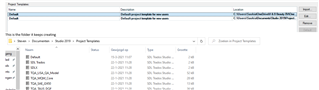
Trados Studio Project Templates window showing a list of templates with their names, descriptions, locations, and applied status. A default template location path is visible.

This is the folder it keeps creating

Now that I’m asking you a technical question, I was also wondering if there is a way to apply changes to the dictionary directly to all files in your project instead of going through each and every file by using the ctrl+f function.


Generated Image Alt-Text
[edited by: Trados AI at 1:40 AM (GMT 0) on 29 Feb 2024]

emoji
Parents Reply Children
  • Hello


    My projects are saved locally in the documents folder but there is also a documenten(Dutch) which is the folder where it keeps creating a clean, default project template. I just disabled the documenten folder from syncing, removed the Project template from that folder and even renamed the folder all together but it didn’t help. If I delete everything and set it up the way it should be, it looks like this

    The second I restart trados however it creates a new project templates folder in Documenten and this happens. I don’t get why it keeps creating a folder there. Mind you documents has that folder so its just making a random clean duplicate even though the project setting is set to the Documents folder.

    And this is the only folder and files it keeps creating

    Hope this explains the situation.