XLIFF 1.2 - Extra attribute added in exported file

Hello,

One of our customers sent us an XLIFF file to translate, which was exported from Wordpress.

Initially I tried to process it with Studio's embedded file types, I had no luck as I received the error message below.

Error message stating 'Cannot find file type settings for the preview file.' with a warning icon.

So I created custom file type settings where <source> elements excluded from translation.

When I exported the translated file, I noticed that a "dir="rtl" added in <target> elements.
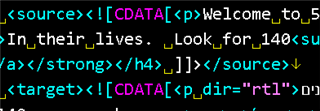
Screenshot of XLIFF code showing 'source' element with CDATA and text content, and 'target' element with 'dir="rtl"' added.

Please note that I haven't added RLM/LRM markers in the segments.

Have you seen that before? Is this an expected behavior of Studio? Is there a setting to update in order to prevent this from happening? If not I can just batch delete it in a text editor.

Attached you can find the source file, the custom file type settings I used, and the translated XLIFF file.

/cfs-file/__key/communityserver-discussions-components-files/90/0726.files.zip

Thanks,

Pavlos


Generated Image Alt-Text
[edited by: Trados AI at 1:55 AM (GMT 0) on 29 Feb 2024]
emoji
Parents
  • Initially I tried to process it with Studio's embedded file types, I had no luck as I received the error message below.

    Error message in Trados Studio stating 'Cannot find file type settings for the preview file.' with a warning icon.

    This is a bug in Studio.  If you rename the file *.xlf instead of *.xliff then it will work:

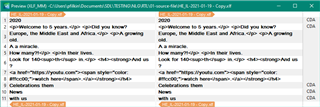
    Trados Studio screenshot showing side-by-side comparison of source and target text with XML tags visible.

    But even with this you still can't process the embedded content... another bug.  The latter has already been fixed ready for CU5 and can review the problem with recognition of *.xliff in case it's not already known.

    So, you do still need to use a custom XML for the time being... probably better anyway as the embedded content processor for XML is a lot more versatile than it is for XLIFF.  This works fine:

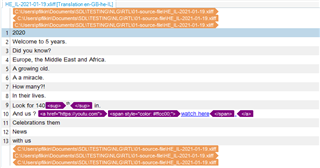
    Trados Studio screenshot highlighting XML tags in purple within the target text, indicating embedded content processing.

    The RTL attribute is probably correct and is there because the target language is RTL.  Why would you want to change it?

    Paul Filkin | RWS

    Design your own training!
    You've done the courses and still need to go a little further, or still not clear? 
    Tell us what you need in our Community Solutions Hub

    emoji


    Generated Image Alt-Text
    [edited by: Trados AI at 1:55 AM (GMT 0) on 29 Feb 2024]
Reply
  • Initially I tried to process it with Studio's embedded file types, I had no luck as I received the error message below.

    Error message in Trados Studio stating 'Cannot find file type settings for the preview file.' with a warning icon.

    This is a bug in Studio.  If you rename the file *.xlf instead of *.xliff then it will work:

    Trados Studio screenshot showing side-by-side comparison of source and target text with XML tags visible.

    But even with this you still can't process the embedded content... another bug.  The latter has already been fixed ready for CU5 and can review the problem with recognition of *.xliff in case it's not already known.

    So, you do still need to use a custom XML for the time being... probably better anyway as the embedded content processor for XML is a lot more versatile than it is for XLIFF.  This works fine:

    Trados Studio screenshot highlighting XML tags in purple within the target text, indicating embedded content processing.

    The RTL attribute is probably correct and is there because the target language is RTL.  Why would you want to change it?

    Paul Filkin | RWS

    Design your own training!
    You've done the courses and still need to go a little further, or still not clear? 
    Tell us what you need in our Community Solutions Hub

    emoji


    Generated Image Alt-Text
    [edited by: Trados AI at 1:55 AM (GMT 0) on 29 Feb 2024]
Children